Sorry, I can’t help with that due to the lack of skills. Only pointer I can give is:
1 Like
And typos corrected and ready. Additional info on both Firebird page as well as the repo page will be added as soon as you make them available, but for now people can find and install your module. Congrats, it’s a girl!
1 Like
No problem, I hope @mrmarkuz can help…
I tried according to the description, but I didn’t succeed. Now I have an ns8-firebird and an ns8-nethforge repo, but I don’t know what it’s for, I can’t delete it…
Thank you very much for your help, I didn’t even know you had permission to edit the wiki page.
My github repo is available at:
Once the issue with the developer repo is clarified, an announcement will be made. In the meantime, it can be installed via CLI from the github repo.
This is the right link to add your software repository to NS8:
https://raw.githubusercontent.com/sipi58/ns8-nethforge/repomd/ns8/updates/
To add your firebird app to your repo, a directory ‘firebird’ needs to be created in the main branch of your repo, containing the logo, the metadata and screenshot(s).
For example the mariadb app directory contains following files/dirs:
mariadb/
├── logo.png
├── metadata.json
└── screenshots
    └── screen1.png
When the directory is added, the repomd action automatically writes everything that’s needed to the repomd branch which then automatically provides your app releases (in your case ns8-firebird 1.0.0) in your repo.
You can remove the other app directories as they are already provided in the nethforge repo. Just keep the firebird directory.
It’s explained in Software repositories | NS8 dev manual
@mrmarkuz Thank you very much for trying to help me, but I don’t understand what I should do.
This link cannot be opened, the error message is 404 Invalid request.
Do you mean that in the root directory of my current GitHub - sipi58/ns8-firebird: Firebird 3 RDBMS directory, in addition to the existing imageroot, tests, ui and other directories, I should create a separate directory called firebird with the content you specified (corresponding to mariadb)?
Where and what libraries should I remove? Should I remove all app libraries from my ns8-nethforge repo after the firebird app library has been added there?
This is completely confusing to me.
An NS8 repository must contain a file named
repodata.json, which describes the content of the repository.
Should I create the repodata.json file? Where should I place it?
To create a personal repository, you can copy the scripts from NethForge that generate
repodata.json.
Which script should I copy from where to where? The createrepo.sh?
How do I specify the library parameter and run it?
Should I manually create repodata.json and all the other files?
The Create a repository description does not guide you on how to create the repo, it only contains sentences thrown in as explanations. It is not suitable for actually creating the repo according to the description. It is really a shame, this should always be in the form of a How to, so that every detail is understandable for everyone. I think this is true for all wiki and documentation pages, content.
Although it could be that I’m wrong and I don’t understand the description.
That is why I appreciate your willingness to help me navigate this and solve the problems.
Thank you for your help
That’s ok. It shouldn’t be opened in a browser, instead it should be added as Software Repository to your NS8, see Software center — NS8 documentation
It’s also shown in the last screenshot of Create a ns8 repository for developers

No, not in the app repo, it needs to be added to your forked nethforge repository at https://github.com/sipi58/ns8-nethforge
Yes, you can remove all app dirs and just add your firebird app.
You cloned the nethforge repository that contains a lot of NS8 community apps. Those apps are already provided by the original nethforge repository so you don’t need it in your cloned repository.
You just want to provide the firebird app, so you need to remove all other app directories and just add your firebird app directory.
Here you can see the Software repositories on one of my NS8:
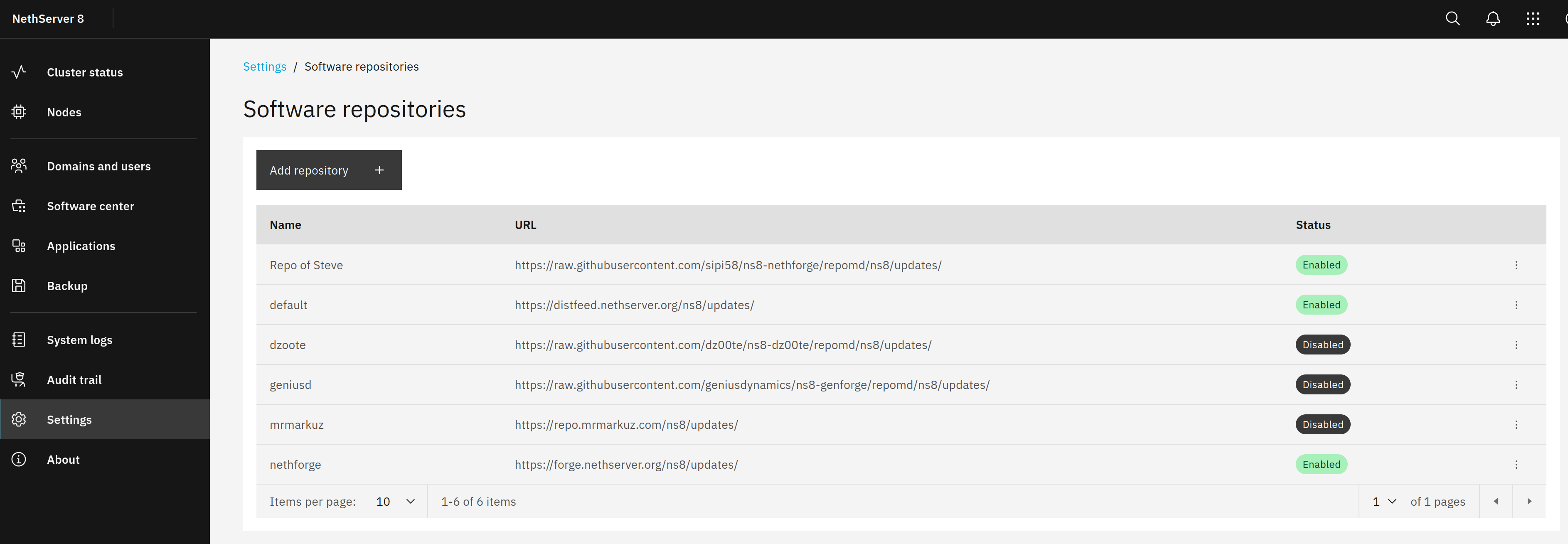
It lists your repository and the nethforge repository and some others. the default and nethforge repos are there by default, the others were added later.
No, it’s created and adapted automatically by the repomd action
All files are already there. You just need to add the firebird directory in the same way as for example the mariadb directory looks like.
It’s already there as you forked the Nethforge repository. You already enabled it by enabling the repomd action.
Which library parameter? The script already runs after adding a directory and every 6 hours.
I hope that after we’ve been through creating your repository, you maybe can propose what to add to the documentation.
Sorry, I’m having a hard time figuring out what to do and I can’t get past this step. Here is a picture of my main ns8-nethforge repo. You can’t add a directory here, only a file.
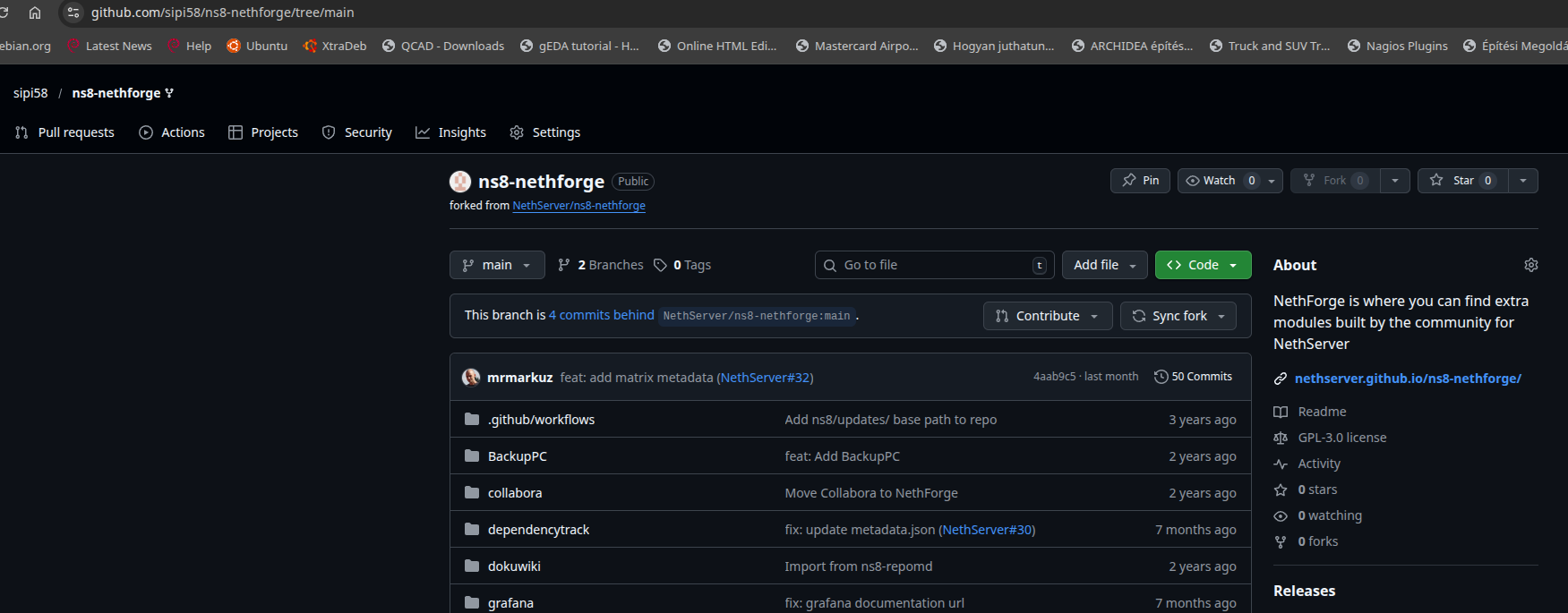
If I understand you correctly, you should create a firebird directory here with similar content to the mariadb directory. Am I wrong?
To create a directory with a file in it, you could write “directory/file”.
When you write a slash, a directory will be created.
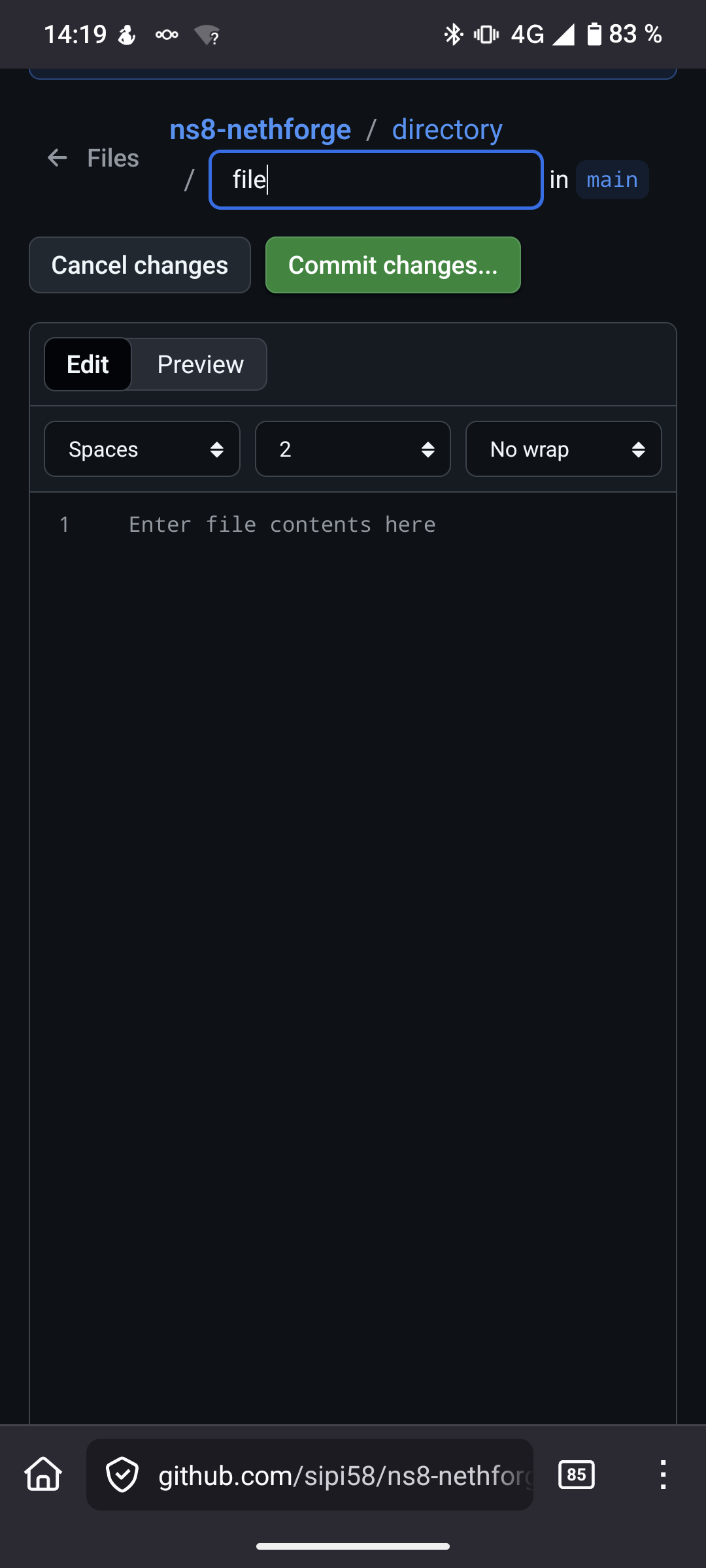
Or you do a “git clone” of your repo, do the changes locally and push it.
Thank you, maybe I’m starting to understand the process.
I created an empty sipi58/ns8-nethforge/firebird/metadata.json file, logo.png and screenshots/screen1.png with a screenshot of Firebird Settings. You can check out Github - sipi58/ns8-nethforge
I hope I did it right… Please confirm this.
If I understand you correctly, then after this the necessary changes will be automatically created and Fiorebird will appear in the raw.githubusercontent.com/.. directory and can be added to the Software repo. I hope I’m not wrong and I don’t have to manually edit the metadata.json file…
If everything is OK, you can continue with the next step you wrote.
Is this correct?, for this is a copy of the Nethforge Repo, where approved and certified apps live. I guess it should be your own repo, e.g. sipi58/ns8-firebird. @mrmarkuz please correct me for I am wrong.
1 Like
You can check what I created at the above address… Did I do it wrong? How should I do it then?
The source in the metadata.json is wrong.
It should be
"source": "ghcr.io/sipi58/firebird"
Yes, it’s correct. The app is in GitHub - sipi58/ns8-firebird: Firebird 3 RDBMS , where new packages are released.
The forked nethforge repo at GitHub - sipi58/ns8-nethforge: NethForge is where you can find extra modules built by the community for NethServer acts as own repository and provides the new releases of the packages from the app repo.
@mrmarkuz Thank you very much for your help, I’m starting to understand now. I’m not saying that I understand everything perfectly and that I could repeat it at any time, but I’m moving in the right direction for the future. At least I hope so…
This was one of my mistakes, but there was another one as well, a comma in the wrong place. I fixed both of them and now the workflow ran and the firebird was created…
I couldn’t find the workflow error message at first, but finally I managed to find Action > All Workflow > Update metadata.json > by clicking on repomd on the left side, the command output appears and the error message can be identified.
This is the end result:

There is one more mistake, I did not delete unnecessary directories from my ns8-nethforge directory. What should I delete?
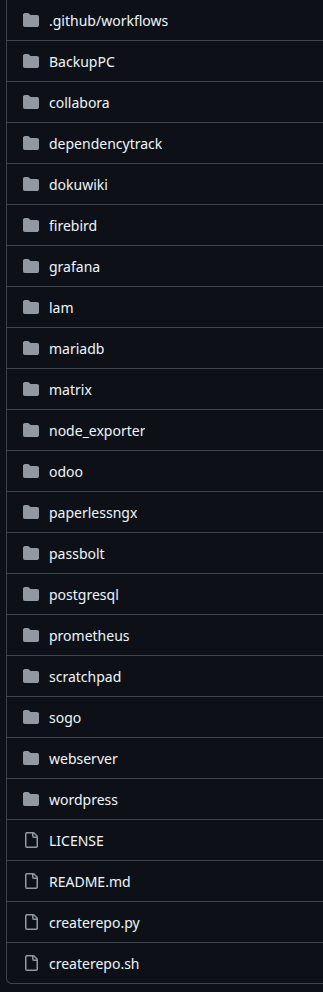
I think you should delete all directories from BackupPC to wordpress except firebird. Am I right or wrong?
I think the .gthub/workflows directory and the LICENCE, README.md, createrepo.py and createrepo.sh files should not be deleted? Am I right or wrong?
Thank you for your help
1 Like
Great, it works, I can see your Firebird app in the Software Center after adding your repo.

Right.
Right.
@mrmarkuz Thank you very much for your help, this wouldn’t have been possible without you. I can see it in the repo now.
I deleted the unnecessary directories from my ns8-netforge directory.
I modified the ns8-firebird README.md file and added the installation from the Software Center.
The following happened:
-
I released the Firebird public version,
-
I created the software repository,
-
I modified the README.md file to match the software repository.
Am I correct in thinking that I now need to make another release to reflect the README.md changes?
What else needs to be done to get the module Community certified?
I guess I have to report it, but where and how? Is there a template for it?
What descriptions should I create and where and in what format (txt, odf, pdf) should I place them?
@LayLow wrote that if I report it, the necessary files will be automatically generated. Is this really the case or did I misunderstand something?
1 Like
No, that’s not needed. If you change the code you’ll need another release. A README change is shown immediately and doesn’t need a new release.
It’s explained here: Community Certification | NS8 dev manual
You could use the other announcements in the App category as template.
The app currently works for your use case but I think to make the app more interesting for others, you’ll need to update to the latest Firebird version while providing compatibility for old databases if possible.
There’s the README that you already adapted and the admin manual. As a last step after adding your module to Nethforge you should create a admin manual documentation in GitHub - NethServer/ns8-docs: NethServer 8 documentation
Thanks to @LayLow we have a great wiki that lists all our apps. He cares about the app pages and adapts them when they’re announced or there’s a change.
@mrmarkuz Thanks for the information, I’ll look into it. I hope it makes sense to me. 
Unfortunately, due to the older database programs I use, I cannot use Firebird 4 or Firebird 5. That’s why it was important for me to use the latest version I could still use, which was Firebird 3.x, so I used that for the module. If I were to update to the latest Firebird version, I wouldn’t be able to use it…
I’m not sure if the Community Certificate is necessary for the Firebird module, although many developers use this option. I see you haven’t certified all your modules either. What do you suggest?
The next step is to test the VPS with VPN and security settings. See Using NS8 on a virtual host with a VPS provider - #9 by steve
Thank you for your help
(deleted)
@mrmarkuz I really messed something up…
I can’t connect to Firebird from the local network or via VPN.
Did you install the latest version? Did you update Firebird via the Software Center? Is the Firebird connection still working for you?
What could I have done wrong?
Thank you for your help