Tailscale is one of the recent generation of “zero-trust” (a misnomer if ever there was one) VPNs; others in this category include ZeroTier and Netbird. It’s clever enough to operate without port-forwarding or other such machinations, and pretty handy for applications like backing up your offsite NS8 server to the NAS on your LAN. It’s easy enough to install from the shell, but a GUI-managed version would be handy. It should, at a minimum, allow you to specify your own login-server (for more on which, see below), and probably arbitrary extra arguments as well.
Headscale is an open-source, self-hosted, Tailscale-compatible coordination server. Simply put, it lets you run your own Tailscale network without actually using Tailscale’s service. It doesn’t include its own GUI, but several third-party UIs are available, and I’d think one should be included–I use headscale-ui FWIW.
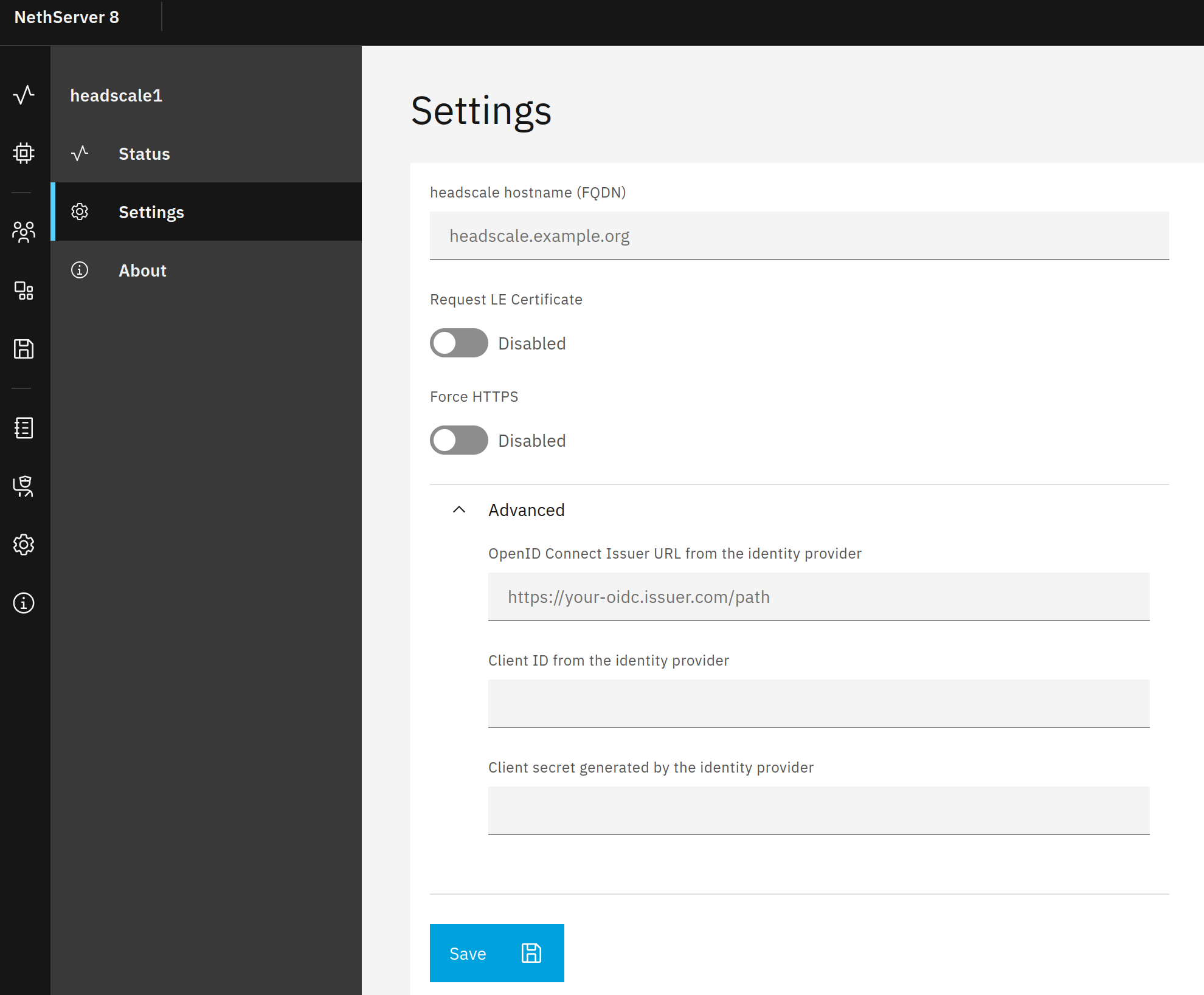
Headscale can also be configured to authenticate via OIDC; since there are a few such providers available for NS8 (Authentik and LemonLDAP::NG I know I’ve seen, I think I’ve also seen Zitadel and perhaps others), bonus points if those configuration settings are exposed.
I also wanted Headscale (smart vpn) with an oidc provider. But it was too complicated for me. Then I found Netbird self-hosted. I didn’t want to use it at first either. But with Caddy Layer 4 reverse proxy and certificate request forwarding, it finally worked.
I think they always use the turn server. But it doesn’t run behind the firewall and reverse proxy. Netbird apparently has its own relay server.
“Caution” always comes from the translator; my English is so-so.
These are two separate apps, of course, but equally obviously they can work together. One big benefit of Tailscale is that its client app is available for so many platforms. My Apple TV? Yep. My single-core RISC-V nanoKVM? Not only available; it ships with it. OPNsense? Yes. TrueNAS? It’s there too. And, of course, all the desktop/mobile platforms.
That app can run, connect to your Tailscale account, and off you go with up to 100 devices on a free account, nothing further needed–and using it that way supports some handy features that Headscale doesn’t, like per-device trusted TLS certs on your own subdomain of ts.net.
Netbird’s ahead of Headscale in terms of the GUI, to be sure. I rarely use the GUI other than to generate auth tokens for new devices, so that isn’t as yet a big deal for me, but no doubt it is to some.
I use it extensively. It uses the core zerotier network and is quite powerful yet simple to use and easy to migrate etc if necessary.
Well worth a look and play.
Headscale and Tailscale are available from my repo in Software Center now.
Headscale UI is used because headplane didn’t work.
As tailscale runs as container, you can’t access the services on the host but it’s possible to use it as subnet router so you can reach the servers that are in the same network as the tailscale node.
I’m going to test if something like port mapping of host services to the container is possible, to make the host reachable by the tailscale container.
Have the “Open headscale” link go to /web so it opens the UI.
I see that some of the commits in your Headscale repo refer to OIDC, and I know Headscale supports OIDC authentication, but I don’t see any configuration options for it. For future use, I suppose?
What are you doing in terms of Magic DNS configuration?
Out of the config.yaml from my current installation:
dns:
  # Whether to use [MagicDNS](https://tailscale.com/kb/1081/magicdns/).
  magic_dns: true

  # Defines the base domain to create the hostnames for MagicDNS.
  # This domain _must_ be different from the server_url domain.
  # `base_domain` must be a FQDN, without the trailing dot.
  # The FQDN of the hosts will be
  # `hostname.base_domain` (e.g., _myhost.example.com_).
  base_domain: magic.2v6.in
And also:
    # Split DNS (see https://tailscale.com/kb/1054/dns/),
    # a map of domains and which DNS server to use for each.
    split:
      lan.2v6.in:
        - 10.1.42.1
      familybrown.org:
        - 192.168.1.1
As to the OIDC, I’m not sure how it’s supposed to work. I’d expected that when it’s configured, an attempt to log into the service would pop up Authentik, but in my one (so far) test, it behaves the same as without it configured: it pulls up a web page saying to log into the server and run X command to authenticate.
I’m sure you’ve already seen the docs, but link just for reference: