NethServer Version: Nethserver 8 - core 3.21.1 Module: Mail 1.8.0
I have a DNS Query Key from Spamhaus that I used for a long time with ClearOS. I saw that the Mail module got updated in the past 6+ months to include DNS Queries and use the rspamd from the discussions and from the github commits. I can see spamhaus listed in the Symbols in rspamd but am missing something conceptually as to how this should be set up. (Newbie home user alert)
This week I got an email from Spamhaus that I need to configure and use the service in the next 7 days or have my account deleted. So I have to finally finish this configuration.
I’ve been reading the docs and can’t find any info about how to configure and add my key to the postfix in Mail and how to configure rspamd to add the key there.
The discussion thread appear to have happened before the updates to add the rspamd plugin and addition to Mail. Can you give some directions on how to find the docs on how to configure these two?
(AI has given some recommendations but I’m worried about implementing solutions from AI on our home mail server.)
Good news on the NS8 side: this is already built into the Mail module, no manual Postfix config needed. It’s documented in the README: Rspamd plugin for Spamhaus DQS, and also listed in the Milestone 8.9 release notes — worth a read if you want the bigger picture of what changed recently on NS8, there’s a lot in there.
The NS8 steps (these I can confirm):
Get a DQS token from Spamhaus (see below for caveats on this part).
Edit the module’s state/rspamd.env file and add:
RSPAMD_dqs_token=<MY_DQS_KEY>
Restart Rspamd:
systemctl --user restart rspamd
No separate Postfix configuration is needed — it’s handled entirely through this Rspamd plugin, thanks to @mrmarkuz and @pagaille. To disable it later, just remove that line and restart the service.
On the Spamhaus side, I can’t speak with authority — best to verify directly with Spamhaus support/docs whether your existing key carries over to a DQS token.
I think it’s great that you’re providing features like this, but why do I have to dig deep into the system to access them? Configuration settings like these belong in the GUI.
Thank you @davidep , the addition of the DQS token looks to be working OK.
I’ve also fixed the ERRO[0000] . Yes, I used Debian 13 and upgraded from Debian 12. It would appear like something got missed in the update. I will add some comments to the other link later this weekend.
And @capote and @pagaille , I agree. If the rspamd module is installed it would be very nice to have access in the GUI.
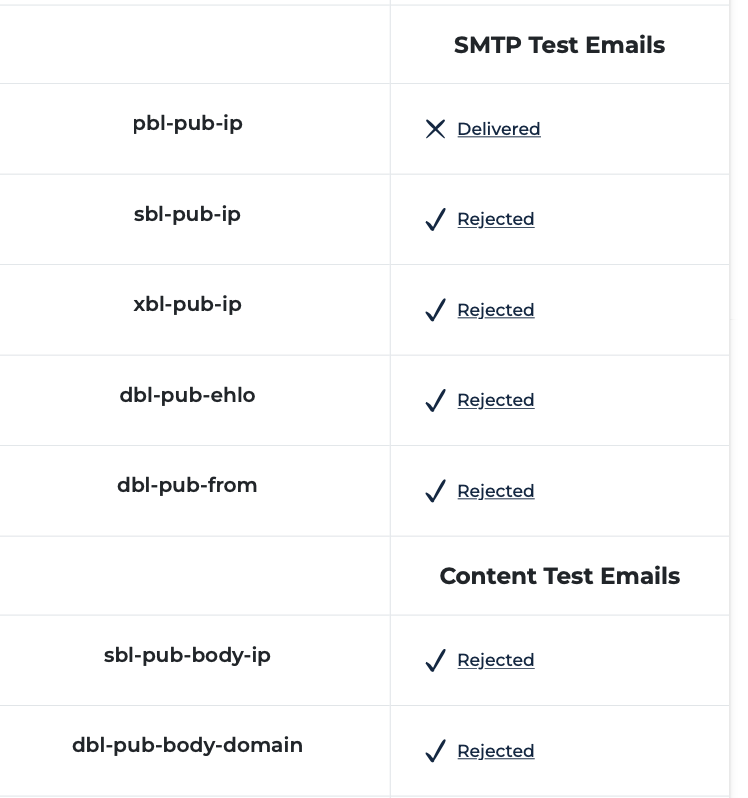
That’s the SMTP test, which doesn’t work since NS8 doesn’t use rspamd at postfix level (might be a nice addition by the way). The content test should work (messages must go into SPAM folder).
Every email showed up in rspamd with a green “pass” and arrived in my inbox.
From reading the docs, I understood that you didn’t need to do anything to smpt/postfix as rspamd and module configuration would take care of everything.
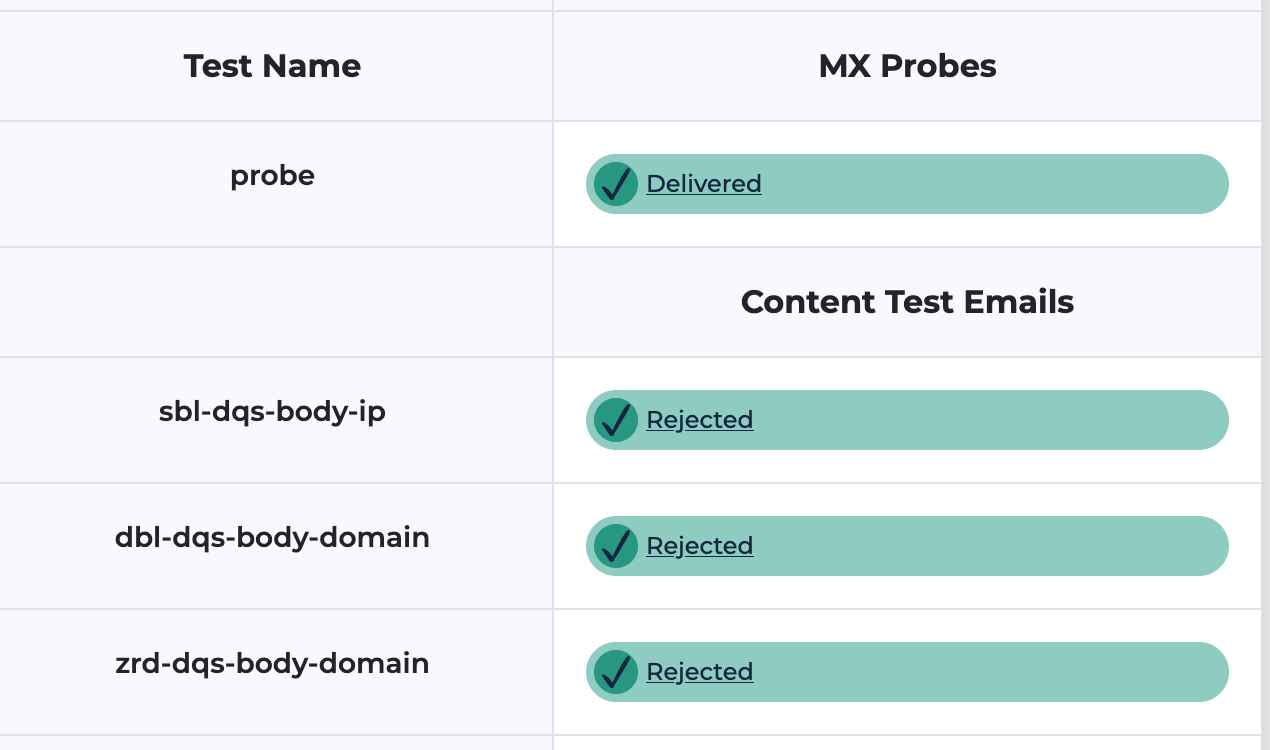
I note also that before making the changes above, only slb-dqs-ip was red i.e. delivered. So in the default config somehow all tests were OK except for one pass through. Now I’ve added the DQS key and enabled rspamd spamhaus module and the result is worse.
Interestingly enough, rspamd starts OK, config is checked OK and there are no errors in the log. So why is this now worse? I have to think on it a bit.
Perhaps I tested using the blocklist tester too quickly. There is activity and something is being blocked as the test results are inconclusive. However the test messages were still delivered.
Having said that, Spamhaus usage shows 143 for the last day. For months before it was zero. So something is working.
The messages that got through say something about MX configuration. C: This is a Spamhaus BLT DQS content-test email which has been C: crafted to be flagged as spam by properly configured mail systems. If C: your MX is correctly configured to do content filtering for the C: dbl-dqs-body-domain test, then this email should be flagged as spam (check the C: headers) or rejected outright. If this email was delivered, and not C: classified as spam, then your MX is not correctly configured for the C: dbl-dqs-body-domain test; please see the BLT documentation at C: https://blt.spamhaus.com/docs` for tips on configuring your MX.`
Here is some more info from one of the content tests. I added the bold.
This email was delivered, but that doesn’t necessarily mean your MX is misconfigured, because this is a test of content-level filtering, and that often takes place after SMTP-level delivery. Please check if this test email really was delivered to an inbox, and if so check that it was flagged as spam. If it was not flagged as spam, then your MX it not configured to use content filtering for the block list for this test.
I’m searching for some info about MX configuration but haven’t found it yet.
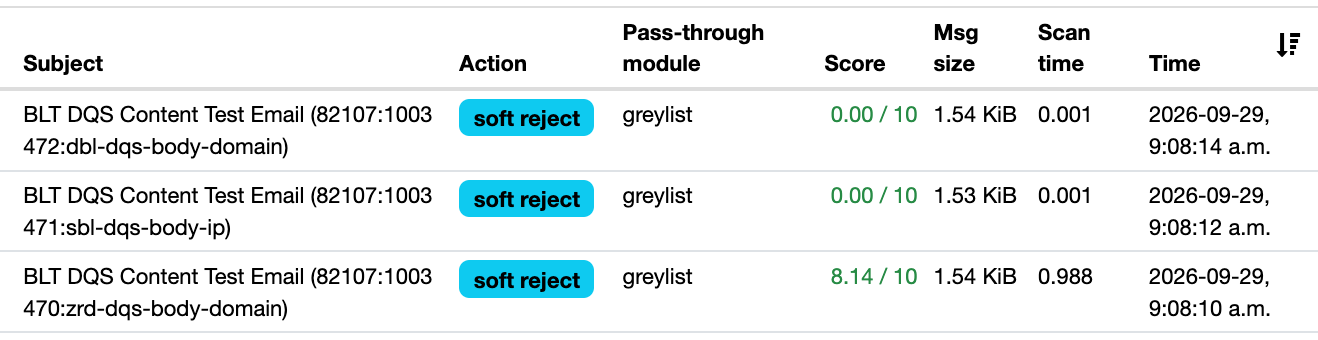
Here is what I see from rspamd. The test emails should have been blocked.
I have been working on it for some time now. Yes the X-Spamd-Result showed that the test was not enabled. I think the script somewhere that creates the local.d/rbl.conf missed this:
spamhaus_zrd {
    ...
    urls = true;
    ...
}
After adding this, it looks like it is “greylisting” but in anycase it is as good as rejected.
Hi @Nuke, do you have any new findings that you’d like to share ? I’m curious about this spamhaus_zrd config setting. I’m still wondering if you are interpreting the tests results correctly : the real test result is whether the test emails are landing as ham or spam.
I forgot to come back and update. Since I made the change to the configuration file, Spamhaus content filters are working. When I run the content test, rspamd is “greylisting” rather than rejecting outright. I think it should be “rejecting” but greylisting also works as these messages are sent once.
I think I will still try to add the postfix spamhaus lists for completeness but generally I am happy with the result now as many spam emails that used to get through are now rejected. There are considerably more “reject” in the rspamd GUI.
Now I’ll be updating the mail app as I see there is an update. We’ll see if my edits to the config survive the update.
Actually “Delivered” doesn’t means that the email gets to the inbox… It ends up in the spam folder, which is the idea, isn’t it ?
I’m not sure that this Zero Reputation Domain (ZRD) has anything to do with that. Don’t let the result of the test mislead you : it works.
Still the postfix level filter would be a nice addition, isn’t it @davidep ?
 Would be a nice improvement since that’s a basic setting.