NethServer Version: 8.9
Module: webserver 1.3.6
tl;dr: rsync --archive --stats -e ssh -p 3092 /var/www/html/weewx/new-belchertown 9008@ns8.familybrown.org:/ is failing with exec request failed on channel 0.
I see I have a previous, similar thread here (Rsync to virtual host?), but I’m not sure how closely-related the issues are, and I expect changes in the webserver module in the last year and a half might make some of that discussion moot.
As I describe here (Self-hosted weather website?), I’m generating a web page on a local VM that has information about my local weather conditions, and that page updates every minute or so. WeeWx has the ability to rsync these files to a remote host, so I figure that’s the way to go. I set up a virtual host on NS8 for this, I generate a SSH keypair for the weewx user, add the public key to the proper user’s configuration in SFTPGo, and configure WeeWx to use it. It works for scp:
dan@wxbox ➜  ~ sudo -u weewx scp -P 3092 neowx-material-latest.zip 9008@ns8.familybrown.org:/
neowx-material-latest.zip                                                                         100% 3178KB   2.3MB/s   00:01
But when I try running an rsync command, it fails:
dan@wxbox ➜  ~ sudo -u weewx rsync -av --stats -e "ssh -p 3092" /var/www/html/weewx/new-belchertown/ 9008@ns8.familybrown.org:/
exec request failed on channel 0
rsync: connection unexpectedly closed (0 bytes received so far) [sender]
rsync error: unexplained error (code 255) at io.c(232) [sender=3.4.1]
Output of a couple of AI-suggested troubleshooting steps:
dan@wxbox ➜  ~ sudo -u weewx ssh -p 3092 9008@ns8.familybrown.org 'echo ok'
exec request failed on channel 0
dan@wxbox ➜  ~ sudo -u weewx ssh -p 3092 9008@ns8.familybrown.org 'rsync --version'
exec request failed on channel 0
The SFTPGo service file looks like it should be allowing rsync:
[Unit]
Description=Podman  sftpgo.service
After=nginx.service

[Service]
Environment=PODMAN_SYSTEMD_UNIT=%n
EnvironmentFile=%S/state/environment
WorkingDirectory=%S/state
Restart=always
TimeoutStopSec=70
ExecStartPre=/bin/mkdir -vp crontabs
ExecStartPre=/bin/rm -f %t/sftpgo.pid %t/sftpgo.ctr-id
ExecStart=/usr/bin/podman run --conmon-pidfile %t/sftpgo.pid \
    --cidfile %t/sftpgo.ctr-id --cgroups=no-conmon \
    --pod-id-file %t/webserver.pod-id --replace -d --name  sftpgo \
    --volume websites:/srv/sftpgo/data:z \
    --volume sftpgo_backups:/srv/sftpgo/backups:Z \
    --volume sftpgo_config:/var/lib/sftpgo:Z \
    --volume ./crontabs:/var/spool/cron/crontabs:Z \
    --volume %S/state/sftpgo.conf.d/admin.json:/etc/sftpgo/admin.json:Z \
    --env SFTPGO_LOADDATA_FROM=/etc/sftpgo/admin.json \
    --env SFTPGO_HTTPD__WEB_ROOT=${TRAEFIK_PATH}\
    --env SFTPGO_SFTPD__ENABLED_SSH_COMMANDS=rsync,scp \
    --user 0:0 \
    ${SFTPGO_IMAGE}
ExecStartPost=/usr/bin/bash -c "while [[ $(curl --request GET --url http://localhost:${SFTPGO_TCP_PORT}/healthz --header 'Accept: t>
# start crond inside
ExecStartPost=podman exec sftpgo crond -L 2
ExecStop=/usr/bin/podman stop --ignore --cidfile %t/sftpgo.ctr-id -t 10
ExecStopPost=/usr/bin/podman rm --ignore -f --cidfile %t/sftpgo.ctr-id
PIDFile=%t/sftpgo.pid
Type=forking

[Install]
WantedBy=default.target
But if I log into the SFTPGo WebAdmin and go to the server status page, it gives only scp as an accepted command:
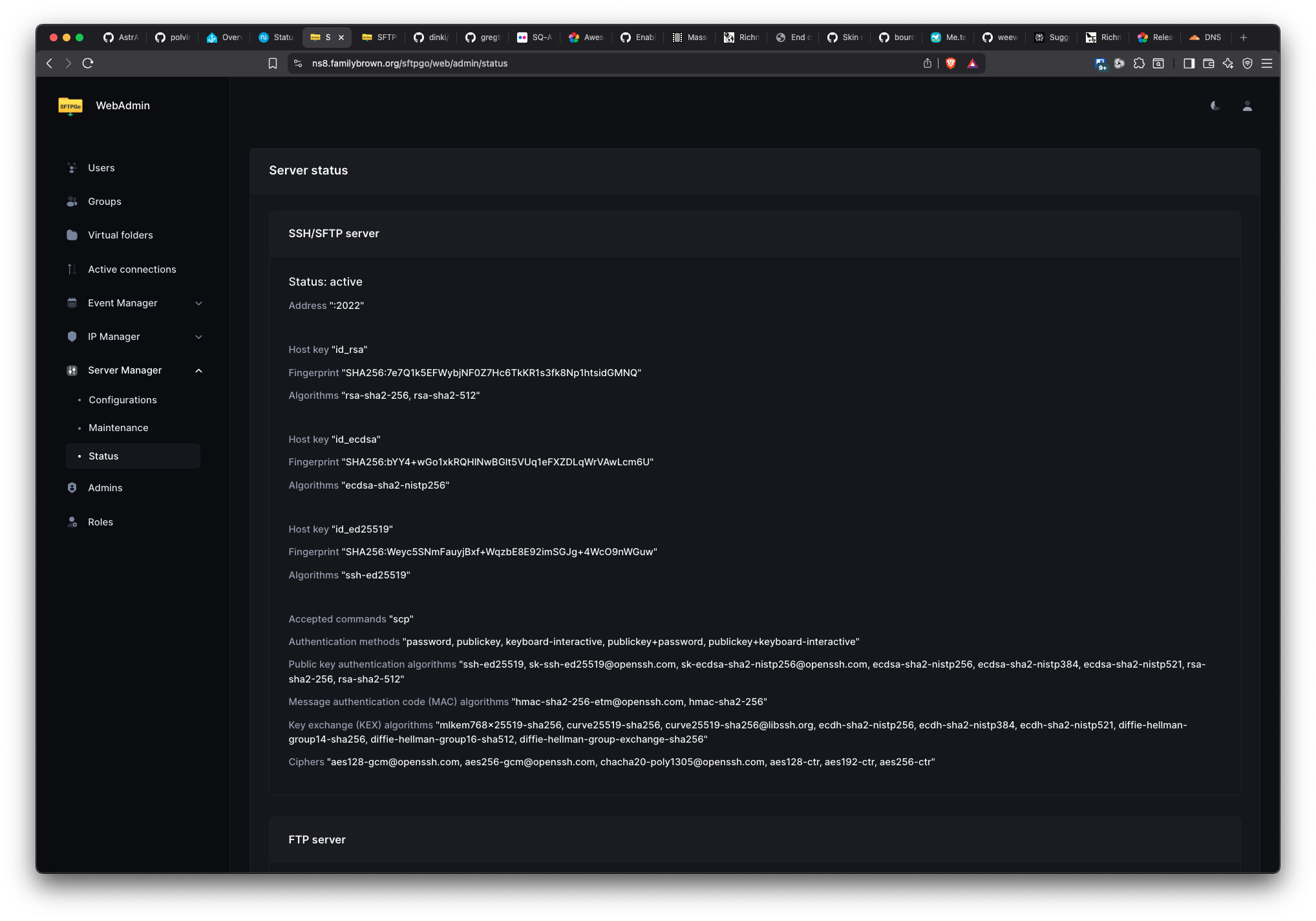
Turns out SFTPGo has removed rsync support:
Thanks, guys (snark directed here to SFTPGo, not to Nethesis).