NethServer Version: 8
Hi,
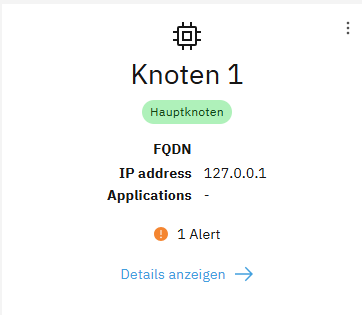
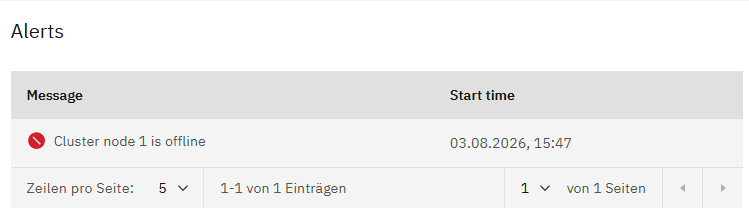
i installed a new Nethserver instance and set up a cluster. While creating the cluster, I received a message stating that the VRN address was already in use, which is definitely not the case. After a reboot, I was able to log in to the admin console normally.
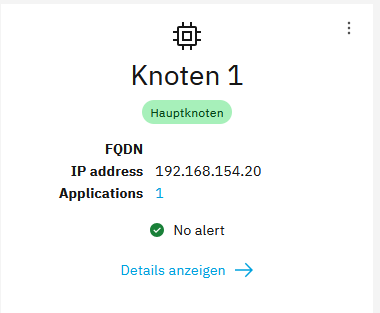
The FQDN under which the server is accessible is also missing.
Here’s a picture of another system to illustrate the difference.
mrmarkuz
August 3, 2026, 7:55pm
2
The shown IP 127.0.0.1 is normal after a fresh installation, after about a minute it should show the right interface IP and the FQDN.
Did you use the standard procedure or the pre-built image ?
If you used the pre-built image or a Proxmox template, see Proxmox VM full or linked clone from template - #5 by davidep
Hi @mrmarkuz
I did it the traditional way.
I then installed Nethserver as described in the instructions. Before that, I had already configured the necessary port forwarding settings on my gateway. The installation of NS 8 completed without any error messages. I then performed the initial setup (create cluster). I did not change the default VPN IP. The cluster installation aborted with an error message stating that the specified VPN IP was already in use. In addition, several other error messages appeared, which i unfortunately didn’t record.
I have now uninstalled Netherver according to the instructions. Attached are the messages as I see them in PuTTY.
Deleting rootless module traefik1…
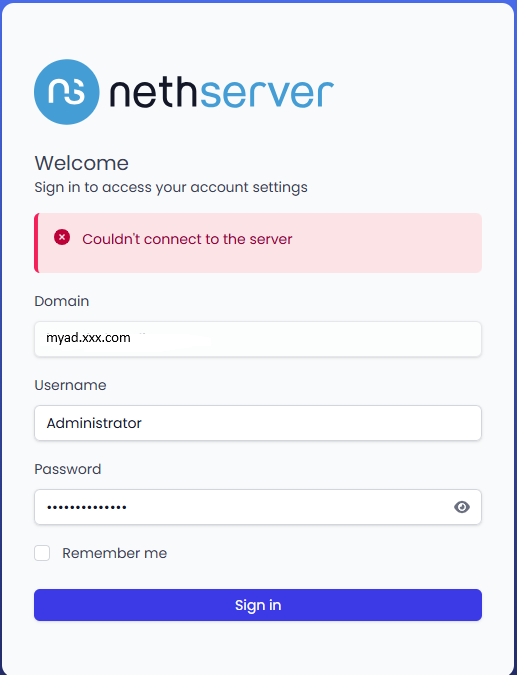
I’ve now reinstalled NS 8 on the same VM. After that, the initial setup went smoothly. First, I installed and configured Samba AD. That worked fine so far. However, just like on another NS 8 instance, I’m having trouble logging in to the User Portal. Even though this is a brand-new installation.
What’s going wrong here?
mrmarkuz
August 4, 2026, 11:04am
6
I tried to reproduce the issue without success, installation and user portal are working here.
My user portal is reachable at https://node.ns8.test/users-admin/ad.ns8.test and I’m able to login as Administrator.
Are there errors in the logs when you try to login?
Is the samba domain reachable from the NS8?
ping myad.xxx.com
The samba domain is reachable from NS 8.
That is all what i can find in the logs.
2026-08-04T13:30:32+02:00 [1:samba1:samba-dc] Auth: [Kerberos KDC,ENC-TS Pre-authentication] user [(null)][Administrator@XXXXX.XXXXX-ONLINE.COM] at [Tue, 04 Aug 2026 11:30:32.850676 UTC] with [aes256-cts-hmac-sha1-96] status [NT_STATUS_PROTOCOL_UNREACHABLE] workstation [(null)] remote host [ipv4:192.168.154.1:48201] mapped to [XXX-ONLINE][Administrator]. local host [NULL] 2026-08-04T13:30:33+02:00 [1:traefik1:traefik] 192.168.154.122 - - [04/Aug/2026:11:30:28 +0000] “POST /users-admin/xxxxx.xxxxx-online.com/api/login HTTP/2.0” 499 21 “-” “-” 110 “samba1-amld-https@file” “http://127.0.0.1:20000 ” 5007ms 2026-08-04T13:30:33+02:00 [1:samba1:samba-dc] Auth: [Kerberos KDC,ENC-TS Pre-authentication] user [(null)][Administrator@XXXXX.XXXXX-ONLINE.COM] at [Tue, 04 Aug 2026 11:30:33.884264 UTC] with [aes256-cts-hmac-sha1-96] status [NT_STATUS_OK] workstation [(null)] remote host [ipv4:192.168.154.1:41698] became [XXXXX-ONLINE[Administrator] [S-1-5-21-4040196191-2615639880-851222450-500]. local host [NULL] 2026-08-04T13:30:37+02:00 [1::qemu-ga] info: guest-ping called 2026-08-04T13:30:41+02:00 [1:ldapproxy1:ldapproxy] 2026/08/04 11:30:41 [info] 25#25: *9 client disconnected, bytes from/to client:1343/228090, bytes from/to upstream:228090/1343 2026-08-04T13:30:41+02:00 [1:samba1:api-moduled] [GIN] 2026/08/04 - 13:30:41 | 200 | 12.7s | 192.168.154.122 | POST “/api/login” 2026-08-04T13:30:42+02:00 [1::qemu-ga] info: guest-ping called
mrmarkuz
August 4, 2026, 1:08pm
8
I guess it’s the same error as in the other thread . Is there also the LAM error again?
Here are logs of a working login:
2026-08-04T14:17:13+02:00 [1:ldapproxy1:ldapproxy] 2026/08/04 12:17:13 [info] 29#29: *23 client 127.0.0.1:50299 connected to 127.0.0.1:20002
2026-08-04T14:17:13+02:00 [1:ldapproxy1:ldapproxy] 2026/08/04 12:17:13 [info] 29#29: *23 proxy 192.168.3.148:36226 connected to 192.168.3.148:636
2026-08-04T14:17:13+02:00 [1:samba2:samba-dc] Auth: [LDAP,simple bind/TLS] user [NS8]\[ldapservice@ad.ns8-test.test] at [Tue, 04 Aug 2026 12:17:13.484655 UTC] with [Plaintext] status [NT_STATUS_OK] workstation [DC234] remote host [ipv4:192.168.3.148:36226] became [NS8]\[ldapservice] [S-1-5-21-4004702653-2937838001-2797294098-1103]. local host [ipv4:192.168.3.148:636]
2026-08-04T14:17:13+02:00 [1:samba2:samba-dc] Auth: [Kerberos KDC,ENC-TS Pre-authentication] user [(null)]\[Administrator@AD.NS8-TEST.TEST] at [Tue, 04 Aug 2026 12:17:13.670874 UTC] with [aes256-cts-hmac-sha1-96] status [NT_STATUS_OK] workstation [(null)] remote host [ipv4:192.168.3.148:40596] became [NS8]\[Administrator] [S-1-5-21-4004702653-2937838001-2797294098-500]. local host [NULL]
2026-08-04T14:17:13+02:00 [1:ldapproxy1:ldapproxy] 2026/08/04 12:17:13 [info] 29#29: *23 client disconnected, bytes from/to client:1293/227964, bytes from/to upstream:227964/1293
2026-08-04T14:17:13+02:00 [1:samba2:api-moduled] [GIN] 2026/08/04 - 14:17:13 | 200 |  713.5ms |   192.168.3.133 | POST     "/api/login"
2026-08-04T14:17:14+02:00 [1:ldapproxy1:ldapproxy] 2026/08/04 12:17:14 [info] 29#29: *27 client 127.0.0.1:55587 connected to 127.0.0.1:20002
2026-08-04T14:17:14+02:00 [1:ldapproxy1:ldapproxy] 2026/08/04 12:17:14 [info] 29#29: *29 client 127.0.0.1:58359 connected to 127.0.0.1:20002
2026-08-04T14:17:14+02:00 [1:ldapproxy1:ldapproxy] 2026/08/04 12:17:14 [info] 29#29: *27 proxy 192.168.3.148:36238 connected to 192.168.3.148:636
2026-08-04T14:17:14+02:00 [1:ldapproxy1:ldapproxy] 2026/08/04 12:17:14 [info] 29#29: *31 proxy 192.168.3.148:36250 connected to 192.168.3.148:636
2026-08-04T14:17:15+02:00 [1:ldapproxy1:ldapproxy] 2026/08/04 12:17:15 [info] 29#29: *31 client disconnected, bytes from/to client:1409/227341, bytes from/to upstream:227341/1409
2026-08-04T14:17:15+02:00 [1:ldapproxy1:ldapproxy] 2026/08/04 12:17:15 [info] 29#29: *27 client disconnected, bytes from/to client:1409/227341, bytes from/to upstream:227341/1409
Let’s check the network…
ip a
…and the Samba config:
api-cli run module/samba1/get-configuration | jq
It’s a fresh installation without any app. Only samba is installed.
Output of ip a:
1: lo: <LOOPBACK,UP,LOWER_UP> mtu 65536 qdisc noqueue state UNKNOWN group default qlen 1000
Output of Samba config:
“configuration_required”: false,ixxxxx.xxxxx-online.com ”,
mrmarkuz
August 4, 2026, 2:42pm
10
Network and samba config looks good. I tested a similar setup and it worked.
Maybe try the curl command from the other thread to check the latency, adapt NS8FQDN,ad.xxx.com and PASSWORD to your setup.
curl -k -s -o /dev/null -w '%{http_code} %{time_total}\n' \
  -X POST https://NS8FQDN/users-admin/ad.xxx.com/api/login \
  -H 'Content-Type: application/json' \
  -d '{"username":"Administrator","password":"PASSWORD"}'
It should return something like
200 0.714507
mrmarkuz
August 4, 2026, 3:02pm
12
Status 000 means a timeout after about 5 seconds.
Do the hostnames resolve to the NS8 LAN IP address? If they resolve to public IPs, the firewall may block the request…
nslookup NS8FQDN
nslookup ad.xxx.com
If nslookup isn’t available:
dnf install bind-utils
I think it’s ok…
Server: 192.168.154.254
Name: tdho-ns8node1.xxxxx-online.com
[root@tdho-ns8node1 ~]# nslookup ad.xxxxx-online.com
Name: ad.xxxxx-online.com
After trying the above command again, the timeout is back,
mrmarkuz
August 4, 2026, 3:18pm
14
The DNS resolves to a wrong IP.
The NS8 has 192.168.154.1…
transocean:
inet 192.168.154.1/24
…but the DNS returns 192.168.154.20.
Sorry @mrmarkuz
I ran the tests on the NS8 from the other thread—the same one where I’m having problems with the user portal. The values match. I forgot to mention that.
mrmarkuz
August 4, 2026, 3:28pm
16
OK, let’s test if the samba port is opened.
nmap -p 636 ad.xxx.com
If nmap is missing:
dnf install nmap
To remove nmap after testing:
dnf remove nmap
nmap -p 636 ad.xxxxx-online.com https://nmap.org ) at 2026-08-04 17:32 CESTad.xxxxx-online.com (192.168.154.20)dc01.ad.xxxxx-online.com
PORT STATE SERVICE
Nmap done: 1 IP address (1 host up) scanned in 5.18 seconds
mrmarkuz
August 4, 2026, 3:43pm
18
The nmap result looks good.
transocean:
“hostname”: “dc1”
The default DC hostname is dc1 but in the nmap result it’s dc01. Could there be a wrong name in DNS?
As I mentioned earlier, I’m using the NS8 from the other thread. The output is correct.
I would have tried uninstalling the LAM app. But that doesn’t make sense, since the problem occurs on the freshly installed NS8 even without the LAM app.
mrmarkuz
August 4, 2026, 3:51pm
20
I don’t think that LAM is the cause but it would be interesting if the LAM error also occurs on the fresh installed server.
Does it work when you use the IP instead of the NS8FQDN or does it time out too?
curl -k -s -o /dev/null -w '%{http_code} %{time_total}\n' \
  -X POST https://192.168.154.20/users-admin/ad.xxx.com/api/login \
  -H 'Content-Type: application/json' \
  -d '{"username":"Administrator","password":"PASSWORD"}'