can I stop samba and AD somehow or shoud I just disconnect the NIC?
As you probably now have 2 NS8 running (old and new) just disconnect the old one (temporary) for the duration of the tests.
ok thankyou I’ll try that
1 Like
the problems persist 
restoring sambe to the 2nd node gives:
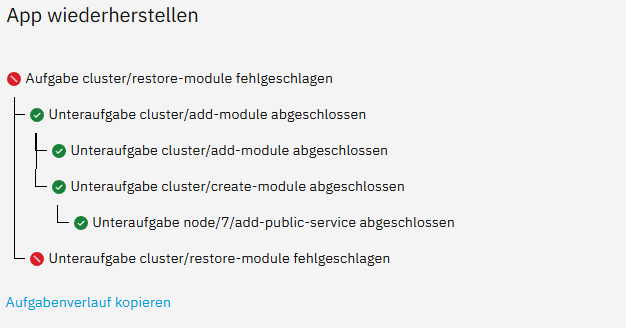
<5>IP address 192.168.178.13 not found. Falling back to VPN IP address
restic --option=rclone.program=/usr/local/bin/rclone-wrapper restore --json 19f0ffe7ccee03539f56a284da31307dd5e10632934e3e3e63616ae4a572f09c --target . --exclude state/environment
Trying to pull ghcr.io/nethserver/restic:3.4.4...
Getting image source signatures
Copying blob sha256:993cf9c50bf4a10805d429d083bfb2ab1828fc59eea3a0168a7fc4919b3994f4
Copying blob sha256:3685f91b5ebb60fb1fba5e9bae10d7bccca10b6da3a10c938faac9ee6f27edf8
Copying config sha256:ac2bd7bbaf8ce17ac622369a24e65c899769f4766506f50b751995a0e867bf52
Writing manifest to image destination
Resume Samba DC state:
Adding new DC to site 'Default-First-Site-Name'
Updating basic smb.conf settings...
Creating account with SID: S-1-5-21-1843216828-3309098103-2065664406-1147
Adding CN=NSDC-HOME2R1,OU=Domain Controllers,DC=ad,DC=nemenz,DC=at
Adding CN=NSDC-HOME2R1,CN=Servers,CN=Default-First-Site-Name,CN=Sites,CN=Configuration,DC=ad,DC=nemenz,DC=at
Adding CN=NTDS Settings,CN=NSDC-HOME2R1,CN=Servers,CN=Default-First-Site-Name,CN=Sites,CN=Configuration,DC=ad,DC=nemenz,DC=at
Adding SPNs to CN=NSDC-HOME2R1,OU=Domain Controllers,DC=ad,DC=nemenz,DC=at
Setting account password for NSDC-HOME2R1$
Enabling account
Seizing domaindns FSMO role...
FSMO seize of 'domaindns' role successful
Seizing forestdns FSMO role...
FSMO seize of 'forestdns' role successful
Seizing rid FSMO role...
FSMO seize of 'rid' role successful
Seizing pdc FSMO role...
FSMO seize of 'pdc' role successful
Seizing naming FSMO role...
FSMO seize of 'naming' role successful
Seizing infrastructure FSMO role...
FSMO seize of 'infrastructure' role successful
Seizing schema FSMO role...
FSMO seize of 'schema' role successful
Removing nTDSDSA: CN=NTDS Settings,CN=NSDC-HOME2,CN=Servers,CN=Default-First-Site-Name,CN=Sites,CN=Configuration,DC=ad,DC=nemenz,DC=at (and any children)
Removing RID Set: CN=RID Set,CN=NSDC-HOME2,OU=Domain Controllers,DC=ad,DC=nemenz,DC=at
Removing computer account: CN=NSDC-HOME2,OU=Domain Controllers,DC=ad,DC=nemenz,DC=at (and any child objects)
checking for DNS records to remove on ForestDnsZones.ad.nemenz.at
updating ForestDnsZones.ad.nemenz.at keeping 0 values, removing 1 values
checking for DNS records to remove on ad.nemenz.at
updating ad.nemenz.at keeping 2 values, removing 1 values
checking for DNS records to remove on DomainDnsZones.ad.nemenz.at
updating DomainDnsZones.ad.nemenz.at keeping 0 values, removing 1 values
checking DC=ad.nemenz.at,CN=MicrosoftDNS,DC=DomainDnsZones,DC=ad,DC=nemenz,DC=at
updating DC=_ldap._tcp.Default-First-Site-Name._sites.DomainDnsZones,DC=ad.nemenz.at,CN=MicrosoftDNS,DC=DomainDnsZones,DC=ad,DC=nemenz,DC=at keeping 0 values, removing 1 values
updating DC=_kpasswd._tcp,DC=ad.nemenz.at,CN=MicrosoftDNS,DC=DomainDnsZones,DC=ad,DC=nemenz,DC=at keeping 0 values, removing 1 values
updating DC=_kerberos._udp,DC=ad.nemenz.at,CN=MicrosoftDNS,DC=DomainDnsZones,DC=ad,DC=nemenz,DC=at keeping 0 values, removing 1 values
updating DC=_kerberos._tcp,DC=ad.nemenz.at,CN=MicrosoftDNS,DC=DomainDnsZones,DC=ad,DC=nemenz,DC=at keeping 0 values, removing 1 values
updating DC=@,DC=ad.nemenz.at,CN=MicrosoftDNS,DC=DomainDnsZones,DC=ad,DC=nemenz,DC=at keeping 1 values, removing 1 values
updating DC=_ldap._tcp.Default-First-Site-Name._sites.ForestDnsZones,DC=ad.nemenz.at,CN=MicrosoftDNS,DC=DomainDnsZones,DC=ad,DC=nemenz,DC=at keeping 0 values, removing 1 values
updating DC=_kerberos._tcp.Default-First-Site-Name._sites,DC=ad.nemenz.at,CN=MicrosoftDNS,DC=DomainDnsZones,DC=ad,DC=nemenz,DC=at keeping 0 values, removing 1 values
updating DC=_ldap._tcp.ForestDnsZones,DC=ad.nemenz.at,CN=MicrosoftDNS,DC=DomainDnsZones,DC=ad,DC=nemenz,DC=at keeping 0 values, removing 1 values
updating DC=_ldap._tcp,DC=ad.nemenz.at,CN=MicrosoftDNS,DC=DomainDnsZones,DC=ad,DC=nemenz,DC=at keeping 0 values, removing 1 values
updating DC=_kpasswd._udp,DC=ad.nemenz.at,CN=MicrosoftDNS,DC=DomainDnsZones,DC=ad,DC=nemenz,DC=at keeping 0 values, removing 1 values
updating DC=home2,DC=ad.nemenz.at,CN=MicrosoftDNS,DC=DomainDnsZones,DC=ad,DC=nemenz,DC=at keeping 0 values, removing 1 values
updating DC=_msdcs,DC=ad.nemenz.at,CN=MicrosoftDNS,DC=DomainDnsZones,DC=ad,DC=nemenz,DC=at keeping 0 values, removing 1 values
updating DC=_gc._tcp.Default-First-Site-Name._sites,DC=ad.nemenz.at,CN=MicrosoftDNS,DC=DomainDnsZones,DC=ad,DC=nemenz,DC=at keeping 0 values, removing 1 values
updating DC=_ldap._tcp.DomainDnsZones,DC=ad.nemenz.at,CN=MicrosoftDNS,DC=DomainDnsZones,DC=ad,DC=nemenz,DC=at keeping 0 values, removing 1 values
updating DC=_ldap._tcp.Default-First-Site-Name._sites,DC=ad.nemenz.at,CN=MicrosoftDNS,DC=DomainDnsZones,DC=ad,DC=nemenz,DC=at keeping 0 values, removing 1 values
updating DC=_gc._tcp,DC=ad.nemenz.at,CN=MicrosoftDNS,DC=DomainDnsZones,DC=ad,DC=nemenz,DC=at keeping 0 values, removing 1 values
checking DC=_msdcs.ad.nemenz.at,CN=MicrosoftDNS,DC=ForestDnsZones,DC=ad,DC=nemenz,DC=at
updating DC=_ldap._tcp.Default-First-Site-Name._sites.dc,DC=_msdcs.ad.nemenz.at,CN=MicrosoftDNS,DC=ForestDnsZones,DC=ad,DC=nemenz,DC=at keeping 0 values, removing 1 values
updating DC=b80cc045-07fb-488d-adfc-9e160a9e736c,DC=_msdcs.ad.nemenz.at,CN=MicrosoftDNS,DC=ForestDnsZones,DC=ad,DC=nemenz,DC=at keeping 0 values, removing 1 values
updating DC=@,DC=_msdcs.ad.nemenz.at,CN=MicrosoftDNS,DC=ForestDnsZones,DC=ad,DC=nemenz,DC=at keeping 1 values, removing 1 values
updating DC=_ldap._tcp.pdc,DC=_msdcs.ad.nemenz.at,CN=MicrosoftDNS,DC=ForestDnsZones,DC=ad,DC=nemenz,DC=at keeping 0 values, removing 1 values
updating DC=_ldap._tcp.dc,DC=_msdcs.ad.nemenz.at,CN=MicrosoftDNS,DC=ForestDnsZones,DC=ad,DC=nemenz,DC=at keeping 0 values, removing 1 values
updating DC=_kerberos._tcp.Default-First-Site-Name._sites.dc,DC=_msdcs.ad.nemenz.at,CN=MicrosoftDNS,DC=ForestDnsZones,DC=ad,DC=nemenz,DC=at keeping 0 values, removing 1 values
updating DC=_ldap._tcp.gc,DC=_msdcs.ad.nemenz.at,CN=MicrosoftDNS,DC=ForestDnsZones,DC=ad,DC=nemenz,DC=at keeping 0 values, removing 1 values
updating DC=_ldap._tcp.Default-First-Site-Name._sites.gc,DC=_msdcs.ad.nemenz.at,CN=MicrosoftDNS,DC=ForestDnsZones,DC=ad,DC=nemenz,DC=at keeping 0 values, removing 1 values
updating DC=_kerberos._tcp.dc,DC=_msdcs.ad.nemenz.at,CN=MicrosoftDNS,DC=ForestDnsZones,DC=ad,DC=nemenz,DC=at keeping 0 values, removing 1 values
updating DC=_ldap._tcp.d34a8619-d8ac-443c-b265-074c65ea4562.domains,DC=_msdcs.ad.nemenz.at,CN=MicrosoftDNS,DC=ForestDnsZones,DC=ad,DC=nemenz,DC=at keeping 0 values, removing 1 values
Removing Sysvol reference: CN=NSDC-HOME2,CN=Enterprise,CN=Microsoft System Volumes,CN=System,CN=Configuration,DC=ad,DC=nemenz,DC=at
Removing Sysvol reference: CN=NSDC-HOME2,CN=ad.nemenz.at,CN=Microsoft System Volumes,CN=System,CN=Configuration,DC=ad,DC=nemenz,DC=at
Removing Sysvol reference: CN=NSDC-HOME2,CN=Domain System Volumes (SYSVOL share),CN=File Replication Service,CN=System,DC=ad,DC=nemenz,DC=at
Removing Sysvol reference: CN=NSDC-HOME2,CN=Topology,CN=Domain System Volume,CN=DFSR-GlobalSettings,CN=System,DC=ad,DC=nemenz,DC=at
Fixing up any remaining references to the old DCs...
Backup file successfully restored to /var/lib/samba/restore
Please check the smb.conf settings are correct before starting samba.
# Generated by expand-config. Manual changes to this file are lost!
[global]

        bind interfaces only = Yes
        interfaces = 127.0.0.1 192.168.178.13
        netbios name = NSDC-HOME2R1
        realm = AD.NEMENZ.AT
        server role = active directory domain controller
        workgroup = NEMENZ
        log level = 1 auth_audit:3

        acl_xattr:security_acl_name = user.NTACL
        acl_xattr:ignore system acls = yes

        template homedir = /srv/homes/%U
        obey pam restrictions = yes

        registry shares = yes
        inherit owner = yes

        include = /etc/samba/include.conf

[sysvol]
        path = /var/lib/samba/sysvol
        read only = No
        acl_xattr:ignore system acls = no
        inherit owner = no

[netlogon]
        path = /var/lib/samba/sysvol/ad.nemenz.at/scripts
        read only = No

[homes]
comment = %u home directory
browseable = no
writeable = yes

renamed 'restore/private' -> './private'
renamed 'restore/state/sysvol' -> './sysvol'
renamed 'restore/state/account_policy.tdb' -> './account_policy.tdb'
renamed 'restore/state/registry.tdb' -> './registry.tdb'
renamed 'restore/state/share_info.tdb' -> './share_info.tdb'
renamed 'restore/state/winbindd_cache.tdb' -> './winbindd_cache.tdb'
removed 'restore/backup.txt'
removed directory 'restore/state'
removed 'restore/etc/gdbcommands'
removed 'restore/etc/include.conf'
removed 'restore/etc/smb.conf.distro'
removed 'restore/etc/smb.conf'
removed 'restore/etc/smb.conf.orig'
removed directory 'restore/etc'
removed 'restore/gencache.tdb'
removed directory 'restore'
removed 'backup/backupFhem.plocate'
removed 'backup/test.plocate'
removed 'backup/Hausumbau.plocate'
removed 'backup/samba-backup.tar.bz2'
removed directory 'backup'
Traceback (most recent call last):
  File "/home/samba2/.config/actions/restore-module/80start_amld", line 36, in <module>
    response = agent.tasks.run(
               ^^^^^^^^^^^^^^^^
  File "/usr/local/agent/pypkg/agent/tasks/run.py", line 39, in run
    results = runp([taskrq], **kwargs)
              ^^^^^^^^^^^^^^^^^^^^^^^^
  File "/usr/local/agent/pypkg/agent/tasks/run.py", line 50, in runp
    return asyncio.run(_runp(tasks, **kwargs))
           ^^^^^^^^^^^^^^^^^^^^^^^^^^^^^^^^^^^
  File "/usr/lib64/python3.11/asyncio/runners.py", line 190, in run
    return runner.run(main)
           ^^^^^^^^^^^^^^^^
  File "/usr/lib64/python3.11/asyncio/runners.py", line 118, in run
    return self._loop.run_until_complete(task)
           ^^^^^^^^^^^^^^^^^^^^^^^^^^^^^^^^^^^
  File "/usr/lib64/python3.11/asyncio/base_events.py", line 654, in run_until_complete
    return future.result()
           ^^^^^^^^^^^^^^^
  File "/usr/local/agent/pypkg/agent/tasks/run.py", line 120, in _runp
    return await asyncio.gather(*runners, return_exceptions=(len(tasks) > 1))
           ^^^^^^^^^^^^^^^^^^^^^^^^^^^^^^^^^^^^^^^^^^^^^^^^^^^^^^^^^^^^^^^^^^
  File "/usr/local/agent/pypkg/agent/tasks/run.py", line 129, in _run_with_protocol
    return await run_apiclient(taskrq, **pconn)
           ^^^^^^^^^^^^^^^^^^^^^^^^^^^^^^^^^^^^
  File "/usr/local/agent/pypkg/agent/tasks/apiclient.py", line 47, in run_apiclient
    taskctx['status_path'] = await _retry_request(_apost_task, taskrq, client=client, theaders=theaders, **kwargs)
                             ^^^^^^^^^^^^^^^^^^^^^^^^^^^^^^^^^^^^^^^^^^^^^^^^^^^^^^^^^^^^^^^^^^^^^^^^^^^^^^^^^^^^^
  File "/usr/local/agent/pypkg/agent/tasks/apiclient.py", line 191, in _retry_request
    raise exhttp
  File "/usr/local/agent/pypkg/agent/tasks/apiclient.py", line 166, in _retry_request
    retval = await request_procedure(*args, **kwargs)
             ^^^^^^^^^^^^^^^^^^^^^^^^^^^^^^^^^^^^^^^^
  File "/usr/local/agent/pypkg/agent/tasks/apiclient.py", line 258, in _apost_task
    jresp = await resp.json()
            ^^^^^^^^^^^^^^^^^
  File "/usr/local/agent/pyenv/lib64/python3.11/site-packages/aiohttp/client_reqrep.py", line 1104, in json
    raise ContentTypeError(
aiohttp.client_exceptions.ContentTypeError: 0, message='Attempt to decode JSON with unexpected mimetype: ', url=URL('http://cluster-leader:9311/api/module/traefik3/tasks')
on the domains and user page
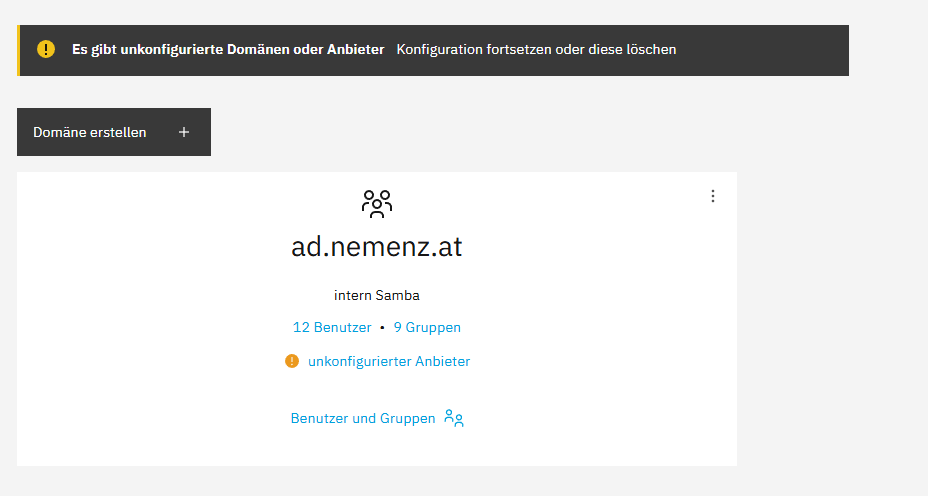
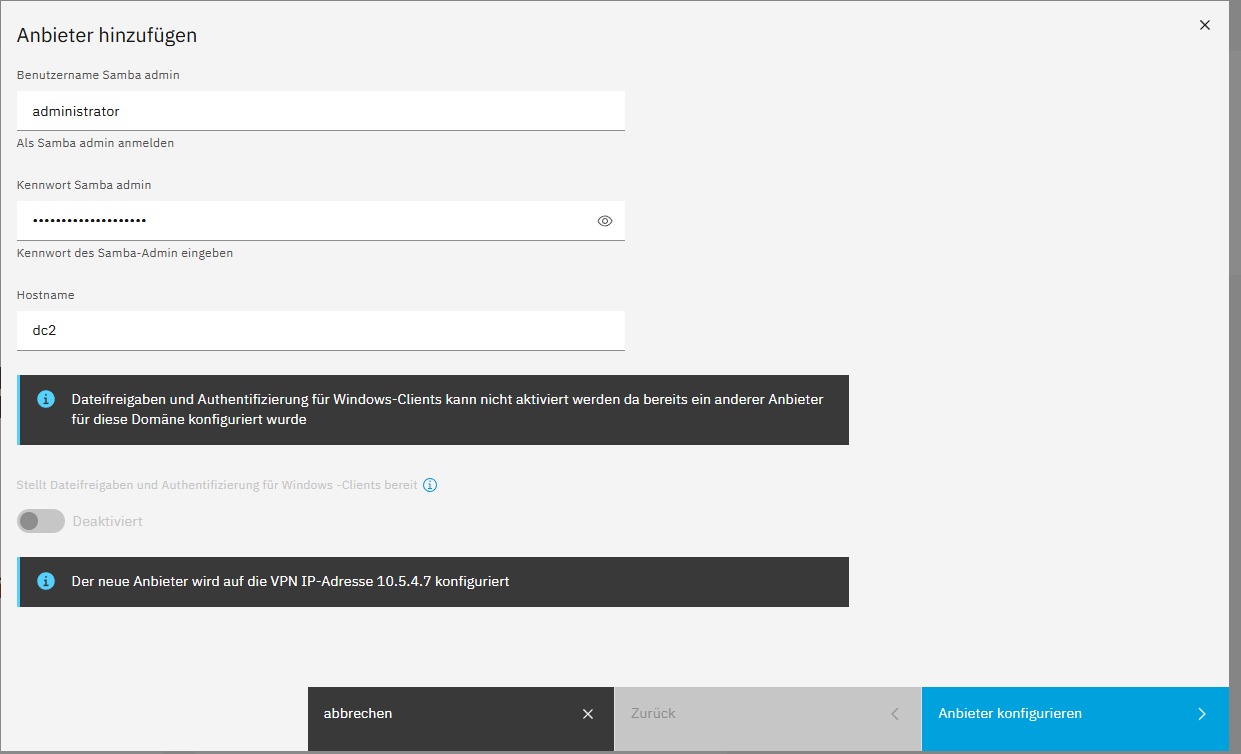
trying to configure
After promoting the new Node as leader node (becouse there would be no connection to the cluser-admin) and turning off the old node there isn’t samba workin at all. no DNS, No loginserver.
@davidep: could you join in and do you have any other advice?
What is the propper way to move Sama to another Node?
Now I have 2 Samba instances. one isn’t doing anything realy
I think you need to delete samba on the old node first as there is just one file server allowed per domain as shown in your screenshot.
Then you need to change the DC IP:
Adapt samba1 to the real samba instance name and change the IP to the one of the second node:
api-cli run module/samba1/set-ipaddress --data '{"ipaddress":"192.168.1.123"}'
2 Likes
It seems both Mail and Samba restoration failed for the same reason. They receive an unexpected response from api-server.
Check the system load:
top -n 1 | head -3
Check the contents of /etc/hosts on EVERY cluster node:
cat /etc/hosts
Can you make a backup/restore test with another module (e.g. Dokuwiki)?
1 Like
top during a restore process?
right now it’s
top - 08:29:00 up  1:10,  1 user,  load average: 0,03, 0,02, 0,04
Tasks: 383 total,   1 running, 382 sleeping,   0 stopped,   0 zombie
%Cpu(s):  2,8 us,  8,3 sy,  0,0 ni, 88,9 id,  0,0 wa,  0,0 hi,  0,0 si,  0,0 st
I did some other APPS move with backup and Restore.
Webserver and roundcube. Not sure anymore if the had any errors. Is there a way to get older messages (the bell symbol in the upper right corner)
Everything is recorded in the Logs page, but searching back in time is a bit tricky: bear in mind that the End date is where the search starts and goes back to Start date or Max lines (whichever hits first).
Do not forget to paste them here.
Please also on every cluster node run this command and share its output:
redis-cli role
I’m not sure how to find the final output of the restore process, but I think the final step was always with some error. Mosly about not being able to destroy the app on the old node or with somesort of IP-addres Problem. Maybe you can hint me what to look at the logs, the’re a bit big 
I’m familiar with searching the logs in a console…
Old node:
cat  /etc/hosts
::1     localhost       localhost.localdomain   localhost6      localhost6.localdomain6

127.0.0.1       localhost       localhost.localdomain   localhost4      localhost4.localdomain4
# commented by set-fqdn #127.0.0.1      node.ns8.test   node

10.5.4.7 cluster-leader
10.5.4.1 cluster-localnode
127.0.1.1 ns8.nemenz.at ns8
and
redis-cli role
1) "slave"
2) "10.5.4.7"
3) (integer) 6379
4) "connected"
5) (integer) 421966027
new node
 cat /etc/hosts
::1     localhost       localhost.localdomain   localhost6      localhost6.localdomain6

127.0.0.1       localhost       localhost.localdomain   localhost4      localhost4.localdomain4
# commented by set-fqdn #127.0.0.1      node.ns8.test   node

127.0.0.1 cluster-leader
10.5.4.7 cluster-localnode
127.0.1.1 node2.nemenz.at node2
and
redis-cli role
1) "master"
2) (integer) 421965245
3) 1) 1) "10.5.4.1"
      2) "6379"
      3) "421965245"
Edit:
In the meantime I did install Dokuwikki on the old node, mada a backup and restored it ion the new node without any problem. Now I have 2 Dokuwikkies, on ech node one.
What are the Core versions of the nodes? When did you install them?
I’m thinking about the regression in Core 3.4.3, fixed by 3.4.4 released on the last Friday.
So it is a permanent condition 
You just have to search for the error message in the Logs Search query field.
Please refer to System logs — NS8 documentation.
The first Node was installed sometimes in Dezember, migrated from NS7
The other one yesterday.
For some reason I have this msg on the softwarepage and don’t know why. The migration is over already :

but I already dis some core updates reacently. maybe not since last friday
Probably not, since it worked right now with doku wiki.
But the question is, what to do now?
Why says my Cluster a migration is ongoing?
Sorry I didn’t understand  However if you say Dokuwiki restoration works the error
 Attempt to decode JSON with unexpected mimetype is not permanent.
It is a safety check triggered by a NS7 node still present in both VPN (last seen < 12 hours) and Redis configuration.
If the migration has finished but you still see it blocking the updates, follow the instructions in Core 8.3 release notes: Release notes — NS8 documentation.
3 Likes
thank you. there where 3 bogus nodes there.
Where can I see what core version the nodes have?
the software pages says Cluster is up to date but does not show any version
@davidep:
next try to move Samba:
- deleted Samba on the 2nd node.
- made a new Backup
- shutdown old old node
- Tried to restore endet with this Errors:
restic --option=rclone.program=/usr/local/bin/rclone-wrapper dump b842e0c1ad8eeff0f3b430f32a609ec4e7771c9c728ed1a33ce25e82fa31d8b1 state/environment
Assertion failed
  File "/var/lib/nethserver/cluster/actions/restore-module/50restore_module", line 93, in <module>
    agent.assert_exp(restore_task_result['exit_code'] == 0)
and
<5>IP address 192.168.178.13 not found. Falling back to VPN IP address
restic --option=rclone.program=/usr/local/bin/rclone-wrapper restore --json b842e0c1ad8eeff0f3b430f32a609ec4e7771c9c728ed1a33ce25e82fa31d8b1 --target . --exclude state/environment
Trying to pull ghcr.io/nethserver/restic:3.4.4...
Getting image source signatures
Copying blob sha256:3685f91b5ebb60fb1fba5e9bae10d7bccca10b6da3a10c938faac9ee6f27edf8
Copying blob sha256:993cf9c50bf4a10805d429d083bfb2ab1828fc59eea3a0168a7fc4919b3994f4
Copying config sha256:ac2bd7bbaf8ce17ac622369a24e65c899769f4766506f50b751995a0e867bf52
Writing manifest to image destination
Fatal: unable to open repository at rclone::smb:backup/ns8Backup/samba/745ad09f-8089-49e5-8c41-687b1f10b4d8: error talking HTTP to rclone: Get "http://localhost/file-9883504075434524555": context deadline exceeded (Client.Timeout exceeded while awaiting headers)
<3>Restic restore failed {}
What’s the right way to move Samba?
I did it some times. If I remember right:
- backup the old node
- install new node
- connect with old backup destination
- restore Samba and repalce the existing one
- restore ohter modules.
It is not necessary to delete anything.
Another way I did:
- Backup the old node, downlod the node configuration backup file
- Install a new server but do not create a new node. Instead, use the “Restore from backup file” option on the first screen.
- restore only samba at first
- restore other modules
If you are using a network configuration with dummy network card, you have to bind Samaba to the dummy interface on the new node… There is a dialog for this during the restore.
Since I have already migrated some Apps, do you sugest to move them back to the old node, then do it like you described?
For me the 2nd way looks better cos if it doesnt work the old node is still there.
I can’t really judge this case. But if I were faced with the question, I would restore the old node and then migrate to a clean system.
It seems Samba restoration failed while connecting to the backup destination, the “backup/ns8Backup” directory shared on some SMB file server.
Ithink I found the mistake:
Since the Backup is on a smb share on the nas its unaccessible during reinstall of samba 
There is no 2nd domaincontoller in my network.
How can I mount this share in nfs or something to access the backups?