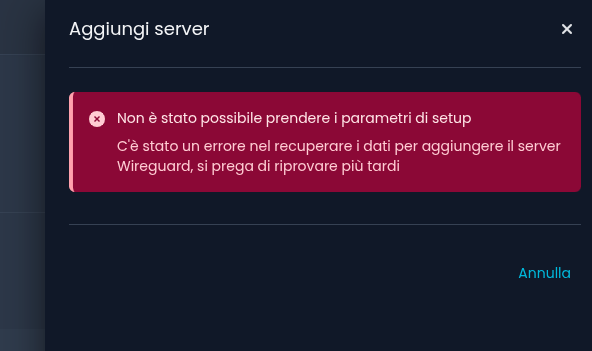
Hi everyone, I’d like to configure WireGuard VPN on a device I just updated to version 8.7.1, but I’m getting this error:Unable to get setup parameters
This is a 6-port firewall device with an Intel N150 processor, purchased online.
mrmarkuz
November 25, 2025, 1:55pm
2
Hi Luca,
you may try a hard refresh of the browser or another browser to exclude browser/cache issues.
Are there errors in the logs ?
You could try if it works on command line, see also ns-api | NethSecurity
Hi Markus, I’ve tried different browsers but I get the same error. I tried the command: api-cli ns.wireguard get-instance-defaults
mrmarkuz
November 25, 2025, 2:42pm
4
Please try following command:
/usr/libexec/rpcd/ns.wireguard call get-instance-defaults
Let’s check existing wg servers:
/usr/libexec/rpcd/ns.wireguard call list-servers
Here are the results of the suggested commands:
root@NethSecBellei:~# /usr/libexec/rpcd/ns.wireguard call get-instance-defaultsresolver1.opendns.com ’: not found10.160.180.0/24 ”, “public_endpoint”: “”}
mrmarkuz
November 25, 2025, 3:11pm
6
Did you setup that server as DNS server?
Does the following work on command line?
dig resolver1.opendns.com
I don’t think I set Nethsecurity as DNS, I set public DNS as forwarder. If I run the dig I get:
root@NethSecBellei:~# dig resolver1.opendns.com
; <<>> DiG 9.20.11 <<>> resolver1.opendns.com
;; OPT PSEUDOSECTION:resolver1.opendns.com . IN A
;; Query time: 0 msec
i can see this:
root@NethSecBellei:~# cat /etc/resolv.conf
mrmarkuz
November 25, 2025, 3:37pm
9
Your NethSecurity can’t resolve resolver1.opendns.com.
Here’s a working dig command:
root@keepout:~# dig resolver1.opendns.com

; <<>> DiG 9.20.11 <<>> resolver1.opendns.com
;; global options: +cmd
;; Got answer:
;; ->>HEADER<<- opcode: QUERY, status: NOERROR, id: 14545
;; flags: qr rd ra; QUERY: 1, ANSWER: 1, AUTHORITY: 0, ADDITIONAL: 1

;; OPT PSEUDOSECTION:
; EDNS: version: 0, flags:; udp: 1232
;; QUESTION SECTION:
;resolver1.opendns.com.		IN	A

;; ANSWER SECTION:
resolver1.opendns.com.	147	IN	A	208.67.222.222

;; Query time: 0 msec
;; SERVER: 127.0.0.1#53(127.0.0.1) (UDP)
;; WHEN: Tue Nov 25 16:28:16 CET 2025
;; MSG SIZE  rcvd: 66
That’s ok.
Maybe you could try another public DNS like 8.8.8.8 or 1.1.1.1.
Does it work to ping a server?
ping community.nethserver.org
Thanks Markus! I changed the resolv.conf file to add DNS 8.8.8.8, and now the device correctly installs the new Wireguard instance.
1 Like
mrmarkuz
November 25, 2025, 4:30pm
11
You’re welcome.resolv.conf was correct, I think you just need to use a correct DNS forwarder, see DNS & DHCP — NethSecurity documentation
1 Like
Thanks Markus, actually when I wrote that I had set public DNS, I actually meant 8.8.8.8 and 1.1.1.1. Despite that, I didn’t understand the problem, which was then solved by changing the resolv.conf.
1 Like
Tbaile
November 26, 2025, 9:36am
13
This still shouldn’t happen, filled a bug entry for it:
opened 09:36AM - 26 Nov 25 UTC
**Steps to reproduce**
- Configure NethSecurity wihtout DNSs.
- Attempt to inst… all or configure a new Wireguard instance.
**Expected behavior**
- If NethSecurity cannot determine its public IP during Wireguard configuration (e.g., due to DNS resolution failure), it should fail silently or provide a non-blocking warning. The process should not show an error or block installation.
**Actual behavior**
- When the firewall cannot resolve resolver1.opendns.com to determine its public IP, an error is shown, even if the rest of the configuration is valid and DNS settings eventually work after editing resolv.conf.
- This may occur even when public DNS like 8.8.8.8 is correctly set, causing confusion during setup.
- The process should be more robust: if unable to detect the public IP via DNS, it should continue and only log a warning or fail gracefully.
**Components**
- ns-api <= 3.4.0
**See also**
https://community.nethserver.org/t/wireguard-error-on-nethsecurity-8-7-1/26641/12
Thank you!
2 Likes