Webtop - mail account authentication error

Nethserver Version: NethServer 7.9.2009

@support_team , @webtop_team

Hello support,

I haven’t had any new updates to my Nethserver to apply in a while but this morning I started to receive the following error when logging into my webtop mail from multiple computers in my office:

mail account authentication error. not connected.

Any idea why I would be receiving this error suddenly? Like I said nothing has changed on my Nethserver in a few weeks. I’m not out of space and I can login to any server using my same nethserver domain name.

It appears this error is only occurring with my nethserver ID. all other ID’s are working without problem.

Thank you.

Hello @webtop_team or @support_team ,

I’ve rebooted my server and it appears my account is now working correctly again. I’m a little concerned that this happened in the first place. Can you provide suggestions on why this happened and if this is a sign that I have an error with my account?

Thank you.

I am seeing what looks similar

In the logs it shows

2025-08-24 13:56:12 [INFO ] [webtop][webtop:core] A1A54924C662CFD168285387EDC458BD: client=xxx.xxx.xxx.xxx profile=admin@* action=LOGIN_SUCCESS
2025-08-24 13:56:12 [DEBUG] [webtop][webtop:core] A1A54924C662CFD168285387EDC458BD: client=xxx.xxx.xxx.xxx profile=admin@* action=AUTHENTICATED
2025-08-24 13:56:31 [DEBUG] [webtop][webtop:core] A1A54924C662CFD168285387EDC458BD: client=xxx.xxx.xxx.xxx profile=admin@* action=LOGOUT
2025-08-24 13:56:35 [INFO ] [webtop][webtop:core] 7EC7FB2E1A4AA5A149976B022129A2A3: client=192.168.35.191 profile=user@NethServer action=LOGIN_SUCCESS
2025-08-24 13:56:35 [DEBUG] [webtop][webtop:core] 7EC7FB2E1A4AA5A149976B022129A2A3: client=xxx.xxx.xxx.xxx profile=user@NethServer action=AUTHENTICATED

And says Authenticated. The admin for webtop is fine, just any normal user gets rejected. If I reset the user password no change, if I alter the users name it is seen in the webtop user list.

Actions to date

uninstalled the rh-php7xx series, tomcat8 and of coarse webtop5. Nothing has changed the behaviour. Before the re-installations the log had a line that indicated the user had been logged out, before the Webtop screen had loaded.

Am I looking in the wrong log files?

What ID’s are these please? email, username?

1 Like

@LayLow The users are set in the Server-manager (cockpit) screen as it is supposed to sync via ldap.

Did find this in the webtop.log

2025-08-24 14:20:31 [ERROR] com.sonicle.webtop.mail.Service - Exception
java.lang.Exception: Mail account authentication error

Which matchers the user interface

From the catalina.log

java.lang.IllegalArgumentException: The AJP Connector is configured with secretRequired=“true” but the secret attribute is either null or “”. This combination is not valid.

But there is no Connector defined as AJP. Should there be an entry?

Reason for the Error:

This behavior is a security enhancement introduced in Apache Tomcat versions 8.5.51 and newer, specifically in response to CVE-2020-1938 (Ghostcat). To mitigate potential vulnerabilities, the AJP Connector now requires a secret when secretRequired is set to “true”.

Resolution:

There are two primary ways to resolve this error:

  • Configure a secret for the AJP Connector:

    • Locate the server.xml file in your Tomcat installation directory (typically conf/server.xml).

    • Find the AJP Connector element, which usually looks something like this:

Example

        <Connector port="8009" protocol="AJP/1.3" redirectPort="8443" secret="mySecretPassword" />

There is no secret recorded for catalina in secrets. This may only be applicable to ver 8

We are on

tomcat version
Server version: Apache Tomcat/7.0.76
Server built: Nov 16 2020 16:51:26 UTC
Server number: 7.0.76.0
OS Name: Linux
OS Version: 3.10.0-1160.119.1.el7.x86_64
Architecture: amd64
JVM Version: 1.8.0_412-b08
JVM Vendor: Red Hat, Inc.

Found the AJL connector. There are 2 sever.xml files 1 in /etc/tomcat and the 2nd in /opt/tomcat8/conf/server.xml has an AJL connector drfined. The adding of secretRequired="false" took the noise out of the log but did not solve the login issue.

Did you already try a reboot of the server or reconfiguring webtop by

signal-event nethserver-webtop5-update

Yes many times and no change to the result. I have dropped the DB and reinstalled. Next I will check if the DB table users is populated, but do expect it will be OK as Name changes do appear in webtop.

I check the core.users table and the users are listed. I tried changing the password stored for my account within the DB. It was stored as plain text. It changed and threw tomcat errors when trying to log in. Then reset the password in the cockpit control to the same password, the DB did not get the update.

The signal-event nethserver webtop5-update also failed to resync the DB. Could this be the issue that the DB has non matching data?

The system shows 1 error on the DB

ERROR: duplicate key value violates unique constraint “settings_pkey”
Detail: Key (service_id, key)=(com.sonicle.webtop.core, meeting.jitsi.name) already exists.

It is there and only 1 entry

          service_id           |                      key                      |                       value                       
-------------------------------+-----------------------------------------------+---------------------------------------------------
 com.sonicle.webtop.core       | devices.sync.shell.uri                        | sh://localhost
 com.sonicle.webtop.core       | otp.enabled                                   | true
 com.sonicle.webtop.core       | smtp.host                                     | localhost
 com.sonicle.webtop.core       | syslog.enabled                                | false
 com.sonicle.webtop.core       | home.path                                     | /sonicle/sonicle/webtop5/
 com.sonicle.webtop.mail       | default.folder.drafts                         | Drafts
 com.sonicle.webtop.mail       | default.folder.prefix                         | 
 com.sonicle.webtop.mail       | default.folder.sent                           | Sent
 com.sonicle.webtop.mail       | default.folder.trash                          | Trash
 com.sonicle.webtop.mail       | default.folder.archive                        | Archive
 com.sonicle.webtop.mail       | default.host                                  | localhost
 com.sonicle.webtop.mail       | default.include.message.in.reply              | true
 com.sonicle.webtop.mail       | default.port                                  | 143
 com.sonicle.webtop.mail       | default.protocol                              | imap
 com.sonicle.webtop.mail       | default.scan.all                              | false
 com.sonicle.webtop.mail       | default.scan.cycles                           | 10
 com.sonicle.webtop.mail       | default.scan.seconds                          | 30
 com.sonicle.webtop.mail       | message.view.max.ccs                          | 40
 com.sonicle.webtop.mail       | message.view.max.tos                          | 40
 com.sonicle.webtop.mail       | specialfolders.autocreate                     | true
 com.sonicle.webtop.core       | dropbox.appkey                                | 
 com.sonicle.webtop.core       | dropbox.appsecret                             | 
 com.sonicle.webtop.core       | googledrive.clientid                          | 
 com.sonicle.webtop.core       | googledrive.clientsecret                      | 
 com.sonicle.webtop.core       | php.path                                      | /usr/share/webtop/bin/
 com.sonicle.webtop.core.admin | manifest.version                              | 5.19.4
 com.sonicle.webtop.core       | zpush.path                                    | /usr/share/webtop/z-push
 com.sonicle.webtop.calendar   | default.calendar.sync                         | W
 com.sonicle.webtop.contacts   | default.category.sync                         | W
 com.sonicle.webtop.tasks      | default.category.sync                         | W
 com.sonicle.webtop.core       | login.systeminfo.hide                         | true
 com.sonicle.webtop.core       | login.webappname.hide                         | true
 com.sonicle.webtop.core       | addon.notifier.url                            | http://www.nethserver.org/webtop/webtop.exe
 com.sonicle.webtop.calendar   | event.statistic.fields.visible                | false
 com.sonicle.webtop.mail       | default.viewmode                              | compact
 com.sonicle.webtop.mail       | toolbar.compact                               | true
 com.sonicle.webtop.vfs        | nextcloud.default.host                        | localhost
 com.sonicle.webtop.vfs        | nextcloud.default.path                        | /nextcloud/remote.php/webdav
 com.sonicle.webtop.contacts   | default.showby                                | lnfn
 com.sonicle.webtop.calendar   | manifest.version                              | 5.19.1
 com.sonicle.webtop.core       | smtp.auth                                     | true
 com.sonicle.webtop.core       | smtp.port                                     | 10587
 com.sonicle.webtop.core       | smtp.starttls                                 | false
 com.sonicle.webtop.core       | manifest.version                              | 5.19.4
 com.sonicle.webtop.core       | meeting.provider                              | jitsi
 com.sonicle.webtop.core       | meeting.jitsi.url                             | https://meet.jit.si/
 com.sonicle.webtop.contacts   | manifest.version                              | 5.16.2
 com.sonicle.webtop.mail       | manifest.version                              | 5.22.1
 com.sonicle.webtop.tasks      | manifest.version                              | 5.13.1
 com.sonicle.webtop.vfs        | manifest.version                              | 5.9.4
 com.sonicle.webtop.core       | public.url                                    | https://mail.compsos.com.au/webtop
 com.sonicle.webtop.core       | davserver.url                                 | https://mail.compsos.com.au/webtop-dav/server-php
 com.sonicle.webtop.core       | pbx.provider                                  | 
 com.sonicle.webtop.mail       | nethtop.vmail.secret                          | kNZ9Pc7LnXVyIzu5
 com.sonicle.webtop.mail       | sort.folders                                  | true
 com.sonicle.webtop.mail       | sieve.spamfilter.disabled                     | true
 com.sonicle.webtop.mail       | default.folder.spam                           | Junk
 com.sonicle.webtop.mail       | default.folder.drafts.deletemsgonsend         | true
 com.sonicle.webtop.mail       | imap.acl.lowercase                            | true
 com.sonicle.webtop.core       | default.viewport.header.scale                 | medium
 com.sonicle.webtop.calendar   | calendar.remote.autosync.enabled              | true
 com.sonicle.webtop.calendar   | calendar.remote.autosync.onlywhenonline       | false
 com.sonicle.webtop.contacts   | category.remote.autosync.enabled              | true
 com.sonicle.webtop.contacts   | category.remote.autosync.onlywhenonline       | false
 com.sonicle.webtop.core       | security.knowndeviceverification.enabled      | false
 com.sonicle.webtop.core       | security.knowndeviceverification.recipients   | 
 com.sonicle.webtop.core       | security.knowndeviceverification.netwhitelist | 
 com.sonicle.webtop.core       | meeting.jitsi.name                            | WebTop Meet
 com.sonicle.webtop.core       | meeting.jitsi.meetingid.prependusername       | true
 com.sonicle.webtop.mail       | pas.spam.threshold                            | 4
 com.sonicle.webtop.core       | default.i18n.languageTag                      | en_EN
 com.sonicle.webtop.core       | default.i18n.timezone                         | Australia/Brisbane
 com.sonicle.webtop.core       | default.i18n.startDay                         | 0
 com.sonicle.webtop.core       | default.i18n.format.date.short                | MM/dd/yy
 com.sonicle.webtop.core       | default.i18n.format.date.long                 | MMM dd, yyyy
 com.sonicle.webtop.core       | default.i18n.format.time.short                | h:mm a
 com.sonicle.webtop.core       | default.i18n.format.time.long                 | h:mm:ss a
 com.sonicle.webtop.core       | maintenance                                   | false

Does it help to remove the jitsi entry from the DB?

Thank you for the suggestion.

No change to the accounts

The catalina log still has this but there is no secretRequired or secret in either server.xml file. It must be defined elsewhere. Any idea what this is “Smack DefaultReactor Thread #0] org.jivesoftware.smackx.ping.PingManager.pingServerIfNecessary XMPPTCPConnection[not-authenticated] (0) was not authenticated”

tailf /var/lib/tomcats/webtop/logs/catalina.log
at sun.reflect.DelegatingMethodAccessorImpl.invoke(DelegatingMethodAccessorImpl.java:43)
at java.lang.reflect.Method.invoke(Method.java:498)
at org.apache.catalina.startup.Bootstrap.start(Bootstrap.java:343)
at org.apache.catalina.startup.Bootstrap.main(Bootstrap.java:474)
Caused by: java.lang.IllegalArgumentException: The AJP Connector is configured with secretRequired=“true” but the secret attribute is either null or “”. This combination is not valid.
at org.apache.coyote.ajp.AbstractAjpProtocol.start(AbstractAjpProtocol.java:274)
at org.apache.catalina.connector.Connector.startInternal(Connector.java:1100)
… 12 more
25-Aug-2025 17:34:02.607 INFO [main] org.apache.catalina.startup.Catalina.start Server startup in 14152 ms
25-Aug-2025 18:04:08.333 WARNING [Smack DefaultReactor Thread #0] org.jivesoftware.smackx.ping.PingManager.pingServerIfNecessary XMPPTCPConnection[not-authenticated] (0) was not authenticated

In the users list, if I right click on a user the “Change Password” is greyed out. Can passwords only be changed in Cockpit and filter down to Webtop?

Yes, AFAIK the passwords for LDAP users needs to be changed at the account providers users page.

Yes that is my impression too. So as a test I changed a name on an account and it was updated in Webtop. So the flow appears to be working in 1 direction.

I created a new “Test” user, in Webtop the new account appeared after refreshing the users screen. This user still failed to be able to login. Time to turn on a debug log.

So the test user authenticated,so why the login failure popups?

2025-08-26 07:21:10 [INFO ] [webtop][webtop:core] C47D542C92AA46D58AD586B83FC20F1E: client=192.168.35.191 profile=test@NethServer action=LOGIN_SUCCESS
2025-08-26 07:21:10 [DEBUG] [webtop][webtop:core] C47D542C92AA46D58AD586B83FC20F1E: client=192.168.35.191 profile=test@NethServer action=AUTHENTICATED
2025-08-26 07:21:20 [DEBUG] [webtop][webtop:core] C47D542C92AA46D58AD586B83FC20F1E: client=192.168.35.191 profile=test@NethServer action=LOGOUT

Maybe I am looking in the wrong area. According to the audit log the authentication is working. Even rejecting and invalid user name.

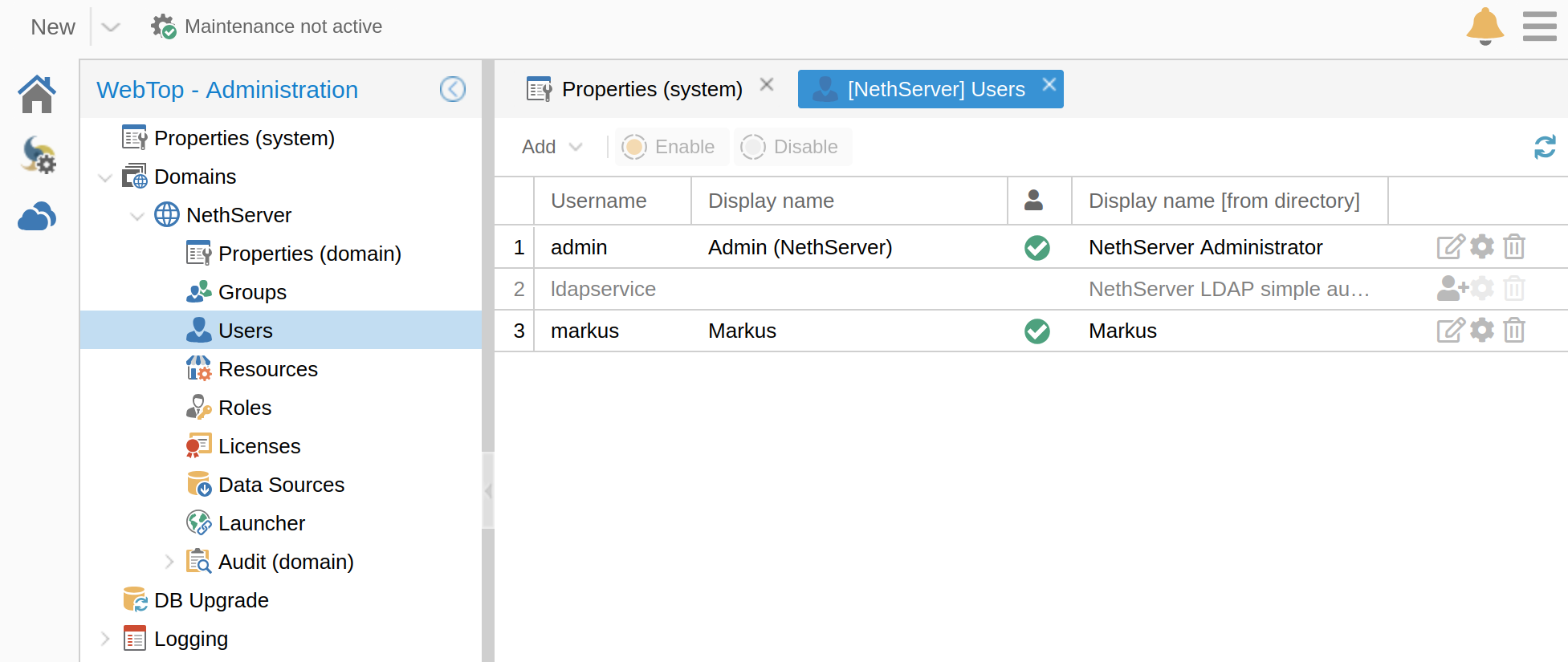
Are the users correctly listed on the admin page?

Thanks Marcus,

Yes exactly the same and some accounts are greyed out until you tick the enable button in properties.

The authentication log says all is good so I am thinking it is a webtop acceptance of the login that has failed. Will keep working my way down the Webtop logs with debug set. Hopefully hit gold in the logs soon!!


1 Like