WebTop 5.34.1 Released
I am pleased to announce the release of this version, which introduces new AI features integrated into the Mail module, together with a convenient administrator report on token usage.
We have also worked to improve and speed up the message list.
The management of recurring events has also been completely redesigned, making them easier to manage.
Below is the complete list of new features and resolved issues.
 AI Features Integrated into Mail
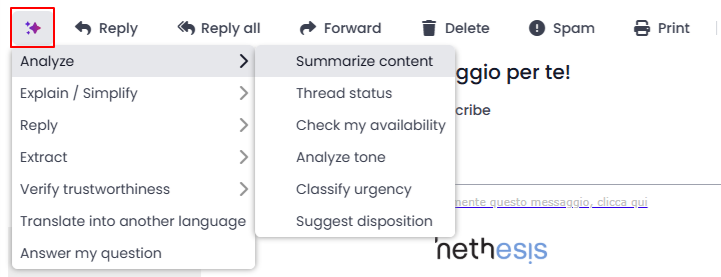
We have added several useful features for analyzing message content, summarizing long threads, extracting relevant information, drafting appropriate replies, simplifying text, translating content, and checking the reliability of suspicious emails.
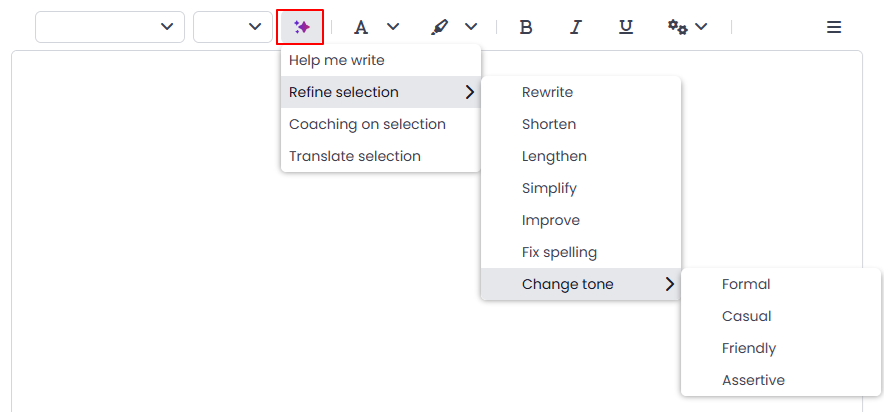
While editing a message, AI can help improve the quality of the text according to different requirements and translate it into virtually any language, including dialects  .
.
Useful information about the initial configuration and usage is available in the online manual HERE.
Configurable LLMs
The currently configurable LLM providers are OpenAI and Claude.
Features available for emails that have already been received:
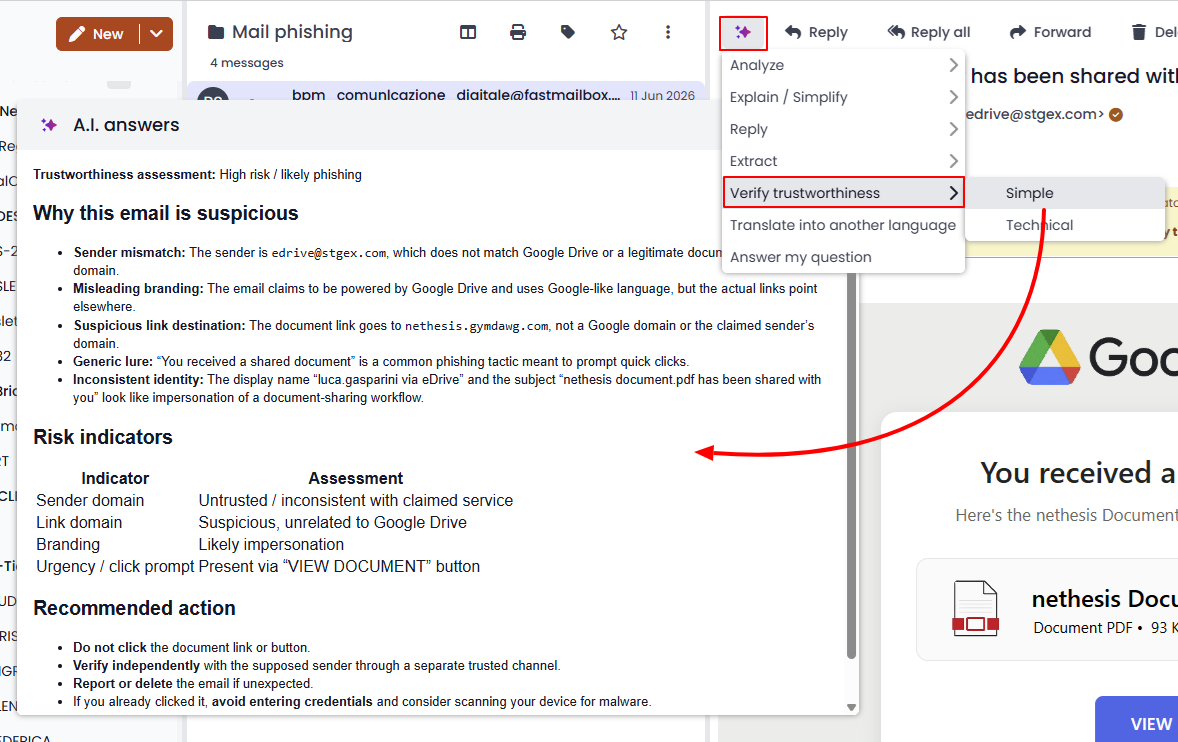
Checking the reliability of a message with two analysis modes: Simple and Technical.
Features available while editing a message, either a new message or a reply:
Token Usage Report for Administrators
Administrators can access a token usage report showing the tokens used by each individual user during the selected time period.

It is also possible to configure the report to be sent by email on a daily, weekly, or monthly basis to a specific address.
Improved Message List and Faster Infinite Scrolling
A major optimization effort has improved the speed and responsiveness of the email list, as well as scrolling performance when searching for older messages.
 Other Improvements
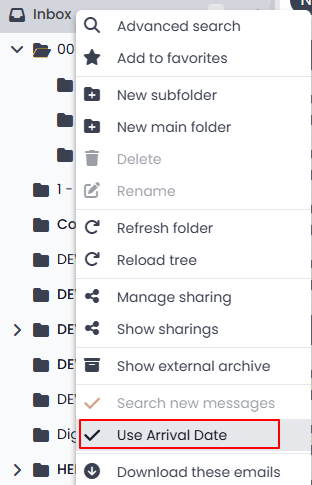
- New option to use the email arrival date
When this option is enabled, messages in the folder are displayed and sorted by arrival date rather than sent date.
For folders containing a large number of messages, this option may also improve the loading speed of the message list.
-
Drag-and-drop and editing of recurring events
-
Event search: more complete results list
Actions can now be performed directly from the list of matching events, and event labels are also displayed.
 Resolved Issues
-
[MAIL] Replying to emails with large attachments could take too long
-
[MAIL] Empty text in the mail preview while deleting or moving messages
-
[MAIL] Extended synchronized lock while previewing messages
-
[MAIL] Simultaneous deletions could interrupt the message list
-
[CALENDAR] The first event in a yearly recurrence could not be edited
-
[CALENDAR] Editing and saving a recurrence entry required the current view to be refreshed
-
[CALENDAR] Changing the recurrence time caused an incorrect event duration
-
[CALENDAR] Printing an event displayed statistical fields even when they were hidden
-
[CALENDAR] Cross-Site Scripting (XSS) vulnerability in some display fields
-
[CONTACTS] Cross-Site Scripting (XSS) vulnerability in some display fields
 How to Update
The update to version 1.5.7, which corresponds to version 5.34.1 of the application, is already available via the Software Center.
 Work in Progress
Preview of Upcoming Features
-
 Mobile app for Android and Apple devices
-
MCP protocol support for AI
-
Nethesis theme with reduced spacing
-
Custom colors for mail folders
-
Login page rebranding