User Portal Login has not been Working since the last Core Update

NethServer Version: 8
Module: Samba AD

Hi everyone,
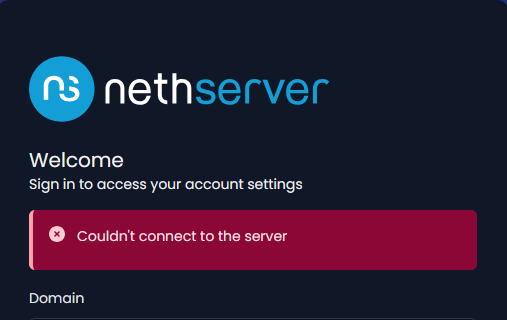
Since the last core update to version 3.20.1, the login in the User Portal has not been working. Even though I enter my login credentials correctly, I get the message shown in the image.
I don’t have this problem on another NS8 server using OpenLDAP as the account provider.

Thank’s for any help…

Uwe

i cannot reproduce with activedirectory, we needs logs to understand

Hi @stephdl

I hope you’re and your family doing well and that you’re not in danger from the terrible fires in France. In which category should I look for logs?

Hop this helps

2026-07-26T21:35:41+02:00 [1:ldapproxy1:ldapproxy] 2026/07/26 19:35:41 [info] 26#26: *43 client 127.0.0.1:43549 connected to 127.0.0.1:20002 2026-07-26T21:35:41+02:00 [1:ldapproxy1:ldapproxy] 2026/07/26 19:35:41 [info] 26#26: *43 proxy 192.168.154.20:39534 connected to 192.168.154.20:636 2026-07-26T21:35:41+02:00 [1:samba1:samba-dc] Auth: [LDAP,simple bind/TLS] user [xxx-ONLINE][ldapservice@ad.xxx-online.com] at [Sun, 26 Jul 2026 19:35:41.628878 UTC] with [Plaintext] status [NT_STATUS_OK] workstation [DC01] remote host [ipv4:192.168.154.20:39534] became [xxx-ONLINE][ldapservice] [S-1-5-21-2442965692-3822645053-898874851-1103]. local host [ipv4:192.168.154.20:636] 2026-07-26T21:35:45+02:00 [1:samba1:samba-dc] Auth: [Kerberos KDC,ENC-TS Pre-authentication] user [(null)][xxx@AD.xxx-ONLINE.COM] at [Sun, 26 Jul 2026 19:35:45.686337 UTC] with [aes256-cts-hmac-sha1-96] status [NT_STATUS_PROTOCOL_UNREACHABLE] workstation [(null)] remote host [ipv4:192.168.154.20:45599] mapped to [xxx-ONLINE][u.tiedt]. local host [NULL] 2026-07-26T21:35:45+02:00 [1:traefik1:traefik] 192.168.154.122 - - [26/Jul/2026:19:35:40 +0000] “POST /users-admin/ad.xxx-online.com/api/login HTTP/2.0” 499 21 “-” “-” 1568 “samba1-amld-https@file” “http://127.0.0.1:20010” 5062ms 2026-07-26T21:35:46+02:00 [1::qemu-ga] info: guest-ping called

I live about 300km from Bordeaux but we have felt this saturday smokes from the fire, really impressive.

did you try to restart to restart the samba/ldapproxy container, eventually restart the full server

runagent -m samba1 systemctl --user restart samba-dc

runagent -m ldapproxy1 systemctl --user restart ldapproxy

No way… Same error. Tomorrow i will try with a restart. Thank you for the moment.

Good morning @stephdl

After a restart of the NS 8 login to userportal is also not possible.

journalctl -f in a terminal and try to catch the log during the login

check if all services are up and running like it should (check the status page of samba1)

at least and not the easier check the journal since the boot to catch something wrong: journalctl -e

Hi @stephdl

That is what i can give.

nethserver/node_exporter has no valid version: certification_level 2 is too low
Jul 30 10:49:12 tdho-ns8node1 agent@cluster[9175]: task/cluster/e33ed95f-63a2-41 36-9cfc-ae5f673ac929: action “list-modules” status is “completed” (0) at step va lidate-output.json
Jul 30 10:49:12 tdho-ns8node1 agent@samba1[8125]: Handler of cluster/event/modul e-domain-changed exited with status “completed” (0) at step 10reload_services
Jul 30 10:49:12 tdho-ns8node1 traefik[2795]: 192.168.154.122 - - [30/Jul/2026:08 :49:12 +0000] “GET /cluster-admin/api/cluster/task/e33ed95f-63a2-4136-9cfc-ae5f6 73ac929/status HTTP/2.0” 200 14130 “-” “-” 192 “cluster-admin-https@file” “http: //127.0.0.1:9311” 14ms
Jul 30 10:49:12 tdho-ns8node1 ldapproxy[3256]: 2026/07/30 08:49:12 [info] 27#27: *7 client 127.0.0.1:52163 connected to 127.0.0.1:20002
Jul 30 10:49:13 tdho-ns8node1 ldapproxy[3256]: 2026/07/30 08:49:12 [info] 27#27: *7 proxy 192.168.154.20:51674 connected to 192.168.154.20:636
Jul 30 10:49:13 tdho-ns8node1 samba-dc[4757]: Auth: [LDAP,simple bind/TLS] user [XXXXX-ONLINE][ldapservice@ad.xxxxx-online.com] at [Thu, 30 Jul 2026 08:49:13.0 05123 UTC] with [Plaintext] status [NT_STATUS_OK] workstation [DC01] remote host [ipv4:192.168.154.20:51674] became [XXXXX-ONLINE][ldapservice] [S-1-5-21-24429 65692-3822645053-898874851-1103]. local host [ipv4:192.168.154.20:636]
Jul 30 10:49:13 tdho-ns8node1 qemu-ga[845]: info: guest-ping called
Jul 30 10:49:14 tdho-ns8node1 qemu-ga[845]: info: guest-ping called
Jul 30 10:49:16 tdho-ns8node1 samba-dc[4757]: Auth: [Kerberos KDC,ENC-TS Pre-authentication] user [(null)][xxx@AD.XXXXX-ONLINE.COM] at [Thu, 30 Jul 2026 08:49:16.936612 UTC] with [aes256-cts-hmac-sha1-96] status [NT_STATUS_PROTOCOL_UNREACHABLE] workstation [(null)] remote host [ipv4:192.168.154.20:58688] mapped to [XXXXX-ONLINE][xxx]. local host [NULL]
Jul 30 10:49:17 tdho-ns8node1 redis[8449]: 1:M 30 Jul 2026 08:49:17.019 * 1 changes in 5 seconds. Saving…
Jul 30 10:49:17 tdho-ns8node1 redis[8449]: 1:M 30 Jul 2026 08:49:17.020 * Background saving started by pid 128
Jul 30 10:49:17 tdho-ns8node1 traefik[2795]: 192.168.154.122 - - [30/Jul/2026:08:49:12 +0000] “POST /users-admin/ad.xxxxx-online.com/api/login HTTP/2.0” 499 21 “-” “-” 191 “samba1-amld-https@file” “http://127.0.0.1:20010” 4930ms
Jul 30 10:49:17 tdho-ns8node1 redis[8449]: 128:C 30 Jul 2026 08:49:17.085 * BGSAVE done, 1079 keys saved, 0 keys skipped, 2843605 bytes written.
Jul 30 10:49:18 tdho-ns8node1 redis[8449]: 128:C 30 Jul 2026 08:49:18.640 * DB saved on disk
Jul 30 10:49:18 tdho-ns8node1 redis[8449]: 128:C 30 Jul 2026 08:49:18.641 * Fork CoW for RDB: current 1 MB, peak 1 MB, average 1 MB
Jul 30 10:49:18 tdho-ns8node1 redis[8449]: 1:M 30 Jul 2026 08:49:18.729 * Background saving terminated with success
Jul 30 10:49:18 tdho-ns8node1 samba-dc[4757]: Auth: [Kerberos KDC,ENC-TS Pre-authentication] user [(null)][xxx@AD.XXXXX-ONLINE.COM] at [Thu, 30 Jul 2026 08:49:18.848264 UTC] with [aes256-cts-hmac-sha1-96] status [NT_STATUS_OK] workstation [(null)] remote host [ipv4:192.168.154.20:51266] became [XXXXX-ONLINE][xxx] [S-1-5-21-2442965692-3822645053-898874851-1104]. local host [NULL]
Jul 30 10:49:23 tdho-ns8node1 qemu-ga[845]: info: guest-ping called
Jul 30 10:49:28 tdho-ns8node1 ldapproxy[3256]: 2026/07/30 08:49:28 [info] 27#27: *7 client disconnected, bytes from/to client:797/222427, bytes from/to upstream:222427/797
Jul 30 10:49:28 tdho-ns8node1 api-moduled[3750]: [GIN] 2026/07/30 - 10:49:28 | 200 | 16.52s | 192.168.154.122 | POST “/api/login”

Hi @transocean

Thank you, these logs are very useful. Good news first: your login is not failing.

Look at this line:

api-moduled[3750]: [GIN] 2026/07/30 - 10:49:28 | 200 | 16.52s | POST "/api/login"

The backend answers 200. The credentials are correct. But it takes 16.5 seconds.

Now look at traefik:

traefik[2795]: "POST /users-admin/ad.xxxxx-online.com/api/login HTTP/2.0" 499 ... 4930ms

499 means the client closed the connection. Your browser gave up after ~5 seconds. The UI then shows the generic error message you see in the screenshot. So this is a timeout, not a wrong password.

Where do the 16 seconds go? Two things stand out.

First, ldapproxy. The connection opens at 08:49:12 and closes at 08:49:28:

client disconnected, bytes from/to client:797/222427, bytes from/to upstream:222427/797

That is 222 KB coming back from your AD for a 797 byte request. The login seems to trigger a very large LDAP search. This would also explain why your OpenLDAP server is not affected.

Second, Kerberos. The first pre-authentication fails, then a retry succeeds 2 seconds later:

08:49:16 ENC-TS Pre-authentication ... status [NT_STATUS_PROTOCOL_UNREACHABLE]
08:49:18 ENC-TS Pre-authentication ... status [NT_STATUS_OK]

This usually points to a UDP retry or a DNS timeout towards the KDC. It costs 2 seconds on every login.

Could you please check three things?

  1. Confirm the latency outside the browser:
curl -k -s -o /dev/null -w '%{http_code} %{time_total}\n' \
  -X POST https://<your-fqdn>/users-admin/ad.xxxxx-online.com/api/login \
  -H 'Content-Type: application/json' \
  -d '{"username":"user","password":"secret"}'

I expect a 200 after ~16 seconds.

  1. How many users and groups do you have in this AD domain? The 222 KB suggests a fairly large directory.

  2. The DNS configuration seen by the container:

runagent -m samba1 podman exec samba-dc cat /etc/resolv.conf

Also tell me if you have a DNS forwarder that is unreachable. That would match the Kerberos error.

I will look at what changed in api-moduled between 3.19.x and 3.20.1 on my side.

Thanks for your patience.
Hi @stephdl

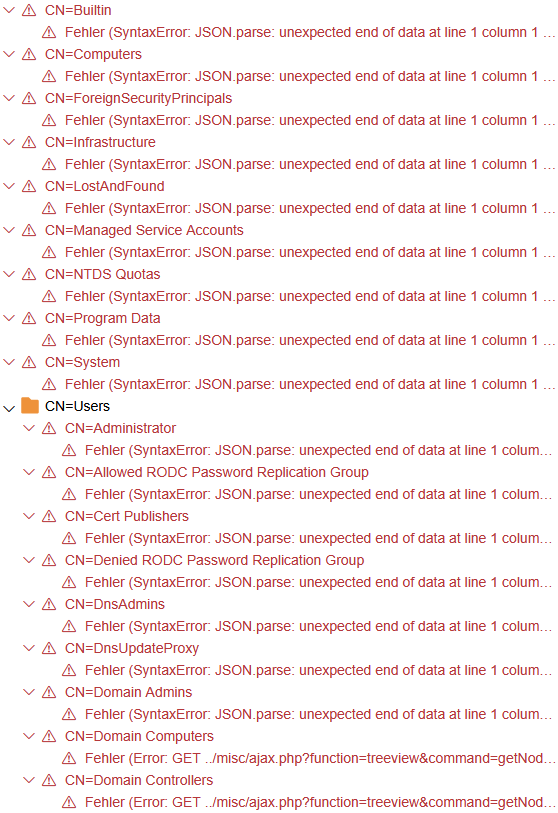
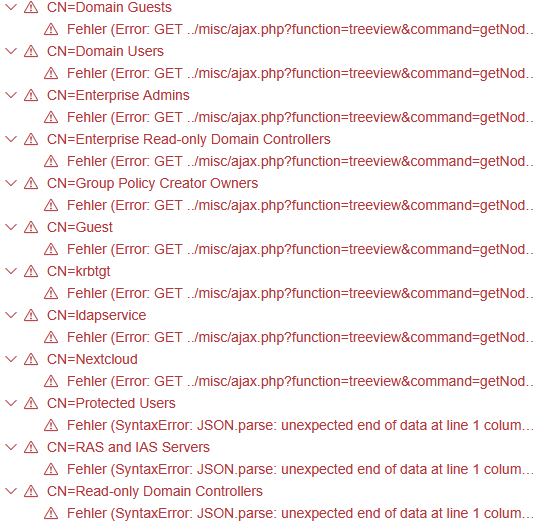
Normaly i have only two users. The admin account and me. And the Nextcloud Users group. But I’ve uninstalled Nextcloud. What I find strange, though, is what I see when I log in to LAM. Error after error. See pics below.

runagent -m samba1 podman exec samba-dc cat /etc/resolv.conf
search ad.xxx-online.com
nameserver 127.0.0.1

There is no DNS forwarder.


so we could eventually kick the ldap and reinstall if you have not much data in a shared folder

ok the error is in the ldap, even lam does not know how to read it

the cluster admin succeeds to read the users ?

Yes, it’s possible.

I’ve also deleted the Nextcloud Users group by now. It doesn’t make sense anyway without Nextcloud installed.

Hi @stephdl

I think the problem with the error messages in the LAM app is directly linked to the failed login attempts on the User Portal. LAM works perfectly until I try to log in to the User Portal. After that, the red error messages appear in the LAM app.After entering the commands
runagent -m samba1 systemctl --user restart samba-dc and
runagent -m ldapproxy1 systemctl --user restart ldapproxy LAM works again.

and the usera portal ?

Unfortunately, that doesn’t work. :slightly_frowning_face: