NethServer Version: 8
Module: Zammad
Good morning @mrmarkuz,
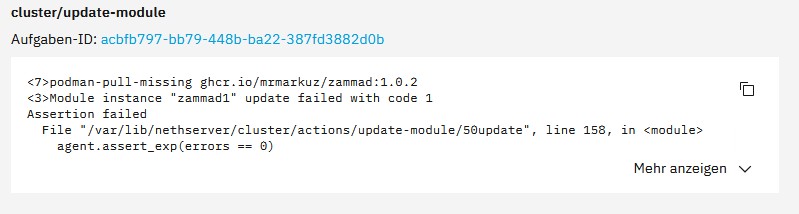
I was just about to update Zammad. It isn’t working and keeps crashing with an error message. See screenshot…
NethServer Version: 8
Module: Zammad
Good morning @mrmarkuz,
I was just about to update Zammad. It isn’t working and keeps crashing with an error message. See screenshot…
Sorry, the app is broken, see ns8:applications:zammad [NethServer & NethSecurity]
It used bitnami images which aren’t available anymore. I need to update it to use other images.
OK… there was also an update for Twenty CRM. The update went smoothly. But now I can’t log in anymore. I can change my password using the reset link, but I can’t log in with the new password afterwards.
2026-03-15T17:37:30+01:00 [1:twenty1:postgresql-app] 2026-03-15 16:37:30.499 UTC [5110] HINT: Rebuild all objects in this database that use the default collation and run ALTER DATABASE twenty REFRESH COLLATION VERSION, or build PostgreSQL with the right library version.
2026-03-15T17:37:30+01:00 [1:twenty1:postgresql-app] 2026-03-15 16:37:30.500 UTC [5109] WARNING: database “twenty” has a collation version mismatch
2026-03-15T17:37:30+01:00 [1:twenty1:postgresql-app] 2026-03-15 16:37:30.500 UTC [5109] DETAIL: The database was created using collation version 2.36, but the operating system provides version 2.41.
2026-03-15T17:37:30+01:00 [1:twenty1:postgresql-app] 2026-03-15 16:37:30.500 UTC [5109] HINT: Rebuild all objects in this database that use the default collation and run ALTER DATABASE twenty REFRESH COLLATION VERSION, or build PostgreSQL with the right library version.
2026-03-15T17:37:45+01:00 [1:twenty1:postgresql-app] 2026-03-15 16:37:45.006 UTC [5111] WARNING: database “twenty” has a collation version mismatch
2026-03-15T17:37:45+01:00 [1:twenty1:postgresql-app] 2026-03-15 16:37:45.006 UTC [5111] DETAIL: The database was created using collation version 2.36, but the operating system provides version 2.41.
2026-03-15T17:37:45+01:00 [1:twenty1:postgresql-app] 2026-03-15 16:37:45.006 UTC [5111] HINT: Rebuild all objects in this database that use the default collation and run ALTER DATABASE twenty REFRESH COLLATION VERSION, or build PostgreSQL with the right library version.
2026-03-15T17:37:50+01:00 [1:twenty1:agent@twenty1] task/module/twenty1/e7bc4351-8257-4115-92b3-7999c0416977: get-status/20read is starting
2026-03-15T17:37:50+01:00 [1:twenty1:agent@twenty1] task/module/twenty1/d7039897-b184-494a-a270-ab926b8ee3fd: get-name/50get_name is starting
2026-03-15T17:37:50+01:00 [1:twenty1:agent@twenty1] task/module/twenty1/9dc1bd10-44a9-4b1a-b2b3-2e45be37ab49: get-configuration/20read is starting
2026-03-15T17:37:51+01:00 [1:twenty1:agent@twenty1] task/module/twenty1/9dc1bd10-44a9-4b1a-b2b3-2e45be37ab49: action “get-configuration” status is “completed” (0) at step validate-output.json
2026-03-15T17:37:51+01:00 [1:twenty1:agent@twenty1] task/module/twenty1/d7039897-b184-494a-a270-ab926b8ee3fd: action “get-name” status is “completed” (0) at step 50get_name
2026-03-15T17:37:51+01:00 [1:twenty1:agent@twenty1] task/module/twenty1/e7bc4351-8257-4115-92b3-7999c0416977: action “get-status” status is “completed” (0) at step validate-output.json
Thanks @transocean, now I found the issue.
I updated my repo yesterday to allow automatic releases which pushed wrong non-working updates of twenty, wg-easy and zammad. It’s fixed now, sorry for any inconvenience.
@mrmarkuz just to clarify, Zammad is currently broken for the above reason(s) right?
TIA
Yes, that’s right.
Hi @mrmarkuz
The Twenty app still isn’t working for me. No matter what I click on, I always get the message ‘An error has occurred’. The logs keep showing ‘database twenty has a collation version mismatch’.
I can partly reproduce it. I get the “An error has occurred” error in the UI but not the collation version mismatch in the logs.
Please share the used Twenty image:
runagent -m twenty1 grep TWENTY_IMAGE environment
should give a result like
TWENTY_IMAGE=docker.io/twentycrm/twenty:v1.3.1
TWENTY_IMAGE=docker.io/twentycrm/twenty:v1.2.1
It seems one needs to install every minor version upgrade to get all database upgrades and fixes.
After following procedure I could login again without errors.
After restarting the twenty service please wait until twenty is up again before going on with the next step.
Enter twenty environment:
runagent -m twenty1
Change version to 1.0.3 and restart twenty:
sed -i 's/^\(TWENTY_IMAGE=docker\.io\/twentycrm\/twenty:\)v[0-9]\+\.[0-9]\+\.[0-9]\+/\1v1.0.3/' environment
systemctl --user restart twenty
Change version to 1.1.1 and restart twenty:
sed -i 's/^\(TWENTY_IMAGE=docker\.io\/twentycrm\/twenty:\)v[0-9]\+\.[0-9]\+\.[0-9]\+/\1v1.1.1/' environment
systemctl --user restart twenty
Change version to 1.2.1 and restart twenty:
sed -i 's/^\(TWENTY_IMAGE=docker\.io\/twentycrm\/twenty:\)v[0-9]\+\.[0-9]\+\.[0-9]\+/\1v1.2.1/' environment
systemctl --user restart twenty
Exit the twenty environment:
exit
What can I say? You’re the best. Thank you so much. 
However, the error messages in the system log are still present
2026-03-21T20:25:45+01:00 [1:twenty1:postgresql-app] 2026-03-21 19:25:45.014 UTC [82] HINT: Rebuild all objects in this database that use the default collation and run ALTER DATABASE twenty REFRESH COLLATION VERSION, or build PostgreSQL with the right library version.
2026-03-21T20:25:47+01:00 [1:twenty1:systemd] Created slice User Background Tasks Slice.
2026-03-21T20:25:47+01:00 [1:twenty1:systemd] Starting Cleanup of User’s Temporary Files and Directories…
2026-03-21T20:25:47+01:00 [1:twenty1:systemd] Finished Cleanup of User’s Temporary Files and Directories.
2026-03-21T20:26:00+01:00 [1:twenty1:postgresql-app] 2026-03-21 19:26:00.006 UTC [83] WARNING: database “twenty” has a collation version mismatch
2026-03-21T20:26:00+01:00 [1:twenty1:postgresql-app] 2026-03-21 19:26:00.006 UTC [83] DETAIL: The database was created using collation version 2.36, but the operating system provides version 2.41.
2026-03-21T20:26:00+01:00 [1:twenty1:postgresql-app] 2026-03-21 19:26:00.006 UTC [83] HINT: Rebuild all objects in this database that use the default collation and run ALTER DATABASE twenty REFRESH COLLATION VERSION, or build PostgreSQL with the right library version.
2026-03-21T20:26:00+01:00 [1:twenty1:postgresql-app] 2026-03-21 19:26:00.011 UTC [84] WARNING: database “twenty” has a collation version mismatch
2026-03-21T20:26:00+01:00 [1:twenty1:postgresql-app] 2026-03-21 19:26:00.011 UTC [84] DETAIL: The database was created using collation version 2.36, but the operating system provides version 2.41.
2026-03-21T20:26:00+01:00 [1:twenty1:postgresql-app] 2026-03-21 19:26:00.011 UTC [84] HINT: Rebuild all objects in this database that use the default collation and run ALTER DATABASE twenty REFRESH COLLATION VERSION, or build PostgreSQL with the right library version.
2026-03-21T20:26:00+01:00 [1:twenty1:postgresql-app] 2026-03-21 19:26:00.084 UTC [85] WARNING: database “twenty” has a collation version mismatch
2026-03-21T20:26:00+01:00 [1:twenty1:postgresql-app] 2026-03-21 19:26:00.084 UTC [85] DETAIL: The database was created using collation version 2.36, but the operating system provides version 2.41.
2026-03-21T20:26:00+01:00 [1:twenty1:postgresql-app] 2026-03-21 19:26:00.084 UTC [85] HINT: Rebuild all objects in this database that use the default collation and run ALTER DATABASE twenty REFRESH COLLATION VERSION, or build PostgreSQL with the right library version.
2026-03-21T20:26:02+01:00 [1:twenty1:postgresql-app] 2026-03-21 19:26:02.561 UTC [86] WARNING: database “postgres” has a collation version mismatch
2026-03-21T20:26:02+01:00 [1:twenty1:postgresql-app] 2026-03-21 19:26:02.561 UTC [86] DETAIL: The database was created using collation version 2.36, but the operating system provides version 2.41.
2026-03-21T20:26:02+01:00 [1:twenty1:postgresql-app] 2026-03-21 19:26:02.561 UTC [86] HINT: Rebuild all objects in this database that use the default collation and run ALTER DATABASE postgres REFRESH COLLATION VERSION, or build PostgreSQL with the right library version.
I already tried to reindex the database to follow that procedure but it didn’t help.
There are several issues about that error. This error should be fixed with another update.
I’m trying to update twenty but it’s a mess. It seems it needs 18 updates to get to the latest version 1.19.
I hope to find a workable solution…