Threat Shield IP Block LAN Traffic

Still testing Threat Shield IP and i noticed that after a while it’s blocking lan traffic and also i can’t connect to the webUI running on TCP/9090 on WAN Side, if i turn off everything works again and if i re-enabled that is working for a while then stop again.

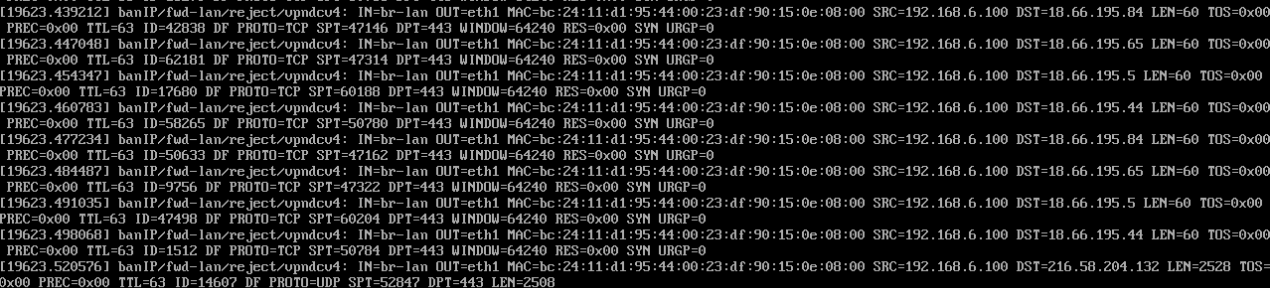
This is what i see on the console of the VM:

Is there a banned IP?
It seems that 192.168.6.100 is banned and therefore blocked from accessing the NethSec/web.

If you didn’t test brute force attacks then maybe some browser or password manager app tries logging in using a wrong password and triggers the ban.

It may take some time until threat shield is fully loaded and blocks the banned IPs.

EDIT:

It seems you enabled the blocklist feed “vpn datacenter IPs”. (vpndcv4)
Please try to disable it and check if it works again.

EDIT2:

I can reproduce the log entries on console when the feed “vpn datacenter IPs” is enabled.

No there is not.

Yes i have enabled it:

But why still blocking the traffic to the lan host even if the ip is not banned?

EDIT:

If i disable the list “vpn datacenter IPs” host lan is able to ping google dns 8.8.8.8 if i enable it no.

The feeds are there to block traffic from/to known IPs.
See GitHub - X4BNet/lists_vpn: Lists of VPN providers (automatically updated) for more info about that feed.

I look at this file:

But i don’t see any matches with my lan subnet which is: 192.168.6.0/24 and one host of them is a new arch linux vm so there is not program vpn related.

It contains the networks that are in your screenshot, see lists_vpn/ipv4.txt at main · X4BNet/lists_vpn · GitHub
Traffic to those VPN networks is blocked.
It doesn’t need to match with your LAN network.

Ok i get it but how it is possible the both of the host lan has been blocked by the banip module with that blocklist “vpndcv4”? And as i said before one of them is a fresh arch linux installation without any program.

Anyway i think is not normal that the host is not showing in the Ban list.
AFAIK the ban list only shows hosts that are actively banned due to for example trying a brute force attack.

Ok but remain the fact that how both of the host has been blocked?Off course if i disable that list host can navigate to the internet.

The list could have wrong IPs.

You could check which processes on the devices want to reach that IPs:

ss -p | grep 18.66.195

