Hi,
I have a minor issue accessing Rspamd web UI.
After migrating to NS8 earlier this year, i set my NS8 node FQDN to myserver-ns8.mydomain.my. I have changed it later to myserver.mydomain.my, including DNS changes, and everything is working fine since then, except the said Rspamd web UI.
The link from mail application / Status / Open Rspamd points (logically) to https://myserver.mydomain.my/rspamd/, but opening it leads to Error 404. I have to manually change the url in address bar to myserver*-ns8**.mydomain.my/Rspamd* (i.e. the old FQDN) to open correctly.
Mail server hostname on mail / Status page shows myserver.mydomain.my (and mail working correctly), nothing in HTTP routes points to the old …-ns8 route.
Despite being minor problem, I would like to correct it, if possible, so the Rspamd WebUI would open with the current FQDN url.
Thanks for any advice.
**
NethServer Version:** 8
Module: mail / rspamd
The rspamd http route just uses the path so I suspect that the node FQDN is wrong.
Please check your node FQDN:
hostname -f
You can change it on the nodes page:
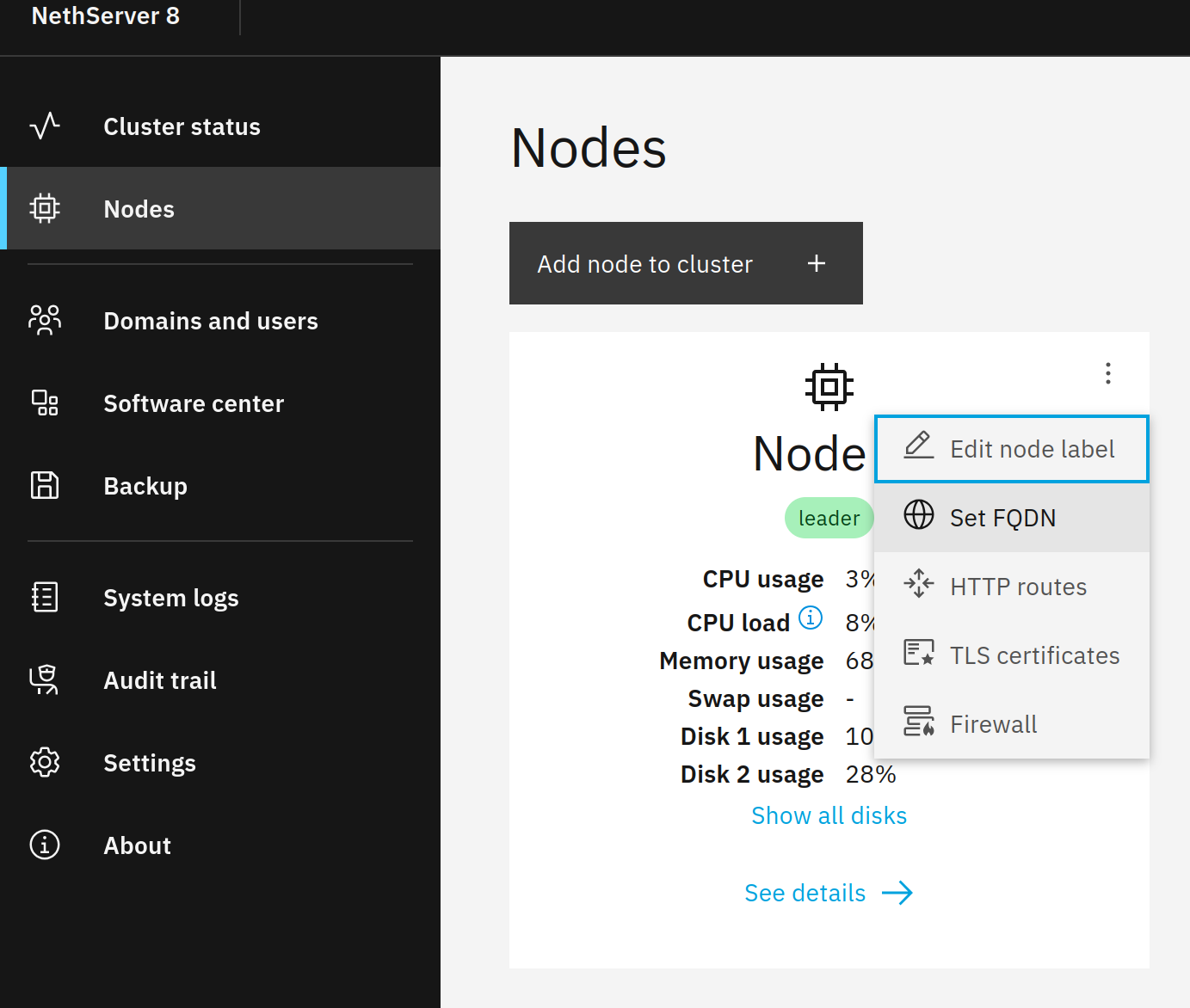
EDIT:
Oops, I was wrong.
The Rspamd URL is setup from the mail server hostname (POSTFIX_HOSTNAME), see also ns8-mail/imageroot/actions/get-filter-configuration/10get_filter_configuration at 12899bcd7f074c75749b5f62b0bcafd623d9c988 · NethServer/ns8-mail · GitHub
You can check the mail server hostname on the mail app status page:

Hi mrmarkuz,
all hostname -f, node FQDN and mail server hostname on the status page shows correctly myserver.mydomain.my (without the -ns8 appendix). Everything works well, including rspamd itself, just its webgui is accessible only from the old url. Shouldn’t something be reloaded to reflect the changed FQDN?
That’s really strange. I’m going to try to reproduce the issue…
EDIT:
The rspamd web interface is usually reachable by IP or any domain name that points to the server.
Are there webapps using the same Host (FQDN) as the mail server hostname? This way I could reproduce an unreachable rspamd web interface because traefik correctly redirects to the installed webapp instead of the nodes rspamd path.
To check the used domain names in the routes on CLI:
runagent -m traefik1 grep -r Host configs | uniq
Yes, the SOGo webapp uses the same FQDN as the mail server (hur.twr.cz actually) with path (for historical reasons):
...
configs/sogo1.yml:      rule: Host(`sogo.twr.cz`)
configs/SOGo.yml:      rule: Host(`hur.twr.cz`) && (Path(`/SOGo`) || PathPrefix(`/SOGo/`))
...
As I have noticed, the hur.twr.cz/SOGo route (manually created) is defined in traefik by host and path, but the automatically created /rspamd just by path. So I have tried to manually create a new rspamd entry based on the automatic one, but defined by both host (hur.twr.cz) and path (/rspamd).
configs/rspamd.yml: rule: Host(`hur.twr.cz`) && (Path(`/rspamd`) || PathPrefix(`/rspamd/`))
Now the Rspamd WebUI opens, but there is another problem: when opening the “old” url (http://hur-ns8.twr.cz/rspamd), it asks for username and password, where I put my admin credentials, which are accepted. But when opening http://hur.twr.cz/rspamd it ask just for password, and none of my passwords are accepted.
In the rspamd http route the authentication is included, you can’t create it like that in the cluster-admin.
Please remove the manually created rspamd route and try again.
OK, I have deleted the manually created rspamd route, so now it behaves as before: rspamd not accessible by http://hur.twr.cz/rspamd, which is linked so from the mail app status panel, but just by the old (nowhere used) http://hur-ns8.twr.cz/rspamd url, which has to be entered manually.
Is the sogo route with the same name still there? Please remove it or use another name for the sogo route.
Oh yes, this was it! After deleting hur.twr.cz/SOGo entries from traefik, the rspamd link works as expected.Thank you!
Anyway, is there a way how to route hur.twr.cz/SOGo url to the SOGo app correctly? The SOGo is accessible via sogo.twr.cz, but lot of clients apps are historically set to the hur.twr.cz/SOGo url, so I would like to keep it, if possible, not having to reconfigure all the clients.
Unfortunately both is not possible. If you like to use that name for SOGo, you need to use another name for rspamd web interface.
As I understand, my problem was, that the hur.twr.cz/SOGo route was defined by both host (hur.twr.cz) and path. When I define the /SOGo route just by path, both seem to work: hur.twr.cz/SOGo as well as the rspamd link (hur.twr.cz/rspamd).
That’s right, but the FQDN that’s setup in the SOGo app must not be the same as the one you use to reach the rspamd web interface.