NethServer Version: 8Module: TLS and HTTP-Routes
Hi Team,
I did add a new node to my current cluster.
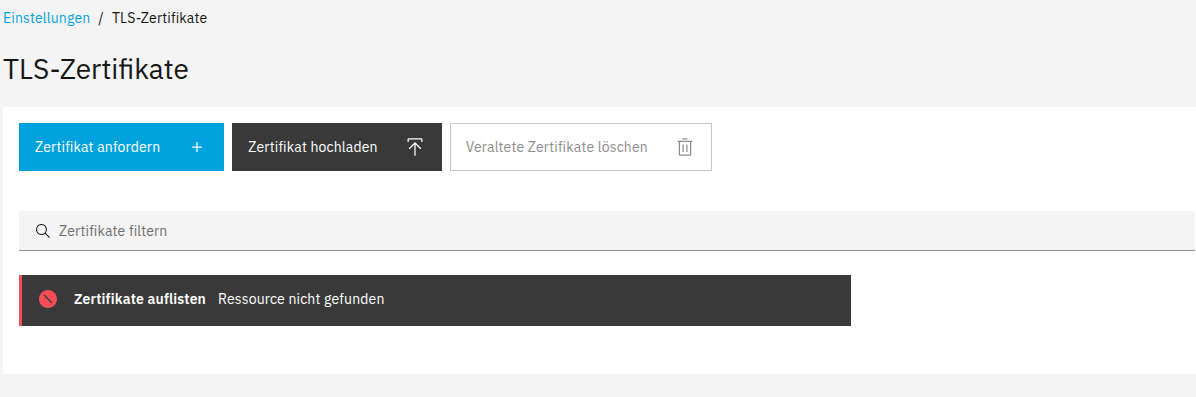
But if I shut now the worker node I get these error messages if I open the module for HTTP-Routes or TLS Certificates. Also authentication for Email is not working anymore
What did I wrong?
Many thanks for your help
Benjamin
mrmarkuz
February 15, 2026, 9:47pm
2
Do certificates of the workers node or apps still exist?
Is there something in the logs?
Let’s try to list the certificates on CLI:
api-cli run module/traefik1/list-certificates | jq
Only on traefik2 the certificates are listed
Could it be that I need a secondary samba service?
Update:
No information on the logfile found
2026-02-15T22:58:40+01:00 [2:traefik2:traefik] 192.168.0.50 - - [15/Feb/2026:21:58:40 +0000] “GET /cluster-admin/api/cluster/task/3fa10136-f46c-480c-b8cd-49e3663fc5e5/status HTTP/2.0” 200 1197 “-” “-” 49400 “cluster-admin-https@file” “http://127.0.0.1:9311 ” 2mshttp://127.0.0.1:9311 ” 1mshttp://127.0.0.1:9311 ” 2mshttp://127.0.0.1:9311 ” 3mshttp://127.0.0.1:9311 ” 1mshttp://127.0.0.1:9311 ” 1mshttp://127.0.0.1:9311 ” 1mshttp://127.0.0.1:9311 ” 1mshttp://127.0.0.1:9311 ” 1mshttp://127.0.0.1:9311 ” 1ms
mrmarkuz
February 15, 2026, 10:11pm
4
Did you upload a custom cert or are you using LE certificates?
Is there an error when listing the certs of traefik1?
On the worker node, are there still traefik configurations?
runagent -m traefik1 ls configs
Only using LE Certs with type automatic. I think it is not related to the certificates more to any config with this two modules (certificates and http-routes)
On new master node
[root@idefix home]# api-cli run module/traefik1/list-certificates | jq
{ “certificates”: [] }
[root@idefix cur]# runagent -m traefik1 ls configs
On old node:
[root@asterix ~]# api-cli run module/traefik1/list-certificates | jq
1 Like
mrmarkuz
February 15, 2026, 10:43pm
6
Thanks, I could reproduce the issue.HTTP routes error if a node goes offline · Issue #7842 · NethServer/dev · GitHub
In my test, after removing the worker node, the leader showed the certificates and routes again.
1 Like
mrmarkuz
February 15, 2026, 10:48pm
8
Please check first if you can reproduce the issue by listing the routes of the workers node traefik instance on the leader:
~]# api-cli run module/traefik1/list-routes
TaskSubmissionCheckFailed: Client "module/traefik1" was not found
…and it’s always good to have a backup.
On which node should I run that command and how to backup correctly?
mrmarkuz
February 15, 2026, 10:53pm
10
On the leader node.
Linux4All:
how to backup correctly?
You could use the NS8 backup to backup the apps of the node or maybe backup the whole node at virtualiziation layer like using PBS for Proxmox.
mrmarkuz
February 15, 2026, 10:57pm
12
Are both nodes running now? For the test the worker node should be down.
yeah, was running. Now I got.
[root@idefix cur]# api-cli run module/traefik1/list-routes
mrmarkuz
February 15, 2026, 11:17pm
14
OK, thanks, just to know that it’s the same issue.
1 Like
davidep
February 16, 2026, 9:20am
15
If the Linux4all issue is the same described in the bug, can we change the topic category to Bug
1 Like
Again, many thanks to you @mrmarkuz . After removing the old node all was working as expected.
1 Like