I am writing to report a sudden issue with our unit that started approximately two hours ago. Specifically:
The DPI-core module is showing an “Unknown” (Sconosciuto) status.
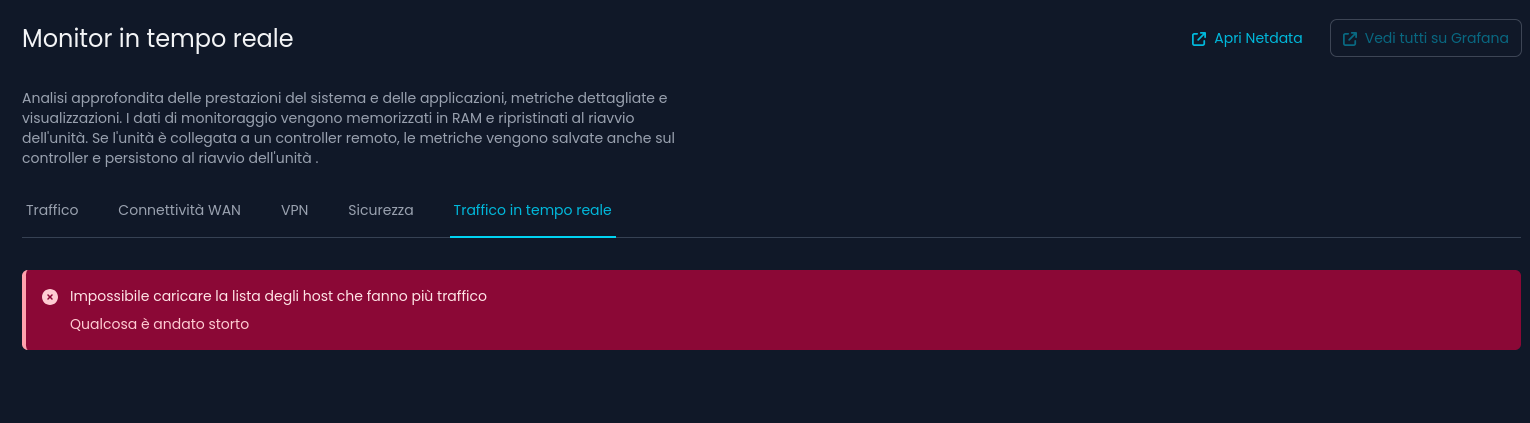
In the “Real-time Monitor” section, I get the following error: “Unable to load the list of top traffic hosts. Something went wrong”.
I have already attempted to restore the system from a known working backup from a few days ago, but the issue persists. This leads me to believe the problem is not related to the local configuration (perhaps a signature update or a cloud sync issue).
Could you please investigate the cause and advise on how to resolve this?
This program comes with ABSOLUTELY NO WARRANTY.
Netifyd is dual-licensed under commercial and open source licenses. The
commercial license gives you the full rights to create and distribute software
on your own terms without any open source license obligations.
Netifyd is also available under GPL and LGPL open source licenses. The open
source licensing is ideal for student/academic purposes, hobby projects,
internal research project, or other projects where all open source license
obligations can be met.
After running service netifyd start, the service restarted and the DPI-core status is back to green. It seems to be resolved for now, but I will keep monitoring it to see if the issue recurs
I would like to provide an update regarding the DPI issue. After further investigation via SSH, I found that the netifyd service was not enabled to start automatically on boot.
I managed to resolve the issue by manually running the following command: /etc/init.d/netifyd enable
After a test reboot, the DPI-core module started correctly and is now active. Could you please check if this was an isolated incident or if a recent update might have inadvertently disabled the service?
Understood. I have performed the test as requested following these steps:
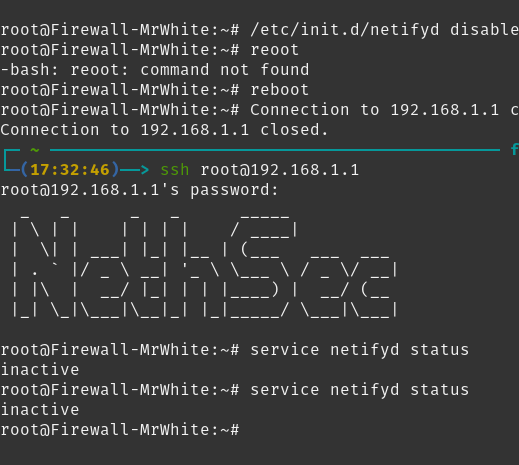
I disabled the service again using /etc/init.d/netifyd disable.
I rebooted the firewall.
After the reboot, I checked the status.
After the reboot, the service is back to “Unknown” status and is not running. It seems that on my unit, the “enabled” setting is still required for it to start.
It appears that on this specific build/configuration, the service does not start unless it is manually enabled. For now, I will run enable again to keep the monitoring active, but I look forward to your feedback on whether this behavior is expected.
I retested and the netifyd service stays enabled after the last netifyd update, just service netifyd enabled gives back another value but this can be ignored I guess.
When I disable the service manually, I can reproduce your issue.
I’m not sure what caused the issue. Let’s monitor it and check if the service gets disabled again.
I would like to add a detail that might be crucial for identifying the bug: the issue occurred exactly after I added about ten protocols to the block list on a separate VLAN.
Immediately after saving and applying these security settings, the DPI-core module went into the “Unknown” status. It is highly likely that the “Apply changes” action in the web interface caused, as a side effect, the netifyd service to be disabled at the system level.
I hope this information helps you replicate the issue internally to prevent it from happening to other users.
I would like to provide an additional technical detail: the issue occurred when, after adding those last 10 protocols to be blocked on a separate VLAN, I reached a total of approximately 31-32 blocked protocols in the global configuration.
It is possible that upon reaching this threshold, or while applying a list of this size, the configuration script fails and leaves the netifyd service in a disabled state. I hope this specific count helps you better isolate the bug.
Might just have verified the issue myself, I’ve installed a fresh 8.7.1, updated the packages and the new licensing tool for netifyd dpi-license-update is disabled. This could be justifiable due to how user preferences on daemon enable/disable are respected on OpenWRT. However, the package update disables netifyd too, which is weirder due to a direct update of a package and on the 8.7.1 it’s enabled by default.
Will try to fix the issue, in the meantime if @mrmarkuz is kind enough to edit his solution and add commands to enable netifyd and enable and start dpi-license-update, that would be nice
Thank you for your patience!
Update:
It seems that image updates are not affected, I tested updating from stable to dev and services are active as expected. However, I did clean cache two days ago I guess this might be a cache build issues, currently compiling clean packages to check.
I have read Tommaso Bailetti’s feedback on the forum. I can confirm that his analysis perfectly matches what happened on my unit (version 8.7.1): the services were disabled following the latest package updates.
As suggested, I have also enabled and started the license update service to ensure everything is correctly configured:
/etc/init.d/netifyd enable
/etc/init.d/dpi-license-update enable
/etc/init.d/dpi-license-update start
The system is now stable, and the DPI-core remains active even after a reboot. Thank you for investigating the issue and for your technical support.

 Netify API updates can be enabled from the configuration file: