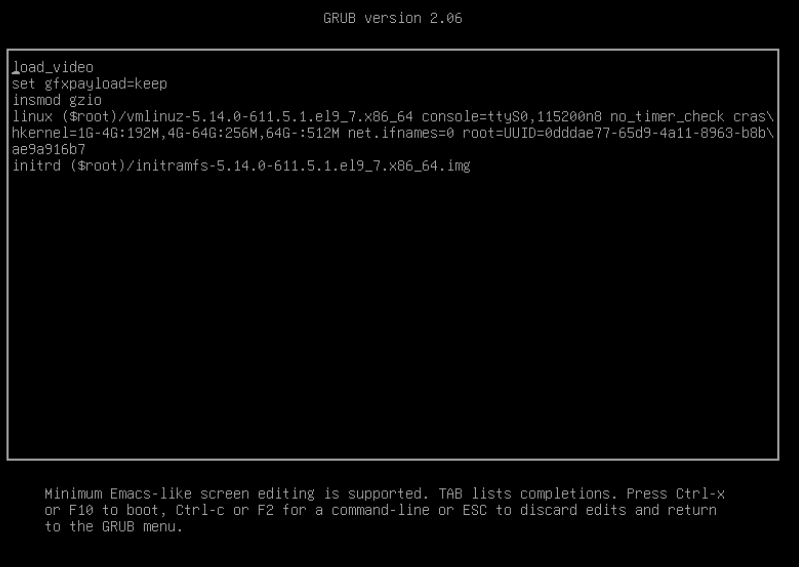
I have two different NS8 installs on Proxmox VMs. Both were working flawlessly. One is a Debian 12 OS and the other was the Rocky VM. Now neither are working after doing the latest NS8 Core Update from the UI. The Debian 12 boots to shell, but I can no longer access the UI from a browser. The Rocky hangs in my Proxmox console at the Probing EDD prompt. Pressing ‘e’ on boot returns
Anyone else have this issue? I haven’t changed anything in the VM hardware of either machine - simply did the core updates from the NS8 UI of each. I knew it would be a gamble with the Debian 12, but the Rocky is supported by the NS team, right? Shouldn’t break if you’re putting out the updates. I haven’t altered any scripts and the install is fairly new. Again, it was working. I tried changing some hardware settings in PM, i.e., CPU and display types, to no avail.
Thanks for the report. These look like two separate symptoms on two separate installs, so let’s split them.
Rocky VM (stuck at boot)
Let it sit at Probing EDD for a few minutes without touching anything — on some Proxmox configs this stage is just slow, not stuck.
If it’s still stuck after that, reboot, press e on the boot entry, and paste the full text shown (not a partial screenshot).
What exact Rocky Linux release is this (check in Proxmox VM hardware notes, or cat /etc/rocky-release if you can get a rescue/live shell)?
In the Proxmox VM’s Hardware/Options tab: BIOS type (SeaBIOS or OVMF) and Machine type (i440fx or q35)?
Which NS8 version was this cluster on before the Core Update, and which version did the update target? (Settings → Software Center → update history)
Besides the NS8 Core Update from the UI, did you also run a system package update on this VM (e.g. dnf update), before or after? The NS8 Core Update itself only pulls Podman images and runs application-level scripts, it doesn’t touch the kernel, initramfs or GRUB — so if the boot is affected, it would help to know if something else touched the OS packages around the same time.
Debian 12 VM (boots to shell, UI unreachable)
Since you have shell access, please run these and paste the output (remove any password, token, certificate, public IP, domain name or email address first):
journalctl -e --no-pager -n 200
Then check the core Traefik module:
runagent -m traefik1
systemctl --user status
exit
And same question as above: which NS8 version before/after the update, and did you run any OS package update alongside the NS8 Core Update?
This will tell us whether it’s a bootloader/kernel issue unrelated to NS8 on the Rocky side, and a module-startup issue on the Debian side.
Yeah, I looked through that one before I even posted my thread. As I stated, it was a working Rocky with NS8 VM, i.e., until I did the NS8 core update.
So, if I redo this Rocky with NS8 VM, starting all over from scratch, what prevents the new VM from breaking when I do an NS8 core update? I have a Nethserver subscription for our business with Nethserver.org. Is it a safe bet that determining why a Proxmox Rocky 9 VM won’t start after an NS8 core update from the NS8 UI, will not be covered by the subscription, i.e., this community is the only avenue?
Just to add a data point on the “is NS8 responsible” question: I regularly install NS8 by hand on top of a plain Rocky or Debian base OS — not from the prebuilt VM disk image — and I don’t hit this kind of boot failure, including after core updates. Updates go through cleanly.
That doesn’t rule out an issue specific to the prebuilt qcow2 image or to your particular Proxmox setup, but it does suggest the NS8 core update mechanism itself isn’t the direct cause of a VM failing to boot — the core update only pulls Podman images and runs application-level scripts, it doesn’t touch the kernel, initramfs or bootloader.
If you want to compare, installing on a fresh Rocky or Debian base (not the prebuilt image) and re-running the same update path would help narrow down whether the image itself is involved.