NS7 ssh without WAN interface

NethServer Version: NethServer release 7.9.2009 (final)
Module: network, ssh

Hello everyone,

I have two NS7 servers, one is running on a server farm as a VPS, the other is at home and works with two network cards (LAN and WAN) as a backup. The VPS uploads the backup to this with sftp. There is nothing else configured on it except Nextcloud and vsftpd, no users, LDAP or Active Directory, samba share, etc.

Just a few of Nextcloud’s own users and ssh so that sftp works.

Unfortunately, the second (WAN) network card is broken, so the VPS cannot connect to the NS7 at home with vsftp. I don’t have another network card at home and since it is a holiday and a long weekend here, I can only look into ordering one on Monday next time, but it will take 2-3 days for it to be delivered.

The server here worked so that the WAN and LAN interfaces were organized in separate VLANs, but both are connected to the router and in principle have access to the internet. The difference is that the port forwarding is set to the WAN interface. I need a temporary solution, so I have port forwarding to the LAN port, but I can’t access the LAN port from the internet with ssh. SSH is enabled on the Green (LAN) port.

How can I fix this now?

Thank you for your help

The service needs to also have the red network access enabled.


On network interfaces page you’d need to remove the red network role and add the gateway to the green network interface.

Thanks for the answer @mrmarkuz

I tried the suggested solution, removed the RED network interface and added the gateway to the GREEN interface. Unfortunately, despite all this, I still can’t access NS7 from the internet via ssh.

I directed traffic to the GREEN interface on the router, I can access it on the local LAN, but not from the internet. This is important because the backup is done from the VPS to the NS7 at home via sftp and we are still working, we will need the backup…

There is no AD configured, so it shouldn’t cause any problems. The network setup looks like this:

db networks show
ens16=ethernet
role=
eth0=ethernet
bootproto=none
gateway=192.168.1.254
ipaddr=192.168.1.197
netmask=255.255.255.0
nslabel=
role=green
ppp0=xdsl-disabled
AuthType=auto
FwInBandwidth=
FwOutBandwidth=
Password=
name=PPPoE
provider=xDSL provider
role=red
user=

Thank you for your help

Maybe because the red role is still there. Please try to set the role property to none.

Other points:

Please recheck if the port forwarding is correct, it should point to the IP of the green interface.
Maybe it’s a VLAN issue, you could try to remove the VLAN for testing.

The LAN card role=green, the red setting refers to ppp0=xdsl-disabled….

The port forwarding is set up correctly, I’ve checked it many times, but I’ll try to be precise.

I disabled the VPN and ran traceroute. Traceroute can’t find the server, it can’t find a route to the server from the ISP and I don’t understand this…

You mean VLAN? Is there also a VPN?

Does it work using the IP?
If you use domain names, please check DNS on the client that wants to connect from outside.

Sorry, I mistyped, of course I disabled VLAN.

No, I can’t connect via ssh from the internet using an IP address, even though I’m sure I entered it correctly because I can connect on the local LAN.

Checking with nslookup returns a good IP address.

I checked the port forwarding again, it is set up correctly.

It seems like NS7 is not responding to ssh from the LAN, even though sshd is enabled on the GREEN interface.

I tested now with an NS7 that has SSH enabled on port 2222 and it works to connect from my mobile from public via 5G using ConnectBot (Android).

Is maybe the IP blocked by Fail2Ban or do you use some IPS?

Port forwarding on firewall: (NethSec)

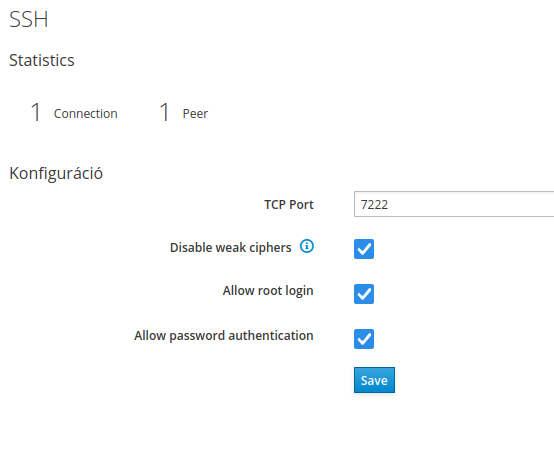
SSH settings on NS7:

NS7 Services:


[root@server2 ~]# config show sshd
sshd=service
    AllowEveryone=none
    AllowGroups=service
    AllowLocalGroups=
    LoginGraceTime=2m
    MaxAuthTries=6
    PasswordAuthentication=yes
    PermitRootLogin=yes
    Protocol=2
    StrongEncryption=enabled
    SubsystemSftp=yes
    TCPPort=2222
    UsePAM=yes
    access=green,red
    status=enabled

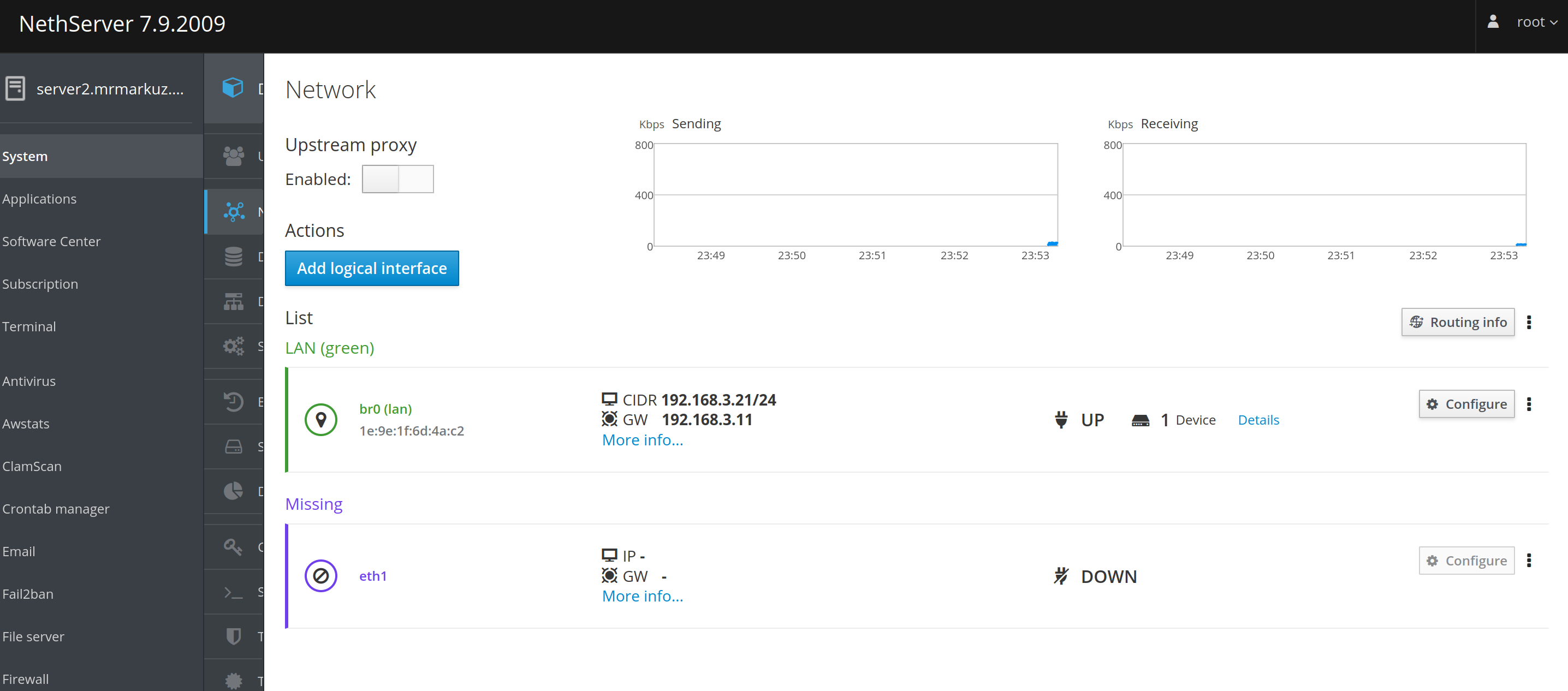
NS7 Network interfaces: (I have a bridge br0 because of samba but that shouldn’t matter)

[root@server2 ~]# db networks show
192.168.100.0=network
    Description=
    Mask=255.255.255.0
192.168.89.0=network
    Description=
    Mask=255.255.255.0
br0=bridge
    FwInBandwidth=
    FwOutBandwidth=
    bootproto=none
    gateway=192.168.3.11
    ipaddr=192.168.3.21
    netmask=255.255.255.0
    nslabel=lan
    role=green
eth0=ethernet
    bridge=br0
    role=bridged
eth1=ethernet
    role=
ppp0=xdsl-disabled
    AuthType=auto
    FwInBandwidth=
    FwOutBandwidth=
    Password=
    name=PPPoE
    provider=xDSL provider
    role=red
    user=

EDIT:

Maybe firewall rules on NS7?

db fwrules show

I couldn’t find my mobile IP address among the bans.

My ssh setup on NS7 looks like this:

sshd config:

config show sshd
sshd=service
AllowEveryone=none
AllowGroups=
AllowLocalGroups=wheel
LoginGraceTime=2m
MaxAuthTries=6
PasswordAuthentication=yes
PermitRootLogin=yes
Protocol=2
StrongEncryption=enabled
SubsystemSftp=yes
TCPPort=7222
UsePAM=yes
access=green
status=enabled

There is not a single firewall rule in db fwrules.

I posted my network setup earlier. I installed two physical network cards in the NS7, they were configured separately, there is no VPN and therefore no virtual bridge interface.

This is just an sftp backup and home nextcloud server, nothing else is configured. I forgot, when one of our programs’ Firebird server was updated to 3.x, this was the test server where both Firebirds were running and converting the databases, but this is also disabled now.

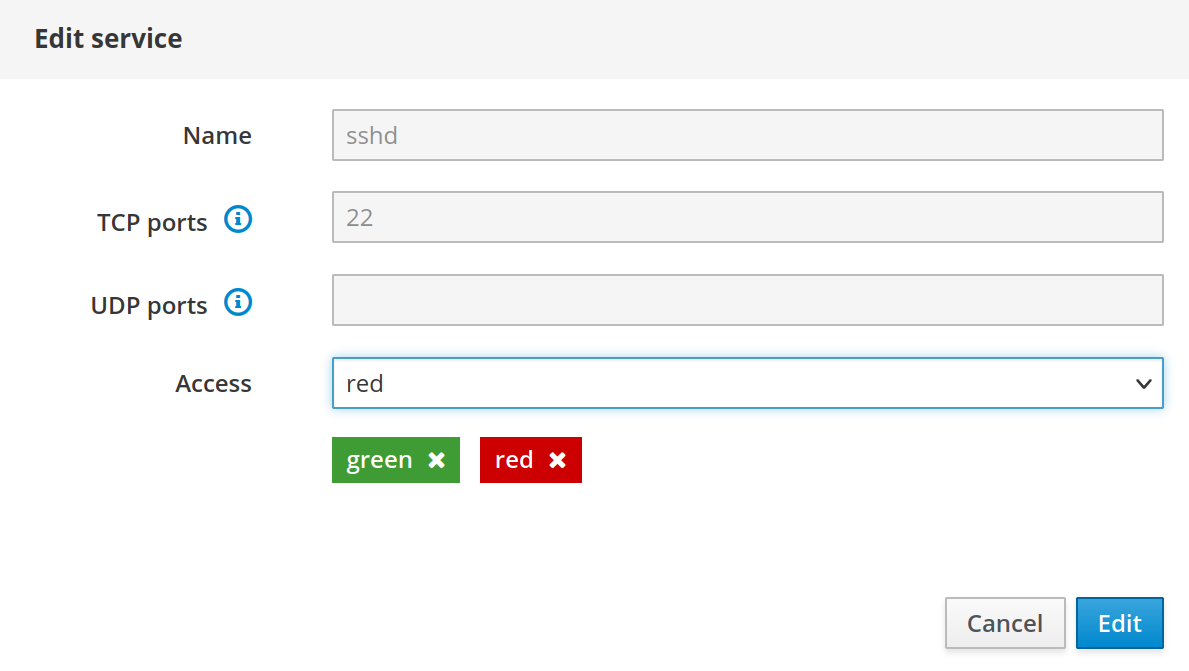
You didn’t enable the access from red in your SSH service.

Instead of access=green it should be access=green,red.

Please enable it…

…so it looks like this:

@mrmarkuz There is no RED interface, so I restricted access to GREEN interface because that was the logical thing to do. I also enabled sshd on RED interface. Now the sshd config looks like this:

config show sshd
sshd=service
AllowEveryone=none
AllowGroups=
AllowLocalGroups=wheel
LoginGraceTime=2m
MaxAuthTries=6
PasswordAuthentication=yes
PermitRootLogin=yes
Protocol=2
StrongEncryption=enabled
SubsystemSftp=yes
TCPPort=7222
UsePAM=yes
access=green,red
status=enabled

Wow, it seems to be working now…

I can now connect from the internet and the NS7 VPS backup also reaches the NS7 here at home. I hope the nightly backup will finally run properly…

Thank you very much for your help.

1 Like