Thanks for your follow-up question.
Overall, my concern relates to the behavior of Neth8 when creating new users—behavior that is (in my opinion) somewhat unexpected or poorly explained in the GUI:
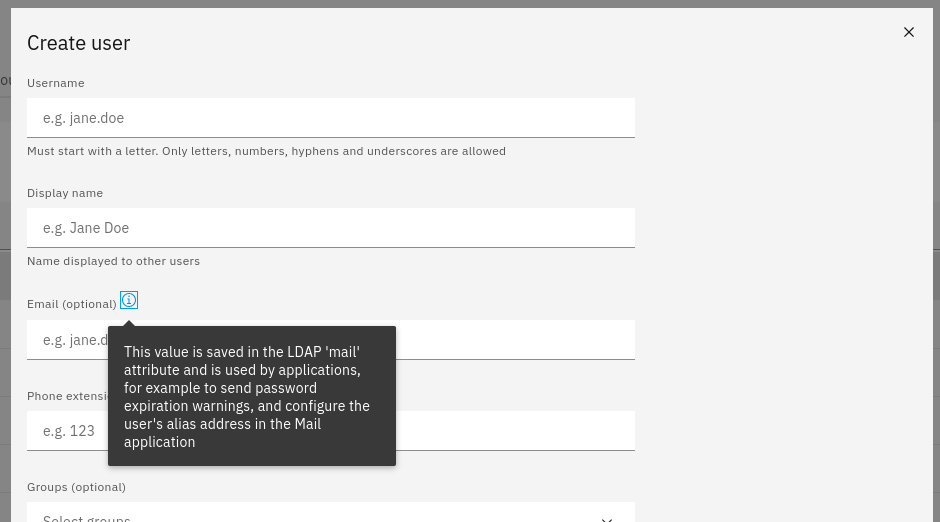
When creating a new user, an “E-mail” field is explicitly displayed. What would one expect from this field? Usually, one would expect to be able to define the new user’s email address there.
However, that is not (or was not) the case—and there is no indication of this at that specific point in the GUI. It simply says “optional.” This leads one to expect that leaving the field blank allows for the creation of a user without an email address (or mailbox). Instead, something else happens—without any warning.
The user is created and does receive a mailbox, but no emails are delivered to the address entered. This is unexpected and only becomes clear by consulting the manual or clicking through the options in the Mail app (Domain/Edit). Sure, one could take the “RTFM” approach. But there is plenty of space in the GUI for explanations, isn’t there?
So, the requirement was either:
To create an email address for every new user within the Mail app and assign it to the user’s mailbox. This involves extra steps—which are manageable once you know them*, but it requires more effort than expected.
Or:
To generally “automate” this process using the existing option: “Add user addresses from userDomain.” Of course, the downside here is that addresses generated this way always follow the “username@domain” pattern—which might not be desired (e.g., if you don’t want the email address to reveal the user account’s login name).
Now we have an additional option, “Add alias addresses from user domain” (a label that, in my view, doesn’t clearly explain what it does), and the behavior when creating new users finally matches expectations. However, for this new method to work just like the familiar ones, one would have to manually create the corresponding address—which, in my opinion, renders the function rather pointless. Or, at the very least, it represents unexpected behavior.
For the administrator, this means:
There used to be two ways the system behaved when creating new users, and now there are four—depending on the settings in the Mail app’s domain options.
Unfortunately, when creating a new user account, there is no clear indication of which mode is currently active or what to expect.
My point is: the system knows its own default settings (even if they are stored elsewhere). It would be helpful if, during user creation, the system displayed exactly what the inputs (in this case, the email address) would actually result in.
For instance, it could display the expected outcome in a preview field—showing, for example, which email address would be created automatically (if that option is enabled).
- Alternatively, it could at least display a note explaining how addresses are (or aren’t) automatically added—specifically, which options have been pre-selected. Otherwise, if managing multiple user domains, one has to check the Neth8 configuration every single time to see how it was defined.
This discussion certainly strays a bit from your original question regarding the scenarios in which one might want to set an email address to “local.” In my view, this applies to all scenarios—for the very same reasons you implemented this option for all other email addresses. Unless there is a technical requirement mandating that these email addresses always be public (a fact that should also be indicated in the GUI during user creation), there is no reason for such a restriction to exist.