IRQBalance in NethSec

Hi there folks,

So after testing some more, in my case having more than 4 vCPUs makes no difference to the throughput I get, if Snort is on.

The question: does NetSec have the OpenWRT IRQbalance implemented? I don’t see /etc/config/irqbalance. If yes, how do we configure it, and if not, can I we get it?

You could add the upstream openwrt repos, see also Package repositories | NethSecurity
This could lead to update issues and conflicts in the worst case, see also Remote access — NethSecurity documentation

Ah I see, thanks for the info.

But, I don’t want to greatly modify Nethsec. The point of Nethsec, and what I am (will be? Still have a few days left of the evaluation) paying for is that I don’t have to customize and modify and build and maintain my own OpenWRT version.

So, I guess I either keep Snort off, or I build my own OpenWRT install. Or I discover some other optimization that is allowed in Nethsec. IRQBalance would have been promising, but as I said, if it ain’t already part of NethSec, it doesn’t make sense (for me) to add it.

How do YOU (kind forum members) run NethSec on a 1Gbit WAN with Snort enabled, and get full bandwidth? What hardware do you have NethSec running on?

Cheers

PS. To test, I switched the Ryzen 5 3600 CPU (Xen 2, 6 cores) in my KVM host server to a Ryzen 5 5700X (Xen 3, 8 cores) which has 25% higher single core and 33% higher multithreaded performance than the older CPU, and giving the NethSec VM more than 4 vCPUs made no difference with either the Ryzen 3600 nor with the Ryzen 5700; a full Gigabit throughput on WAN is just not possible with Snort enabled. This is with minimal other load on the host, the NethSec VM gets all the resources it needs. It just doesn’t scale.

1 Like

Can I also ask what SQM algorithm is used in NethSec? Is it Cake? And can it be tuned to the type of WAN we have (fiber in my case, but if you DOCSIS or VDSL for example it would need to be tuned differently)?

I have a lab where I test performances of all hardware Nethesis sells.
Over the years, I’ve tested many different systems using both the 7.x NethServer versions (based on CentOS) and the newer NethSecurity 8, ranging from two cores to 8, using various network traffic patterns.

Concerning network flows, I tried different configs of irqbalance and packet steering, and I never found noticeable differences in network speed or CPU load.

However, it may also depend on the network card model and driver, I mostly tested Intel cards.

Having said this, I’ll be happy if you test irqbalance: if we find that it helps on some systems, I will re-evaluate its inclusion.
See packages: add irqbalance by filippocarletti · Pull Request #433 · NethServer/nethsecurity · GitHub for instructions.

It’s cake, using qosify.
To tune for different wan types you need the command line:

qosify.wan.overhead_type='none'

See tc-cake manual for possible values (instead of none).

1 Like

Thanks for the info. Yes, I should test IRQBalance. =)

Hi,

I’m currently running three OpenWrt firewalls on a 25/10G network serving over 1,000 users and 200 servers. Specifically, one firewall is for general users, another handles guests, a public hotspot and eduroam (across 50 WiFi APs), and the last one is dedicated to the servers.

Additionally, a fourth OpenWrt firewall is deployed on a central upstream node, routing four public /24 subnets over five 25G links.

We were previously using OPNsense, but due to FreeBSD driver and performance issues, we switched to OpenWrt.

Two of the firewalls run on bare metal for maximum performance, and the remaining two are hosted as VMs on Proxmox for greater flexibility.

On the VMs, we utilize irqbalance, software flow offloading, packet steering, and multiqueue on the network cards (configured with 32 queues and over 32 vCPUs).

We are currently planning to migrate to NethSecurity and have already started the process with the firewall handling user traffic and NAT. Previously, we achieved a 10 Gb/s throughput through this firewall for LAN ↔ WAN traffic with NAT (without DPI or IPS enabled).

However, with NethSecurity, the throughput is only around 200-600 Mb/s (with DPI and IPS enabled). When measuring the throughput using a speed test (which bypasses NAT and the standard LAN ↔ WAN path), we still get close to 10 Gb/s.

What should we do to improve the performance?

1 Like

Hi and welcome!

I am not sure in which timezone you are in, but I am confidentent that we will get discussions going within any EU timezone!

cc: @Tbaile

At this time = these days…

Discussions are welcome in the next upcoming days.

And I don’t sleep a lot, so I’m back in few hours :slight_smile:

1 Like

I did some performance tests in the past, but I didn’t find noticeable improvements using packet steering and/or irqbalance. I used Intel X710 10GbE.

The firewall throughput you are seeing is way too low, it’d be a little below the speedtest-measured value.

If you’re willing to do some tests, you can enable packet steering with the following commands:

uci set network.globals=globals
uci set network.globals.packet_steering=2

irqbalance must be installed and configured.

To exclude variables, could you try to temporarly stop DPI and IPS?

2 Likes

Thanks for your post.

The low speedtest results where caused by a misconfigurated client.

Now there are much better.

My setup (to measure real throughput):

[Debian Client] -25G-> [Nethsecurity] -25G-> Internet (upstream 10G)

I’m using:

AMD EPYC 73F3 processors
Broadcom BMC57504 cards
Proxmox VM, 24 CPUS, network with multiqueue 24

Results:
without packet steering and irq balance

   Speedtest by Ookla

      Server: ISP Alliance a.s. - Prague (id: 4162)
         ISP: CESNET z.s.p.o.
Idle Latency:     0.90 ms   (jitter: 0.05ms, low: 0.85ms, high: 0.92ms)
    Download:  6944.96 Mbps (data used: 10.0 GB)                                                   
                  1.58 ms   (jitter: 0.77ms, low: 0.98ms, high: 45.25ms)
      Upload:  5112.03 Mbps (data used: 5.5 GB)                                                   
                  2.38 ms   (jitter: 4.41ms, low: 1.31ms, high: 46.88ms)
 Packet Loss:     0.0%
  Result URL: https://www.speedtest.net/result/c/31f5d9d4-6760-4b1d-bbf8-a46ca9d74193

with packet steering and irq balance enabled
(I have followed the instructions and I have installed irqbalance from the openwrt repository)

   Speedtest by Ookla

      Server: ISP Alliance a.s. - Prague (id: 4162)
         ISP: CESNET z.s.p.o.
Idle Latency:     0.88 ms   (jitter: 0.03ms, low: 0.86ms, high: 0.93ms)
    Download:  7356.43 Mbps (data used: 10.7 GB)                                                   
                  1.32 ms   (jitter: 0.19ms, low: 0.98ms, high: 4.19ms)
      Upload:  7301.20 Mbps (data used: 3.5 GB)                                                   
                  2.25 ms   (jitter: 0.49ms, low: 1.17ms, high: 3.97ms)
 Packet Loss:     0.0%
  Result URL: https://www.speedtest.net/result/c/0b7a27c9-4428-4810-a775-6f429715ca1e

The results are always slightly better with packet steering and irq balance enabled.

I will try to setup a iperf3 and curl/https server on the WAN side to test the 25G network speed

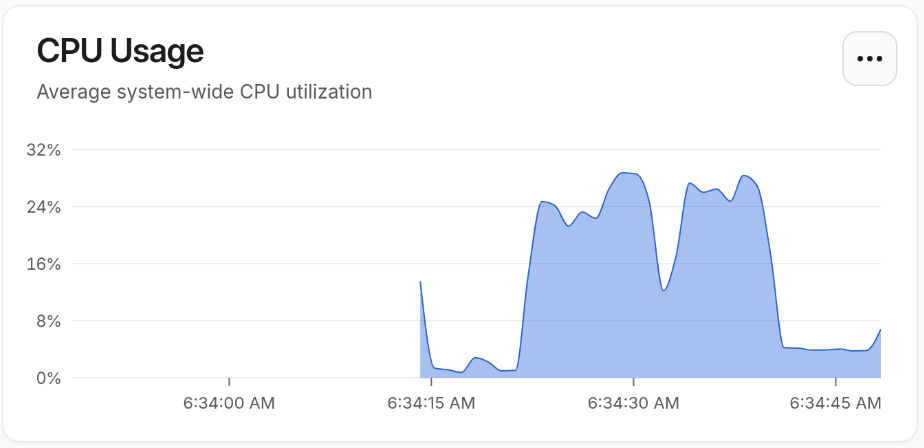
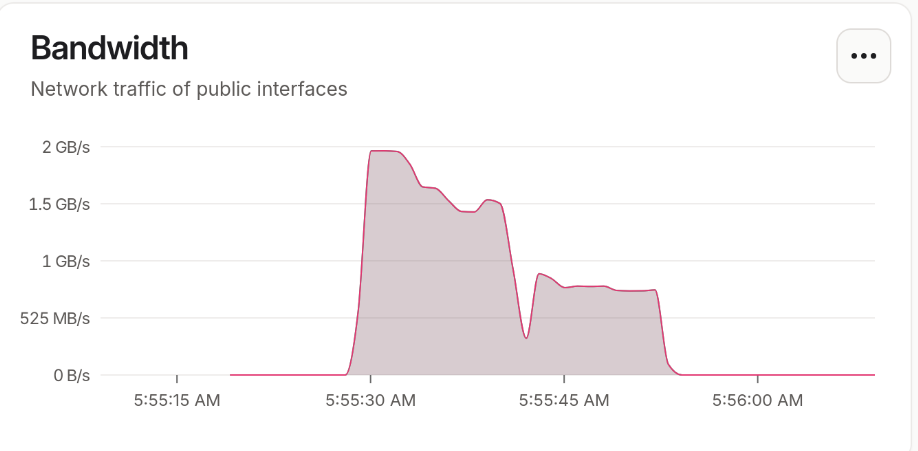
CPU usage on 24 core NethSecurity VM:

OK
i have tried to disable irq balance and packet steering again:

root@user:~# service irqbalance stop
root@user:~# uci set irqbalance.irqbalance.enabled=0
root@user:~# uci set network.globals=globals
root@user:~# uci set network.globals.packet_steering=0
root@user:~# uci commit
root@user:~# reboot

and I have got the best results so far:

   Speedtest by Ookla

      Server: Tlap s.r.o. - ZCOM - Prague (id: 32363)
         ISP: CESNET z.s.p.o.
Idle Latency:     0.88 ms   (jitter: 0.13ms, low: 0.83ms, high: 1.01ms)
    Download:  9145.47 Mbps (data used: 9.9 GB)                                                   
                  2.28 ms   (jitter: 0.48ms, low: 0.97ms, high: 4.13ms)
      Upload:  9351.68 Mbps (data used: 4.4 GB)                                                   
                  3.44 ms   (jitter: 0.34ms, low: 0.91ms, high: 4.84ms)
 Packet Loss:     0.0%
  Result URL: https://www.speedtest.net/result/c/9c17d4a5-8a7a-4cab-84ca-f9e0bc44f493

So no difference, only good luck and random results from upstream speedtest servers.

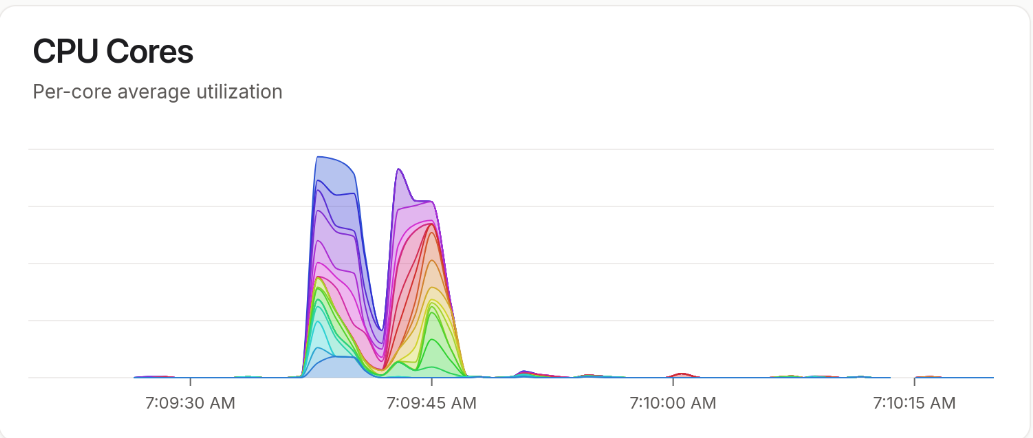
Multiple cpu cores are still used:

EDIT:
Following the IPS/Snort repair, which was silently broken (the Web UI indicate, that everything is fine, see separate topic), the speed dropped to 4.5-5G both directions. Yes: “Fun comes at a cost.”

IRQ balancing and packet steering offer only a minimal benefit with working IPS since performance is limited by a single core hitting 100% utilization/load.