Hugh data consumption NTP in Nethsecurity

Saw the issue on GH, nice to have it reported!

Flow actions is not the culprit, as it doesn’t actively logs traffic, the issue might reside in netifyd, since it’s the engine that classifies the traffic that goes through the firewall.

We have already applied the update to most of the machines but this is the first report of it.

A suggestion might be to flash again the image in the firewall then update again the packages, something is afoot here but it’s very weird

1 Like

Just reinstall the 1.6.0 with the same image ?

Yes, you can use the 1.6.0 image, then remember to update the packages, the base image does not come with latest updates.

1 Like

I’ve done the image update.

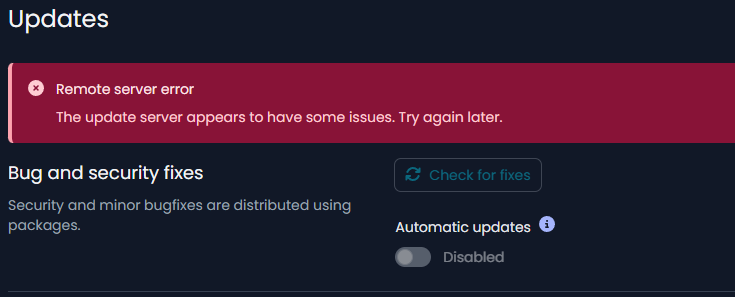
Now i can update via UI anymore

opkg update

Downloading https://updates.nethsecurity.nethserver.org/stable/stable/24.10.0/targets/x86/64/packages/Packages.gz
*** Failed to download the package list from https://updates.nethsecurity.nethserver.org/stable/stable/24.10.0/targets/x86/64/packages/Packages.gz
Downloading https://updates.nethsecurity.nethserver.org/stable/stable/24.10.0/packages/x86_64/base/Packages.gz
*** Failed to download the package list from https://updates.nethsecurity.nethserver.org/stable/stable/24.10.0/packages/x86_64/base/Packages.gz
Downloading https://updates.nethsecurity.nethserver.org/stable/stable/24.10.0/packages/x86_64/luci/Packages.gz
*** Failed to download the package list from https://updates.nethsecurity.nethserver.org/stable/stable/24.10.0/packages/x86_64/luci/Packages.gz
Downloading https://updates.nethsecurity.nethserver.org/stable/stable/24.10.0/packages/x86_64/nethsecurity/Packages.gz
*** Failed to download the package list from https://updates.nethsecurity.nethserver.org/stable/stable/24.10.0/packages/x86_64/nethsecurity/Packages.gz
Downloading https://updates.nethsecurity.nethserver.org/stable/stable/24.10.0/packages/x86_64/packages/Packages.gz
*** Failed to download the package list from https://updates.nethsecurity.nethserver.org/stable/stable/24.10.0/packages/x86_64/packages/Packages.gz
Downloading https://updates.nethsecurity.nethserver.org/stable/stable/24.10.0/packages/x86_64/routing/Packages.gz
*** Failed to download the package list from https://updates.nethsecurity.nethserver.org/stable/stable/24.10.0/packages/x86_64/routing/Packages.gz

Collected errors:

opkg_download: Failed to download https://updates.nethsecurity.nethserver.org/stable/stable/24.10.0/targets/x86/64/packages/Packages.gz, wget returned 8.
opkg_download: Failed to download https://updates.nethsecurity.nethserver.org/stable/stable/24.10.0/packages/x86_64/base/Packages.gz, wget returned 8.
opkg_download: Failed to download https://updates.nethsecurity.nethserver.org/stable/stable/24.10.0/packages/x86_64/luci/Packages.gz, wget returned 8.
opkg_download: Failed to download https://updates.nethsecurity.nethserver.org/stable/stable/24.10.0/packages/x86_64/nethsecurity/Packages.gz, wget returned 8                                      .
opkg_download: Failed to download https://updates.nethsecurity.nethserver.org/stable/stable/24.10.0/packages/x86_64/packages/Packages.gz, wget returned 8.
opkg_download: Failed to download https://updates.nethsecurity.nethserver.org/stable/stable/24.10.0/packages/x86_64/routing/Packages.gz, wget returned 8.

I went back to the previous snapshot and updates are possible to install
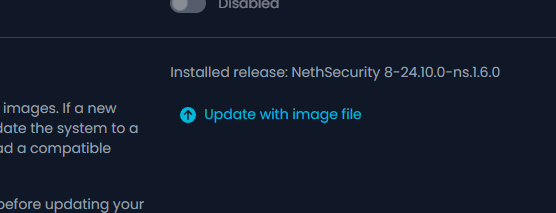
Uh, this was expected, didn’t think of that, We changed update management and configuration with the latest packages, the new config doesn’t work with the latest packages.

This issue is not being reproduced in any firewall that I’m aware of, I have no clue where to start :sweat_smile:

To remove the firewall from the equation, could you disable npt with /etc/init.d/sysntpd stop?

1 Like

I’ve performed the update again and let it run for a while.
Immediately the NTP increased by getting data.
Stopping the service stopped also the data collection on NTP

I find it still strange that the that the data collection is on 0.pool.ntp.org and in the settings it is 0.openwrt.pool.ntp.org

It seems they’re pointing to the same servers:

markus@asusminipc:~> nslookup 0.openwrt.pool.ntp.org
Server:		192.168.3.11
Address:	192.168.3.11#53

Non-authoritative answer:
Name:	0.openwrt.pool.ntp.org
Address: 91.206.8.36
Name:	0.openwrt.pool.ntp.org
Address: 46.102.157.67
Name:	0.openwrt.pool.ntp.org
Address: 152.53.15.127
Name:	0.openwrt.pool.ntp.org
Address: 178.251.64.52

markus@asusminipc:~> nslookup 0.pool.ntp.org
Server:		192.168.3.11
Address:	192.168.3.11#53

Non-authoritative answer:
Name:	0.pool.ntp.org
Address: 91.206.8.36
Name:	0.pool.ntp.org
Address: 46.102.157.67
Name:	0.pool.ntp.org
Address: 178.251.64.52
Name:	0.pool.ntp.org
Address: 152.53.132.244
1 Like

i’m getting this
Is this correct ?

127.0.01 ?
Non-authoritative answer:

nslookup 0.openwrt.pool.ntp.org
Server:         127.0.0.1
Address:        127.0.0.1:53

Non-authoritative answer:
Name:   0.openwrt.pool.ntp.org
Address: 185.51.192.61
Name:   0.openwrt.pool.ntp.org
Address: 45.32.4.67
Name:   0.openwrt.pool.ntp.org
Address: 172.233.59.163
ame:   0.openwrt.pool.ntp.org
Address: 178.239.19.59

Non-authoritative answer:

Yes, it’s a pool of servers so the IPs may differ.

1 Like

Ok. The 127.0.0.1 shouldn’t be my LAN IP 192.168.1.1 ?

It depends on which system you did the nslookup. I did it on my client device/workstation so the server is the LAN IP of my NethSec.

If you did it on the NethSecurity, it’s 127.0.0.1 as NethSec is a DNS server.

1 Like

Ok. It looks that i’ve found the problem.

I stopped the service and saw that there was no data going to/from 0.pool.ntp.org any more
But is daw that there still NTP date going to my Somfy box (device for the sunscreens)
I check the app and there was an update pending (maybe for a longer time because i don’t use the app)

This stopped the NTP data of the Somfy box.
Then i started the NTP service back on and waych what happened.
Until now it looks pretty normal and i’ve monitor it for the coming time

2 Likes