Creating two VLANs causes loss of Internet

Hi,

When I create a second VLAN on my GW, my machines behind the GW lose Internet. If I delete the second VLAN, everything works again.

Background

My plan is to connect several Cable Modems to my GW. Each Cable Modem is connected to a Smart Switch and is presented to the GW tagged.

I will map a single IP to each Cable Modem

In this example, I have VLAN ID 103 and 105.

GW Configuration

  • enp1s0 - LAN (green)
  • enp2s0 - Internet (red) – my current Internet. Link weight 100.
  • enp3s0 - LAN (green) - connected to my Smart Switch
  • enp3s0.103 - VLAN ID 103, DHCP, Internet (red), Link weight 1 - device connected and provides an IP.
  • enp3s0.105 - VLAN ID 105, … same as 103.

multi WAN is set up in Active backup The link status monitor is configured as follows:

  • Check IP: 8.8.8.8
  • Disable … # lost pings: 4
  • Disable % lost pings: 50
  • Ping interval: 2

Problem

From a machine behind the GW, I ping 8.8.8.8

When I add the second VLAN (it doesn’t matter which), I can no longer ping.

If I delete the second VLAN, I can ping again.

Hi

This seems to be the problem:

  • enp3s0 - LAN (green) - connected to my Smart Switch

GREEN - and connected to the Internet on the same NIC hardware ?
-> Maybe you’re expecting too much IQ from your “SmartSwitch”… :slight_smile:

I’m not sure, but I don’t think you can get reliable Multi-WAN if using vLANs on the same interface…

I’d stick in another LAN Interface, and forget the vLANs if you want relaible Multi-WAN.

Note: I’m not using NethServer as my Firewall, but OPNsense, just as open and free as NethServer. But: I have fast reliable Multi-WAN working at several sites! And I also use SmartSwitches and vLANs - just not in the Area of Multi-WAN! If you can afford 2 providers, a NIC shouldn’t be an issue!

My 2 cents
Andy

Hi,

Thank you for the response. The Smart Switch has a few more IQ points than a regular old switch. :wink: Seriously, the Smart Switch is used for tagging/untagging of packets. It is only accessible from within my LAN.

By using the Smart Switch, I’m able to present to the gateway N-number of ISPs as VLANs.

I do not plan on setting up multi-WAN though, I will be mapping a home to their ISP.

Thx!
-pablo

Hi

I DO know vLANs and SmartSwitches quite well - I use mostly HP, but a few Ciscos are out there too.

Good Luck!

Andy

Hi,

I ended up switching to OPNsense.

What is interesting is that I independently came to this conclusion. It’s a very snazzy software load.

Cheers,
-pablo

1 Like

@pablo_s

Cool that you independently came to this conclusion…
After using OPNsense for a few years now, and at about 30 sites, I’m very happy with this product.

I usually have bought boxes (supporting the project this way…) but you could also get a PCengines Box, that’s the same as OPNsense uses in their smallest version.

But it comes with all VPNs, even Wireshark. It can run as Hardware, on an old PC, or virtualized.
And you can make a high availability failover using two boxes, any combination of real hardware or virtualized…

VLans are well supported and just work!

I use at all sites Zabbix for monitoring, even that is included in OPNsense! Or if you prefer Nagios, NRPE is also available.

One of my favroite features is the possibility to restore only parts of the config, eg VPN or Users.
This helps a lot in creating a “Master” config, that I can reuse for most sites.

If you need a tip or two, don’t hesitate to send a PM…
Their forum isn’t as good as here, but their docs are quite good…

Andy

Hey @Andy_Wismer,

Thank you for your kind offer to chat.

I created a VirtualBox lab to simulate my needs. This allowed me to test various GW solutions. As my lab simulated exactly my needs, I was able to configure OPNsense VM exactly as what I needed when I rolled it out. I only had to tweak the backup XML file to change the interface names. This was dead easy.

At the time of install, all I had to do is restore from the tweaked VM backup. Done!

I am using Zabbix too. LOL!

Neat trick on restoring only parts. I saw that option but glanced over it as I needed the whole config.

I also like how they’re clever about queuing changes until you’re ready to persist them. When they persist them, it seems it’s done intelligently because there is never any loss of Internet.

I’m now finalizing my installation. I’m quite happy with the software.
-pablo

@pablo_s

If you need tips in using OPsense, NethServer & Zabbix, like I said, don’t hesitate…

Another nice feature is the possibility to save your Backups - encrypted - to Google, or to your NextCloud…
I use encrypted backups, unless I need to tweak a portion of the Config file. Like I once had to use a PC with 4 NICs as a temporary replacement until the replacement box came. Easy, just changed the NICs name (it’s also the driver!) and restored the config to the newly as OPNsense set up PC. Everything worked, including Provider Failover, VoIP and VPNs…

Some samples of what I do with Zabbix / Networks:

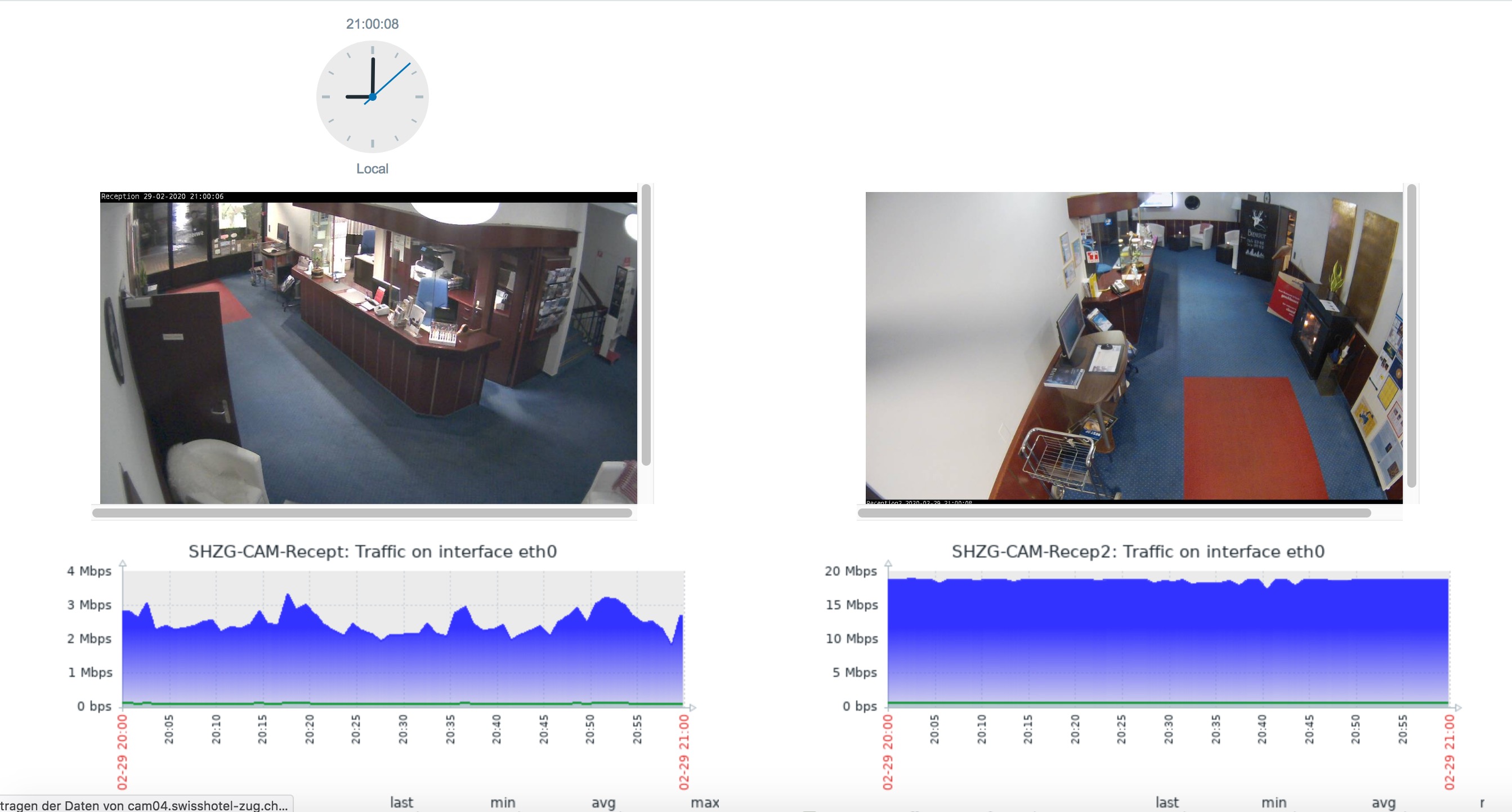
Zabbix Monitoring of Cameras in a Hotel, with Live views:

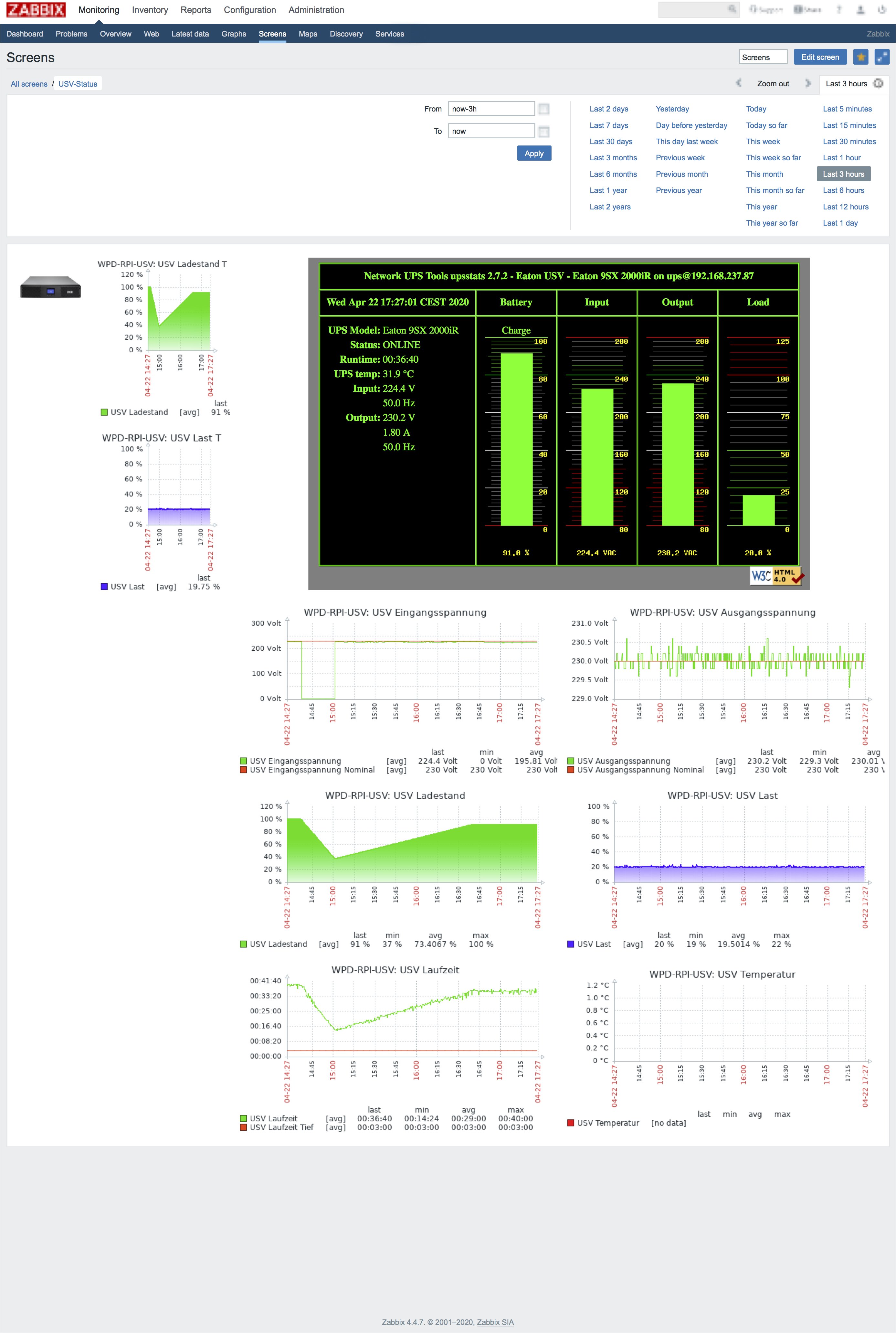
Monitoring UPS (On a dedicated Raspberry) with Zabbix:

My 2 cents
Andy

Thanks again for your kind offer to help @Andy_Wismer!

Our situation is such that we’re creating a wireless Last Mile to backhaul dedicated Internet connections to our neighbors. Using OPNsense is dead easy. Each Cable Modem is connected to the Smart Switch and tagged with its own VLAN ID. OPNsense is the one-to-one mapper between a home and its respective Cable Modem.

The neat thing is people can order whatever Internet package that they want. Eventually we may have to increase the wireless network capacity.

We use Zabbix to monitor all the internal network and systems.

It’s quite spiffy!

Later!
-pablo

1 Like

Cool idea, Pablo!

Did that a long time ago (Around 1997) as Internet wasn’t then what it is now…
We actually “wired” the houses at roof level… :slight_smile:
But still a valid and good idea in a neighbor community!

BTW, where are you located? With spanisch names, there’s a big bandwidth of possible locations, from the obvious Spain to South America, or any place on this world where someone could be! :slight_smile:

I am in north eastern Switzerland, right on the border to the german town of Constance, on the lake of constance.

Andy

I’m sorry for that, I was to slow reconfiguring my openwrt router with some test vlans to help you. I found out that it seems you need a red interface with gateway to make browsing work. If you set more gateways on green it does not work. But this seems irrelevant now.

Could you please explain in detail what you wanted to achieve, what was not working in Nethserver that now works in OPNsense.
I’d like to explore and improve the Neth side.

1 Like

Hi @mrmarkuz,

I appreciate that you tried to help. Thank you.

I don’t quite follow you on what you mean by to make browsing work … it may be moot at this point.

May I suggest using VirtualBox + OPNsense. That was the quickest way that I found to set up the VLAN output from the Smart Switch In fact, I actually used pfSense but now that I see the power of OPNsense, I would never use pfSense

Sure. I live in a rural part of the world: dirt roads, farms, etc. In the village, there is High Speed Internet.

My neighbor and I are geeks. :wink: My neighbors are not. We all want High Speed Internet.

The local ISPs focus on high density areas. Not our areas.

We have created a private, wireless last mile to our eight respective homes. In order to remain legal, we cannot share Internet connections. Each home must order their own service.

With the above in mind, logically, we need to implement the following:

[ Cable Modem #1 ] <--> [ Home #1 ]
[ Cable Modem #2 ] <--> [ Home #2 ]
   ...
[ Cable Modem #8 ] <--> [ Home #3 ]

where the wireless cloud, if you will, connects each home.

Physically, we are using Smart Switches. Each switch has seven usable ports and one additional port to connected to the gateway. The Cable Modems are given a unique VLAN ID.

We have two Smart Switches because at the moment, we have eight Cable Modems.

Our GW has four Ethernet ports allocated as follows:

  1. Switch 1
  2. Switch 2
  3. LAN - to the wireless backhaul antenna
  4. Free

As we are not forcing people to purchase Static IPs, each Cable Modem is setup in Router mode. Its DHCP addressing is unique across each modem.

Given all the above, we need to map a Home to their corresponding Cable modem. The ISP is very strict about the no-sharing policy. We want to stay within their rules. In other words, no sharing.

With NethServer, I could only get the above to work with two Cable Modems. I had to jury-rig the setup due to the bug:

  • Cable Modem #1 - WAN
  • Cable Modem #2 - VLAN ID

The VLANs are on the same NIC as the switches. Logically, the switches are internal (green). The VLANs are Internet (red).

I tried many different permutations to make it work. I don’t recall whether I tried with making the Switch NIC red. I thought I did but if you are saying you tested it and got it to work with three or more VLANs, then clearly I did not.

As I mentioned above, I ended up creating a VirtualBox lab to simulate my environment:

  • Simulate the output of two smart switches, with eight Cable modems dispensing unique DHCP addressing schemes. Each with their unique VLAN ID.
  • The gateway software (e.g. pfSense, NethServer, OPNsense)
  • Three homes - I figured that was enough

With my lab set up, I did some Google’ing on different GW solutions. I found OPNsense. I read it was a fork from pfSense.

My experience with pfSense is that it works pretty well. It has some rough edges but not bad.

One of the things about pfSense and OPNsense is the ability to queue up changes, then persist them all at once. NS truly falls short on this front. With NS, on certain changes, you have to persist each one. While it is persisting it, you may or may not lose the Internet and it takes a very long time. The *sense solutions are quick and never lose the Internet.

In fact, I was telling my geeky wife that the in my opinion, NS is more of a hobbyist solution. It’s okay to have some network interruptions while affecting changes. OPNsense is an Enterprise-level solution. You can make many changes without affecting the network.

I also find the dashboard and reports in OPNsense far more modern. NS and Cockpit are a step in the right direction but it’s still way too old.

I would strongly suggest that you spin up a version of OPNsense in a VM. There are a lot of neat features that NS can use.

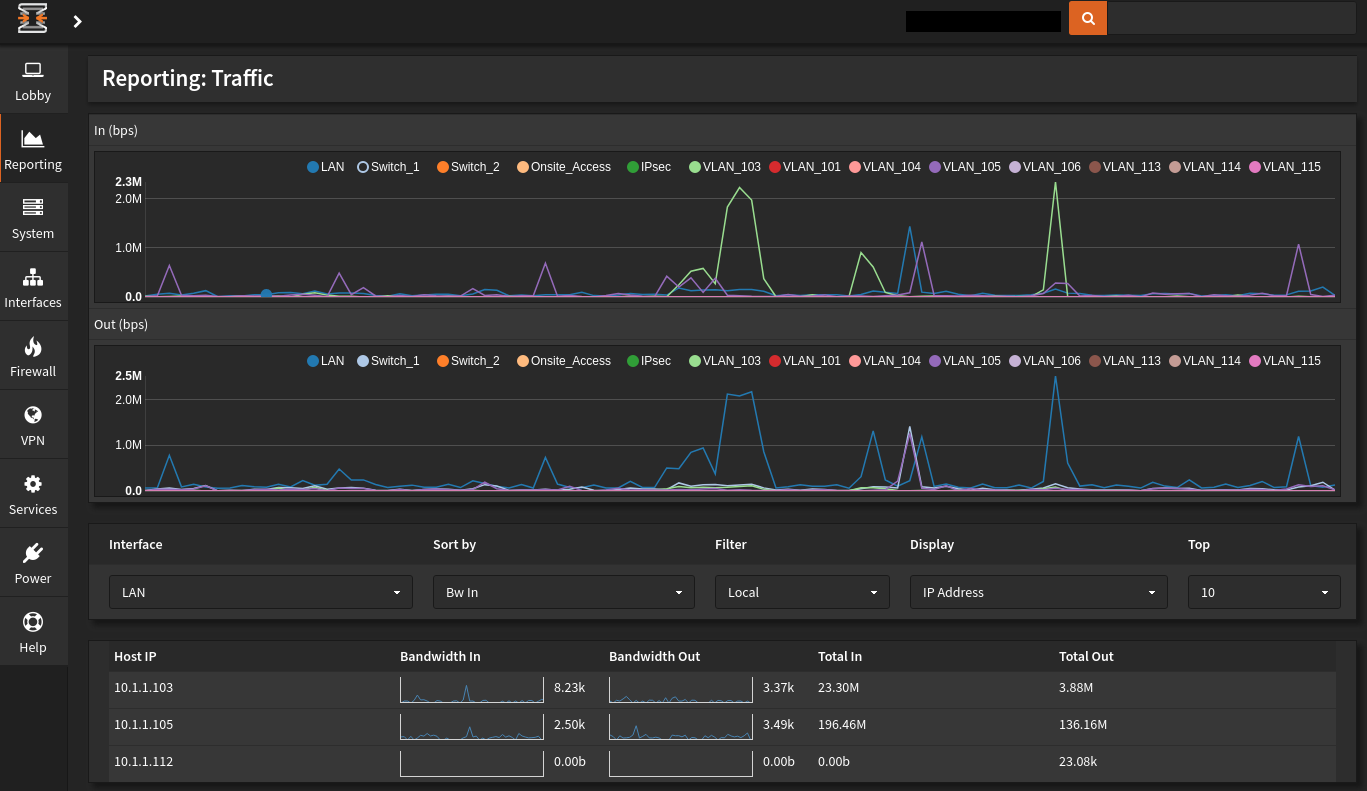
I’m attaching a couple of images. At the moment, we only have two Cable Modems set up: VLAN ID 103 and 105.

You can see their traffic in these graphs.

I hope this detailed response was helpful. I could go into more detail but in the end, I strongly suggest that you try OPNsense.

Cheers,
-pablo!

Dashboard

Reporting Traffic

2 Likes

Thanks for the detailed explanation. I am going to test.

1 Like

Hey @mrmarkuz,

You’re welcome. Before I burn down my lab, let me know if you’d like me to give you the VMs. I could put them on my G Drive.

I didn’t explain some other features but I’ll do so now. They’re all easy to implement.

btw, I’m a Linux person. OPNsense uses FreeBSD. To me though, UNIX is UNIX. I think you understand what I mean by that … :wink:

Cheers!
-pablo

Multiple WAN HA Strategies
While no home is allowed to share their Internet connection, I tested the ability to create Active-Passive Multi-WAN support per home.

For example, suppose my geeky neighbor is geek 1 and I’m geek 2, I can create the following two HA solutions:

  1. GEEK_1 FAILS_TO GEEK_2
  2. GEEK_2 FAILS_TO GEEK_1

As expected, the policy for failure can be loss of link, loss of packets, latency. I cannot recall whether it’s and/or. As you can see, it’s quite deluxe.

I did create a default HA for the wireless infrastructure. It Load Balances between my geeky neighbor and me.

Backup and Restore
The backup file is an XML file. As I set up my lab exactly as Production, it was extremely easy to install the software and get up to speed. The only tweaking I did was change the Interface driver names in the file: eth0 => igb0, etc.

Backups to the Cloud
I believe backing up to the cloud is a newish NS feature. I like that OPNsense also has it.

Whizzy Search
With so many options, there’s a search bar in the upper right of the screen. As you start typing, potential matches show up. Rather than navigating through a myriad of menus, sub-menus, sub-sub-menus, you can jump right to where you need to be.

Compact/Detailed Nav Bar
The left nav bar easily collapses to icons. Leaving you more real estate. It’s easy to expand. However I don’t because of the whizzy search.

Cheers,
-pablo

3 Likes