Change the SSH port problem

I would like to change the ssh port for a similar reason as @LayLow but I have a problem.

NS8 is running Rocky Linux 9.6 and @davidep firewall commands don’t work because if I remove TCP port 22 from the ssh service and reload the firewall settings then I can’t ssh on TCP port 2222 or TCP port 22 (the latter makes sense).

If I disable port forwarding, remove TCP port 2222 from the ssh service and add TCP port 22 again, then reload the firewall settings, I can still log in on both ports.

I checked but I couldn’t find a /etc/ssh/sshd_config.d/10-ports.conf file either.

What did I do wrong?

Thank you for your help

I tested it and after changing the port as explained in the documentation, I’m not able to login to port 22 anymore.

If you try locally, you can still login but from publc it shouldn’t be possible.
Maybe it’s still working due to the VPN?

@mrmarkuz Of course, I did it according to the documentation.

Sorry, but I don’t understand what you mean. The ssh firewall reset was successful, I reloaded the firewall settings, and later restarted the NS8 server, but I can still log in with ssh on TCP 22 and TCP 2222 ports.

Here is the output of frewall-cmd --list-all prancs:

public (active)
target: default
icmp-block-inversion: no
interfaces: dummy0 eth0
sources:
services: http https mail1 ns-wireguard samba3 ssh wg-easy1
ports: 8080/tcp
protocols:
forward: yes
masquerade: no
forward-ports:
source-ports:
icmp-blocks:
rich rules:

Here is the output of frewall-cmd --info-service ssh prancs:

ssh
ports: 22/tcp
protocols:
source-ports:
modules:
destination:
includes:
helpers:

If I understand correctly, NS8 would only be available on TCP port 22, but this is not true, because you can also log in on TCP 2222… Am I wrong?

Yes, that’s right. I can’t reproduce. With that configuration I can’t reach SSH on port 2222 anymore, just on port 22.

Did you reload the firewall correctly?

firewall-cmd --reload

Is there maybe another firewall that does port forwarding? Maybe it works because you’re connected via VPN?

I meant that if you setup the port forward to use SSH on port 2222, you still can login locally to port 22. You should test it from another machine and not locally.

Of course.

There is no other firewall. I am not trying to connect via VPN.

The same is true for public IP addresses or domain names, you can also log in from the internet on TCP ports 22 and 2222 with ssh.

This is an NS8 running on Proxmox that I installed with the ns8-rocky-qcow2 image earlier. I’ve had several problems with it, it doesn’t work as it should sometimes.

Unfortunately, I can’t reinstall it right now. In the meantime, I see that there are a lot of updates for the operating system, I’ll run them to see if that helps.

1 Like

@steve please post the exact command you used (bash history) to change the ssh port. I suspect a typo.

2 Likes

@LayLow I’ve copied the exact commands from the bash history below to redirect the ssh port:

firewall-cmd --permanent --add-forward-port=port=2222:proto=tcp:toport=22
firewall-cmd --permanent --service=ssh --add-port=2222/tcp
firewall-cmd --permanent --service=ssh --remove-port=22/tcp
firewall-cmd --reload

Here are the exact commands from bash history that I used to disable ssh port forwarding:

firewall-cmd --permanent --service=ssh --remove-port=2222/tcp
firewall-cmd --permanent --remove-forward-port=port=2222:proto=tcp:toport=22
firewall-cmd --permanent --service=ssh --add-port=22/tcp
firewall-cmd --reload

I checked the documentation several times and knowing the firewall commands I don’t think I made a mistake, but I can’t completely rule it out. Of course, it would help a lot if someone else looked at what I did because more eyes see more…

Thank you for your help

Please see ns8:admin_cmds:ssh [NethServer & NethSecurity] and the documentation. You seem to miss 1 line.

ps. ‘Undoing’ a port redirection has not been documented yet, changing th redirection is, so we are in learning curve here.

2 Likes

Please explain what you mean, because I think the lines described in the wiki are identical to the commands I issued on the console.

If I’m wrong, I’d like to know what I did wrong. Thank you.

I retested and couldn’t reproduce. Here the commands are just working.

Let’s try another port like 2223 to exclude possible external port forwardings (on the router for example)

firewall-cmd --permanent --add-forward-port=port=2223:proto=tcp:toport=22
firewall-cmd --permanent --service=ssh --add-port=2223/tcp
firewall-cmd --permanent --service=ssh --remove-port=22/tcp
firewall-cmd --reload

Now SSH should be accessible on port 2223 only.

Let’s reset to default:

firewall-cmd --permanent --remove-forward-port=port=2223:proto=tcp:toport=22
firewall-cmd --permanent --service=ssh --remove-port=2223/tcp
firewall-cmd --permanent --service=ssh --add-port=22/tcp
firewall-cmd --reload

Now SSH should be accessible on port 22 only.

2 Likes

There was no problem with the commands, I used them before.

I updated the NS8 core in the meantime and then tried to redirect the port on the firewall again.

I was successful and now the TCP 2222 port is redirected to the ssh TCP 22 port on the firewall.

From the outside (through the firewall) ssh is only accessible on the TCP 2222 port, the TCP 22 port is closed.

Thank you for your help, the problem is solved, but the cause could not be found.

I’m continuing the testing now…

1 Like

Over the past week, I’ve been running Crowdsec to see what’s happening to the server on the internet.

Today, for the first time since I set it up, I received a notification from Crowdsec that it had prevented 4.33k attacks in the past week. Since only http and https are currently allowed on the router, the report affects them. I’m attaching a picture of it.
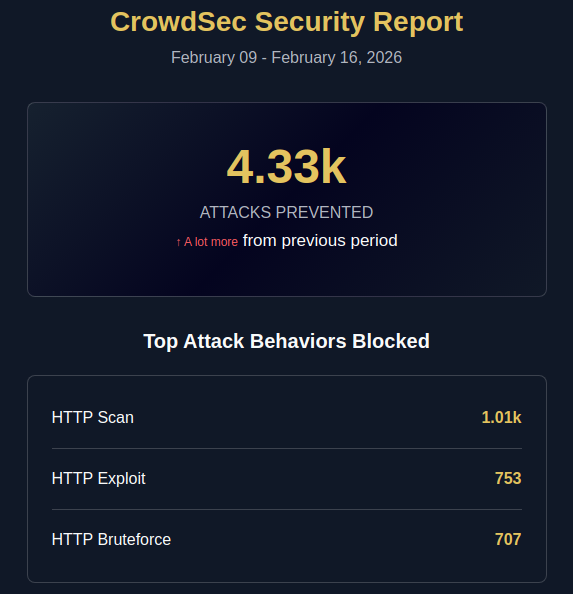
These are huge numbers for me, I’ve never seen so many attacks on my servers and routers, I hope it will decrease.

The report doesn’t say what he did with the attacks, blacklisted him, banned him, or anything else. I can’t find a list of banned addresses anywhere.

Is this available to view somewhere?

Thank you for your help

You need to login into the Crowdsec website, all details are there. Please use a new topic if you want to discuss more.