root@d1:~# add-module ghcr.io/stephdl/sam:0.0.1-dev.6
new version
root@d1:~# add-module ghcr.io/stephdl/sam:0.0.1-dev.6
new version
Am I wrong?
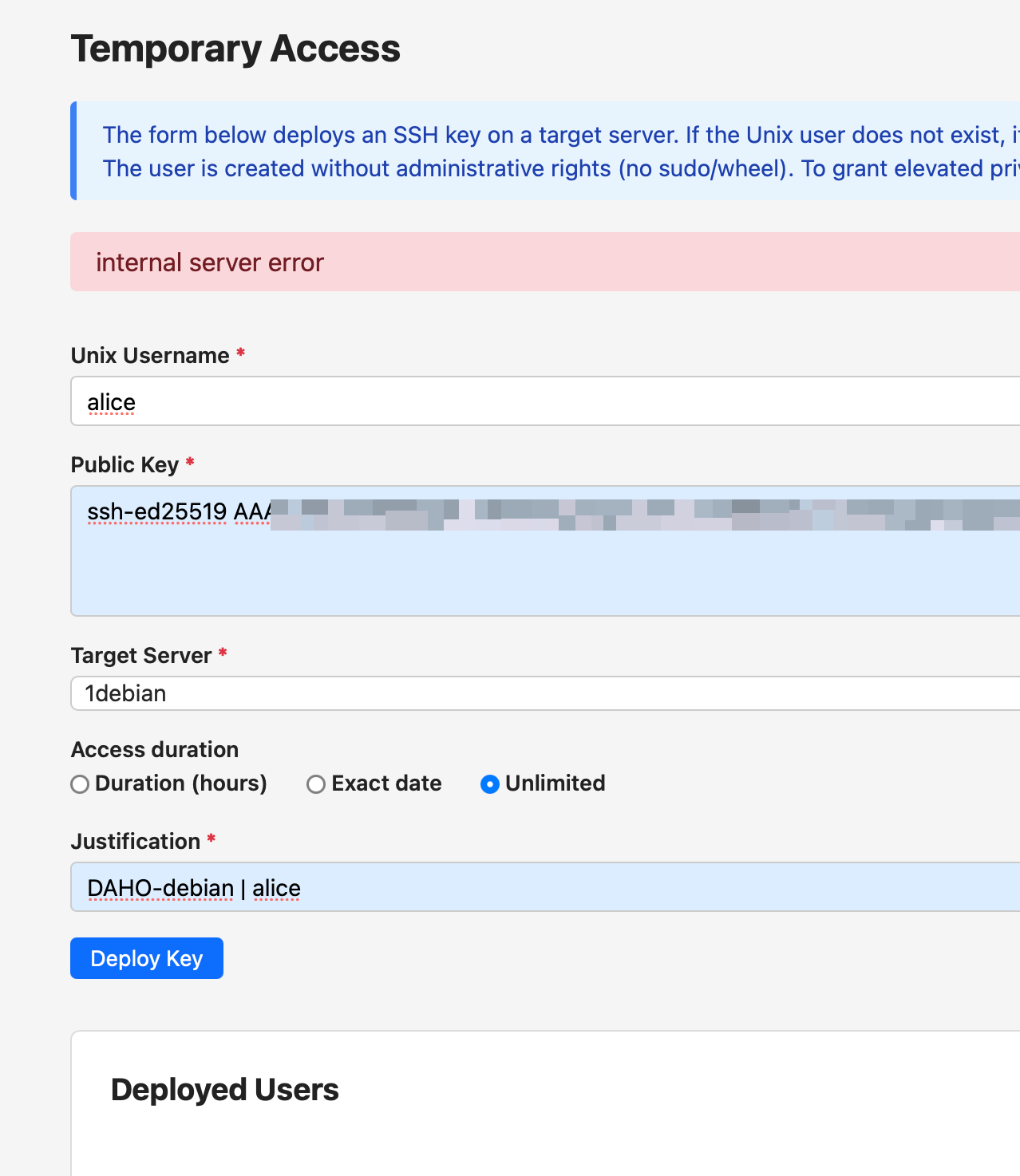
2026-04-29T15:53:33+02:00 [1:sam1:sam-app] 2026-04-29 13:53:33,392 INFO 127.0.0.1 - - [29/Apr/2026 13:53:33] “e[35me[1mPOST /api/access/deploy HTTP/1.0e[0m” 500 -
2026-04-29T15:53:33+02:00 [1:sam1:sam-app] 10.0.2.100 - - [29/Apr/2026:13:53:33 +0000] “POST /api/access/deploy HTTP/1.1” 500 34 “ssh-access-manager” “Mozilla/5.0 (Macintosh; Intel Mac OS X 10_15_7) AppleWebKit/605.1.15 (KHTML, like Gecko) Version/26.4 Safari/605.1.15”
2026-04-29T15:55:01+02:00 [1:sam1:sam-app] 2026-04-29 13:55:01,650 INFO Connected (version 2.0, client OpenSSH_10.0p2)
2026-04-29T15:55:01+02:00 [1:sam1:sam-app] expire.py: 0 warnings sent, 0 keys expired
2026-04-29T15:55:01+02:00 [1:sam1:sam-app] 2026-04-29 13:55:01,685 INFO Authentication (publickey) failed.
2026-04-29T15:55:01+02:00 [1:sam1:sam-app] 2026-04-29 13:55:01,703 INFO [CRITICAL] [ssh-access-manager] Scan failed on 1debian
2026-04-29T15:55:03+02:00 [1:sam1:sam-app] FAILED 1debian: Authentication failed.
2026-04-29T15:56:36+02:00 [1:sam1:sam-app] 2026-04-29 13:56:36.711 UTC [56] LOG: checkpoint starting: time
2026-04-29T15:56:37+02:00 [1:sam1:sam-app] 2026-04-29 13:56:37.370 UTC [56] LOG: checkpoint complete: wrote 6 buffers (0.0%), wrote 1 SLRU buffers; 0 WAL file(s) added, 0 removed, 0 recycled; write=0.603 s, sync=0.027 s, total=0.659 s; sync files=7, longest=0.007 s, average=0.004 s; distance=5 kB, estimate=154 kB; lsn=0/1C248B0, redo lsn=0/1C24858
2026-04-29T15:56:59+02:00 [1:sam1:sam-app] 2026-04-29 13:56:59,206 INFO Connected (version 2.0, client OpenSSH_10.0p2)
2026-04-29T15:56:59+02:00 [1:sam1:sam-app] 2026-04-29 13:56:59,251 INFO Authentication (publickey) failed.
2026-04-29T15:56:59+02:00 [1:sam1:sam-app] 2026-04-29 13:56:59,253 ERROR deploy_key failed
2026-04-29T15:56:59+02:00 [1:sam1:sam-app] Traceback (most recent call last):
2026-04-29T15:56:59+02:00 [1:sam1:sam-app] File “/app/app/web.py”, line 631, in api_deploy_key
2026-04-29T15:56:59+02:00 [1:sam1:sam-app] result = actions.deploy_key(
2026-04-29T15:56:59+02:00 [1:sam1:sam-app] ^^^^^^^^^^^^^^^^^^^
2026-04-29T15:56:59+02:00 [1:sam1:sam-app] File “/app/app/actions.py”, line 502, in deploy_key
2026-04-29T15:56:59+02:00 [1:sam1:sam-app] ssh.ensure_scripts(hostname, server[“id”], server[“ip_address”])
2026-04-29T15:56:59+02:00 [1:sam1:sam-app] File “/app/app/ssh.py”, line 253, in ensure_scripts
2026-04-29T15:56:59+02:00 [1:sam1:sam-app] client = _connect(ip)
2026-04-29T15:56:59+02:00 [1:sam1:sam-app] ^^^^^^^^^^^^
2026-04-29T15:56:59+02:00 [1:sam1:sam-app] File “/app/app/ssh.py”, line 216, in _connect
2026-04-29T15:56:59+02:00 [1:sam1:sam-app] client.connect(hostname=ip, username=SSH_USER, key_filename=COLLECTOR_KEY, timeout=15)
2026-04-29T15:56:59+02:00 [1:sam1:sam-app] File “/usr/lib/python3.12/site-packages/paramiko/client.py”, line 483, in connect
2026-04-29T15:56:59+02:00 [1:sam1:sam-app] self._auth(
2026-04-29T15:56:59+02:00 [1:sam1:sam-app] File “/usr/lib/python3.12/site-packages/paramiko/client.py”, line 814, in _auth
2026-04-29T15:56:59+02:00 [1:sam1:sam-app] raise saved_exception
2026-04-29T15:56:59+02:00 [1:sam1:sam-app] File “/usr/lib/python3.12/site-packages/paramiko/client.py”, line 731, in _auth
2026-04-29T15:56:59+02:00 [1:sam1:sam-app] self._transport.auth_publickey(username, key)
2026-04-29T15:56:59+02:00 [1:sam1:sam-app] File “/usr/lib/python3.12/site-packages/paramiko/transport.py”, line 1703, in auth_publickey
2026-04-29T15:56:59+02:00 [1:sam1:sam-app] return self.auth_handler.wait_for_response(my_event)
2026-04-29T15:56:59+02:00 [1:sam1:sam-app] ^^^^^^^^^^^^^^^^^^^^^^^^^^^^^^^^^^^^^^^^^^^^^
2026-04-29T15:56:59+02:00 [1:sam1:sam-app] File “/usr/lib/python3.12/site-packages/paramiko/auth_handler.py”, line 263, in wait_for_response
2026-04-29T15:56:59+02:00 [1:sam1:sam-app] raise e
2026-04-29T15:56:59+02:00 [1:sam1:sam-app] paramiko.ssh_exception.AuthenticationException: Authentication failed.
2026-04-29T15:56:59+02:00 [1:sam1:sam-app] 2026-04-29 13:56:59,260 INFO 127.0.0.1 - - [29/Apr/2026 13:56:59] “e[35me[1mPOST /api/access/deploy HTTP/1.0e[0m” 500 -
2026-04-29T15:56:59+02:00 [1:sam1:sam-app] 10.0.2.100 - - [29/Apr/2026:13:56:59 +0000] “POST /api/access/deploy HTTP/1.1” 500 34 “ssh-access-manager” “Mozilla/5.0 (Macintosh; Intel Mac OS X 10_15_7) AppleWebKit/605.1.15 (KHTML, like Gecko) Version/26.4 Safari/605.1.15”
Ps.: I also added PubkeyAuthentication yes in /etc/ssh/sshd_config and restarted ssh
Ps2.:I also added the key in /home/audit-collector/.ssh/authorized_keys
Ps3.: Perhaps I need to provision the remote server manually?
../bin/provision-server --hostname debian.home.mydomain.de --ip 192.168.3.27 --user root --env lab --os debian
Unfortunately, I can’t access the environment:
root@daho-ns8:~# runagent -m sam1 podman exec -ti sam-app bash
Error: crun: executable file `bash` not found in $PATH: No such file or directory: OCI runtime attempted to invoke a command that was not found
root@daho-ns8:~#
I am providing a new way for the onboarding, more simple
add-module ghcr.io/stephdl/sam:0.0.1-dev.7 1
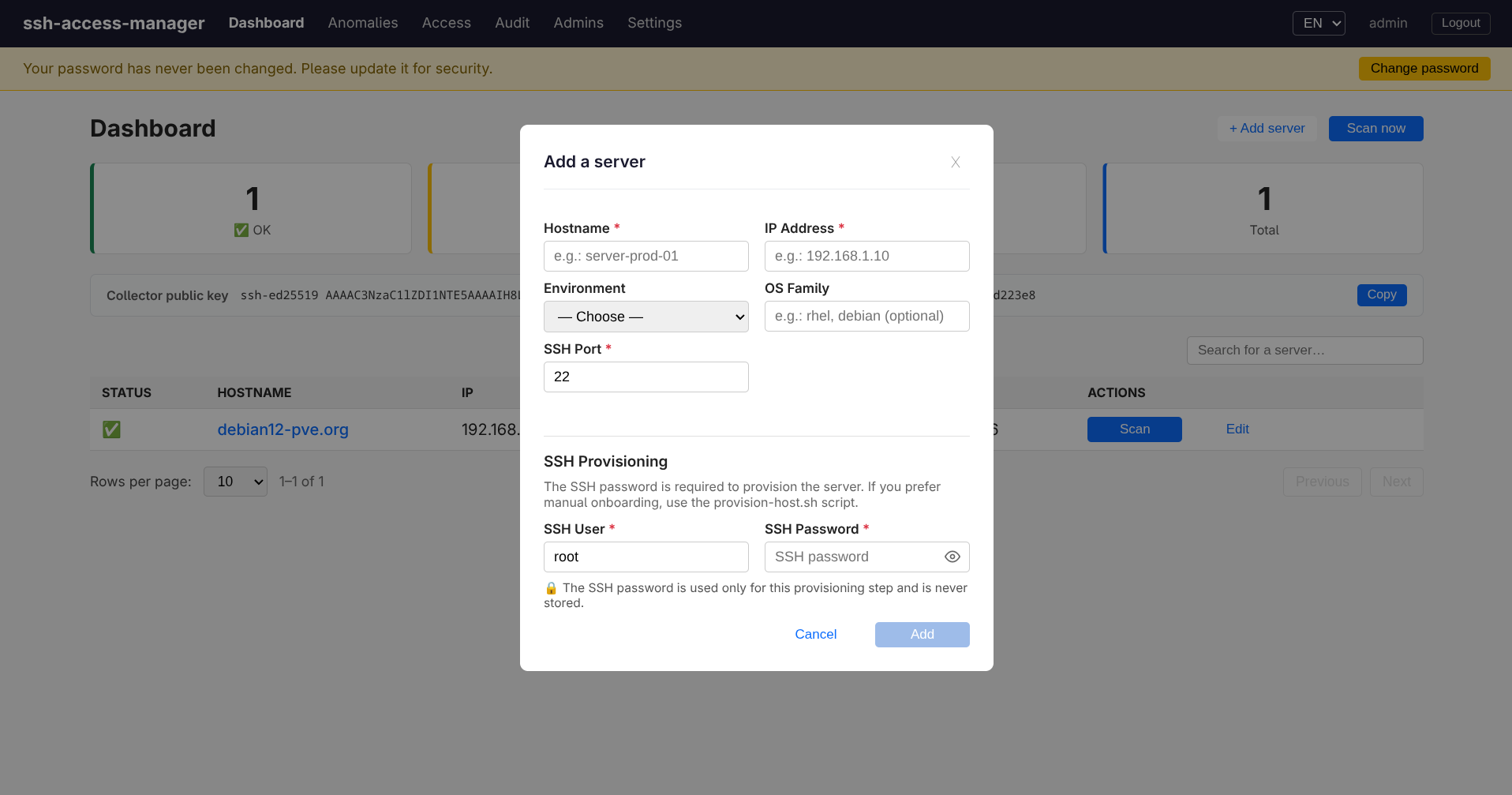
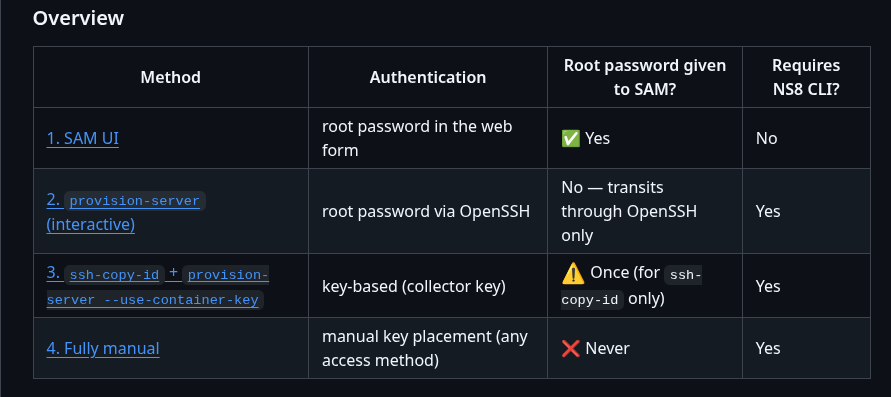
new way to provision a server, either you do not trust me and you can provision the server manually
you run a CLI where you give the password on the cli
or if you trust me you can do it in the UI, the password is not saved in database it is only to authenticate, create the user and give the key based access to sam
Full verification complete. The SSH password is never stored — not in the database, not in logs.
add_server() (line 638–675)
provision_server() (line 678–702)
SQL schema (servers table)
The table has no ssh_password column — it cannot be stored accidentally. Columns are: id, hostname, ip_address, ssh_port, os_family, os_version, environment,
is_active.
The SSH password is ephemeral: held in memory only for the duration of the paramiko connection, then discarded.
in short, we have several way to provision a remote server see