Tried to restore the data backup and it went well. Unfortunately, I couldn’t see the data in user accounts.
The scenario of backup on production server is as per the pic…
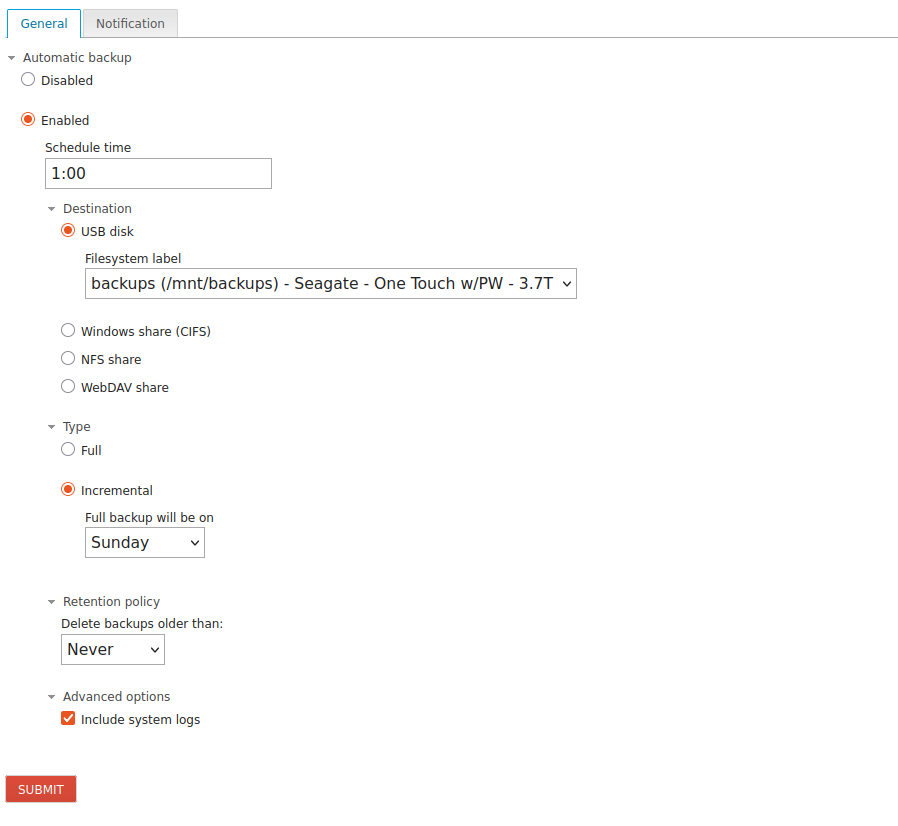
so how do I proceed to restore full data on to the new VM?
Tried to restore the data backup and it went well. Unfortunately, I couldn’t see the data in user accounts.
The scenario of backup on production server is as per the pic…
so how do I proceed to restore full data on to the new VM?
Did you restore via Cockpit?
I assume there was no error message in UI, were errors in the logs?
It may take some time until the data backup is finished. Which data did you check that was missing?
You could try to run the restore on CLI to catch the error: (adapt <name> to the name of your backup)
restore-data -b <name>
Thanks for the response.
Have few doubts…
After removing the subscription, I haven’t taken the complete backup as per the image. So will wait till coming Sunday and take both config data and user data.. Will try to restore on the VM.
I can download the config data from the cockpit. But how do I download the user data from the production server?
Please let me know (the complete path/process) how to transfer the data from production server to the vm, so that, will use scp / filezilla to transfer.
It went well. No errors observed.
I don’t think my config backup file doesn’t have any data as it is an incremental one.
I tried this but no data is restored, as there is no real user data on the VM.
If I know how to transfer the actual user data from production server to VM, then will try again and let you know.
Once again thanks for taking time and helping me.
The config backup has nearly no data, it’s just about to be able to restore the configuration.
As the data is on an USB disk, you would need to attach the USB disk to the VM to be able to restore the data.
My points are still not clear. Please answer. Am unable to connect to your responses.
Let me give you
Do I need to wait till Sunday to have complete backup on to the external hard disk?
Download configuration from cockpit and restore on VM
Copy the entire content (around 40GB), to another USB drive and connect that to VM and
try to restore the config backup after connecting the USB to VM.
Is this correct?
Or any other procedure, I can follow?
No, the incremental backup should be ok to restore the data.
Yes, restore the config after the USB disk is attached to the VM.
When the config is restored and the Software packages are installed you can proceed with the data restore.
No need to copy the data to a new disk.
You could just unplug the USB disk from the physical server and attach it to the VM.
Thanks for the speedy reply.
The challenge here is the production server is 500KM away from my present location.
So how?
OK, in that case you could
Successfully setup sftp through VPN between these two locations. Let me know which files (path) I should copy and paste in the remote location.
In the meantime, will explore rsync tool too.
You could copy the backuped files from the USB disk. You would need to mount the USB disk on the physical server to be able to access the data.
Check the attached disks to find your USB disk device:
lsblk -f
Check the mountpoint of the backup, in my test case it’s /mnt/backup-testbackup1
[root@neth ~]# ls /mnt/
backup-testbackup1
Mount the USB disk: (in my test case the disk device is /dev/sdb1)
mount /dev/sdb1 /mnt/backup-testbackup1
The backuped files look like this, there’s also a backup-config.tar.xz which is the configuration backup.
[root@neth ~]# ls /mnt/backup-testbackup1/neth/
backup-config.tar.xz  duplicity-full.20250926T110947Z.manifest  duplicity-full.20250926T110947Z.vol1.difftar.gz  duplicity-full-signatures.20250926T110947Z.sigtar.gz
Now it should be possible to access the files under /mnt/backup-testbackup1 and download/copy them to another (USB) disk.
If you use some other disk you may configure a backup on the VM that points to the new (USB) disk. The restore process will grab the files from there.