no packages for update
after a restart the mysql is started, but the rest dont work.
Could you paste the output of?
systemctl status nsdc
Also search for any error message in
journalctl -M nsdc
1 Like
the output of systemctl status is:
â nsdc.service - NethServer Domain Controller container
Loaded: loaded (/usr/lib/systemd/system/nsdc.service; enabled; vendor preset: disabled)
Active: active (running) since Tue 2016-12-13 08:32:04 CET; 6min ago
Docs: man:systemd-nspawn(1)
Main PID: 27144 (systemd-nspawn)
Status: "Container running."
Memory: 149.4M
CGroup: /machine.slice/nsdc.service
ââ27144 /usr/bin/systemd-nspawn --quiet --keep-unit --boot --network-bridge=br0 --machine=nsdc
ââ27146 /usr/lib/systemd/systemd
ââsystem.slice
ââdbus.service
â ââ27253 /bin/dbus-daemon --system --address=systemd: --nofork --nopidfile --systemd-activation
ââsystemd-journald.service
â ââ27232 /usr/lib/systemd/systemd-journald
ââsystemd-logind.service
â ââ27252 /usr/lib/systemd/systemd-logind
ââsamba.service
â ââ27260 /usr/sbin/samba -i --debug-stderr
â ââ27263 /usr/sbin/samba -i --debug-stderr
â ââ27264 /usr/sbin/samba -i --debug-stderr
â ââ27265 /usr/sbin/smbd -D --option=server role check:inhibit=yes --foreground
â ââ27266 /usr/sbin/samba -i --debug-stderr
â ââ27267 /usr/sbin/samba -i --debug-stderr
â ââ27268 /usr/sbin/samba -i --debug-stderr
â ââ27269 /usr/sbin/samba -i --debug-stderr
â ââ27270 /usr/sbin/samba -i --debug-stderr
â ââ27271 /usr/sbin/samba -i --debug-stderr
â ââ27272 /usr/sbin/samba -i --debug-stderr
â ââ27273 /usr/sbin/samba -i --debug-stderr
â ââ27274 /usr/sbin/samba -i --debug-stderr
â ââ27275 /usr/sbin/samba -i --debug-stderr
â ââ27276 /usr/sbin/winbindd -D --option=server role check:inhibit=yes --foreground
â ââ27277 /usr/sbin/samba -i --debug-stderr
â ââ27280 /usr/sbin/smbd -D --option=server role check:inhibit=yes --foreground
â ââ27281 /usr/sbin/smbd -D --option=server role check:inhibit=yes --foreground
â ââ27283 /usr/sbin/smbd -D --option=server role check:inhibit=yes --foreground
â ââ27284 /usr/sbin/winbindd -D --option=server role check:inhibit=yes --foreground
â ââ27393 /usr/sbin/smbd -D --option=server role check:inhibit=yes --foreground
ââconsole-getty.service
ââ27257 /sbin/agetty --noclear --keep-baud console 115200 38400 9600 vt220
Dec 13 08:32:05 xxx.xx.xx. systemd-nspawn[27144]: [ OK ] Started Network Service.
Dec 13 08:32:05 xxx.xx.xx systemd-nspawn[27144]: [ OK ] Reached target Network.
Dec 13 08:32:05 xxx.xx.xx systemd-nspawn[27144]: [ OK ] Started Samba domain controller daemon.
Dec 13 08:32:05 xxx.xx.xx systemd-nspawn[27144]: Starting Samba domain controller daemon…
Dec 13 08:32:05xxx.xx.xx systemd-nspawn[27144]: [ OK ] Reached target Multi-User System.
Dec 13 08:32:05 xxx.xx.xx systemd-nspawn[27144]: [ OK ] Reached target Graphical Interface.
Dec 13 08:32:05 xxx.xx.xx systemd-nspawn[27144]: Starting Update UTMP about System Runlevel Changes…
Dec 13 08:32:05xxx.xx.xx systemd-nspawn[27144]: [ OK ] Started Update UTMP about System Runlevel Changes.
Dec 13 08:32:05 xxx.xx.xx systemd-nspawn[27144]: CentOS Linux 7 (Core)
Dec 13 08:32:05 xxx.xx.xx systemd-nspawn[27144]: Kernel 4.4.22-1.el7.elrepo.x86_64 on an x86_64
So the nsdc container is up and samba4 is running. Can you ping its IP address? You can obtain it with
config show nsdcyes ping is responding
if i view at the domain account is written this now
NetBIOS domain name: xxx
ads_connect: No logon servers
ads_connect: No logon servers
Didn’t find the ldap server!
ads_connect: No logon servers
Join to domain is not valid: No logon servers
ads_connect: No logon servers
ads_connect: No logon servers
1 Like
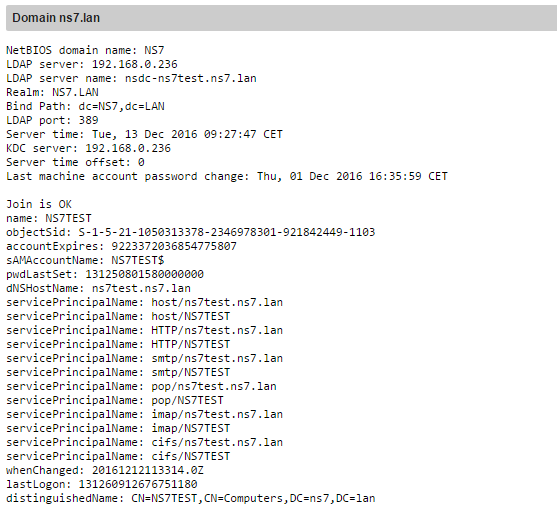
The container seems good, let’s see the “client” side… What does the Server Manager report at page “Status > Domain accounts”?
/cc @support_team
Let’s see dnsmasq:
systemctl status dnsmasqâ dnsmasq.service - DNS caching server.
Loaded: loaded (/usr/lib/systemd/system/dnsmasq.service; enabled; vendor preset: disabled)
Active: active (running) since Mon 2016-12-12 20:06:06 CET; 12h ago
Main PID: 1190 (dnsmasq)
CGroup: /system.slice/dnsmasq.service
ââ1190 /usr/sbin/dnsmasq -k
Dec 13 06:08:32 xxx.xxx.xxx dnsmasq-dhcp[1190]: DHCPREQUEST(br0) 192.168.100.150 00:04:20:2a:50:91
Dec 13 06:08:32 xxx.xxx.xxx dnsmasq-dhcp[1190]: DHCPACK(br0) 192.168.100.150 00:04:20:2a:50:91 SqueezeboxRadio
Dec 13 07:45:01 xxx.xxx.xxx dnsmasq-dhcp[1190]: DHCPREQUEST(br0) 192.168.100.109 e8:50:8b:0a:b8:6a
Dec 13 07:45:01 sxxx.xxx.xxx dnsmasq-dhcp[1190]: DHCPACK(br0) 192.168.100.109 e8:50:8b:0a:b8:6a android-2dec71c06455d059
Dec 13 08:17:35 xxx.xxx.xxx dnsmasq-dhcp[1190]: DHCPDISCOVER(br0) b8:ee:65:ac:37:0b
Dec 13 08:17:35 xxx.xxx.xxx dnsmasq-dhcp[1190]: DHCPOFFER(br0) 192.168.100.112 b8:ee:65:ac:37:0b
Dec 13 08:17:35 xxx.xxx.xxx dnsmasq-dhcp[1190]: DHCPREQUEST(br0) 192.168.100.112 b8:ee:65:ac:37:0b
Dec 13 08:17:35 xxx.xxx.xxx dnsmasq-dhcp[1190]: DHCPACK(br0) 192.168.100.112 b8:ee:65:ac:37:0b Rainer-Notebook
Dec 13 08:18:29 xxx.xxx.xxx dnsmasq-dhcp[1190]: DHCPREQUEST(br0) 192.168.100.112 b8:ee:65:ac:37:0b
Dec 13 08:18:29 xxx.xxx.xxx dnsmasq-dhcp[1190]: DHCPACK(br0) 192.168.100.112 b8:ee:65:ac:37:0b Rainer-Notebook
What is the nethserver-sssd version?
rpm -q nethserver-sssd
What does this command say?
realm list
Please check also:
host -t SRV _ldap._tcp.$(hostname -d) $(config getprop nsdc IpAddress)
host -t SRV _ldap._tcp.$(hostname -d) 127.0.0.1What provider do you have? AD container, too?
nethserver-ssd version is nethserver-sssd-1.0.8-1.ns7.noarch
realm list says
compu-max.lan
type: kerberos
realm-name: COMPU-MAX.LAN
domain-name: compu-max.lan
configured: kerberos-member
server-software: active-directory
client-software: winbind
required-package: oddjob-mkhomedir
required-package: oddjob
required-package: samba-winbind-clients
required-package: samba-winbind
required-package: samba-common-tools
login-formats: COMPU-MAX%U
login-policy: allow-any-login
compu-max.lan
type: kerberos
realm-name: COMPU-MAX.LAN
domain-name: compu-max.lan
configured: kerberos-member
server-software: active-directory
client-software: sssd
required-package: oddjob
required-package: oddjob-mkhomedir
required-package: sssd
required-package: adcli
required-package: samba-common-tools
login-formats: %U@compu-max.lan
login-policy: allow-realm-logins
host -t SRV _ldap._tcp.$(hostname -d) $(config getprop nsdc IpAddress)
Using domain server:
Name: 192.168.100.1
Address: 192.168.100.1#53
Aliases:
_ldap._tcp.compu-max.lan has SRV record 0 100 389 nsdc-sbs.compu-max.lan.
host -t SRV _ldap._tcp.$(hostname -d) $(config getprop nsdc IpAddress)
Using domain server:
Name: 192.168.100.1
Address: 192.168.100.1#53
Aliases:
_ldap._tcp.compu-max.lan has SRV record 0 100 389 nsdc-sbs.compu-max.lan.
[root@sbs ~]# Using domain server:
-bash: Using: command not found
[root@sbs ~]# Name: 192.168.100.1
-bash: Name:: command not found
[root@sbs ~]# Address: 192.168.100.1#53
-bash: Address:: command not found
[root@sbs ~]# Aliases:
-bash: Aliases:: command not found
[root@sbs ~]#
[root@sbs ~]# _ldap._tcp.compu-max.lan has SRV record 0 100 389 nsdc-sbs.compu-max.lan.
-bash: _ldap._tcp.compu-max.lan: command not found
[root@sbs ~]# host -t SRV _ldap._tcp.$(hostname -d) 127.0.0.1
Using domain server:
Name: 127.0.0.1
Address: 127.0.0.1#53
Aliases:
_ldap._tcp.compu-max.lan has SRV record 0 100 389 nsdc-sbs.compu-max.lan.
1 Like
this are entrys from messages during and after the updates:
systemd-nspawn: Failed to create directory /var/lib/machines/nsdc//sys/fs/selinux: Read-only file system
sbs winbindd[2669]: [2016/12/12 11:33:26.593372, 0] …/source3/libsmb/cliconnect.c:1895(cli_session_setup_spnego_send)
Dec 12 11:33:26 sbs winbindd[2669]: Kinit for SBS$@COMPU-MAX.LAN to access cifs/nsdc-sbs.compu-max.lan@COMPU-MAX.LAN failed: Preauthentication failed
Dec 12 11:33:26 sbs winbindd[2669]: [2016/12/12 11:33:26.939050, 0] …/source3/libsmb/cliconnect.c:1895(cli_session_setup_spnego_send)
sbs [sssd[ldap_child[3345]]]: Failed to initialize credentials using keytab [MEMORY:/etc/krb5.keytab]: Preauthentication failed. Unable to create GSSAPI-encrypted LDAP connection.
You said kinit failed. Let’s see
cat /etc/krb5.confdont get it all in one screen, outpost is:
required-package: samba-common-tools
  login-formats: COMPU-MAX\%U
  login-policy: allow-any-login
compu-max.lan
  type: kerberos
  realm-name: COMPU-MAX.LAN
  domain-name: compu-max.lan
  configured: kerberos-member
  server-software: active-directory
  client-software: sssd
  required-package: oddjob
  required-package: oddjob-mkhomedir
  required-package: sssd
  required-package: adcli
  required-package: samba-common-tools
  login-formats: %U@compu-max.lan
  login-policy: allow-realm-logins
[root@sbs ~]# compu-max.lan
  realm-name: COMPU-MAX.LAN
-bash: compu-max.lan: command not found
[root@sbs ~]#   type: kerberos
-bash: type:: command not found
[root@sbs ~]#   realm-name: COMPU-MAX.LAN
-bash: realm-name:: command not found
[root@sbs ~]#   domain-name: compu-max.lan
-bash: domain-name:: command not found
[root@sbs ~]#   configured: kerberos-member
-bash: configured:: command not found
  client-software: winbind
[root@sbs ~]#   server-software: active-directory
-bash: server-software:: command not found
[root@sbs ~]#   client-software: winbind
-bash: client-software:: command not found
[root@sbs ~]#   required-package: oddjob-mkhomedir
  required-package: samba-winbind-clients
  required-package: samba-winbind
-bash: required-package:: command not found
[root@sbs ~]#   required-package: oddjob
  required-package: samba-common-tools
  login-formats: COMPU-MAX\%U
-bash: required-package:: command not found
[root@sbs ~]#   required-package: samba-winbind-clients
-bash: required-package:: command not found
compu-max.lan
[root@sbs ~]#   required-package: samba-winbind
  type: kerberos
  realm-name: COMPU-MAX.LAN
-bash: required-package:: command not found
  domain-name: compu-max.lan
[root@sbs ~]#   required-package: samba-common-tools
-bash: required-package:: command not found
[root@sbs ~]#   login-formats: COMPU-MAX\%U
  server-software: active-directory
-bash: login-formats:: command not found
[root@sbs ~]#   login-policy: allow-any-login
  client-software: sssd
-bash: login-policy:: command not found
  required-package: oddjob
[root@sbs ~]# compu-max.lan
  required-package: oddjob-mkhomedir
  required-package: sssd
-bash: compu-max.lan: command not found
[root@sbs ~]#   type: kerberos
-bash: type:: command not found
[root@sbs ~]#   realm-name: COMPU-MAX.LAN
-bash: realm-name:: command not found
[root@sbs ~]#   domain-name: compu-max.lan
-bash: domain-name:: command not found
[root@sbs ~]#   configured: kerberos-member
-bash: configured:: command not found
[root@sbs ~]#   server-software: active-directory
  required-package: samba-common-tools
  login-formats: %U@compu-max.lan
-bash: server-software:: command not found
[root@sbs ~]#   client-software: sssd
-bash: client-software:: command not found
[root@sbs ~]#   required-package: oddjob
-bash: required-package:: command not found
[root@sbs ~]#   required-package: oddjob-mkhomedir
-bash: required-package:: command not found
[root@sbs ~]#   required-package: sssd
-bash: required-package:: command not found
[root@sbs ~]#   required-package: adcli
-bash: required-package:: command not found
[root@sbs ~]#   required-package: samba-common-tools
-bash: required-package:: command not found
[root@sbs ~]#   login-formats: %U@compu-max.lan
-bash: login-formats:: command not found
[root@sbs ~]#   login-policy: allow-realm-logins
-bash: login-policy:: command not found
[root@sbs ~]# host -t SRV _ldap._tcp.$(hostname -d) $(config getprop nsdc IpAddress)
Using domain server:
Name: 192.168.100.1
Address: 192.168.100.1#53
Aliases:

_ldap._tcp.compu-max.lan has SRV record 0 100 389 nsdc-sbs.compu-max.lan.
[root@sbs ~]# host -t SRV _ldap._tcp.$(hostname -d) $(config getprop nsdc IpAddress)
Using domain server:
Name: 192.168.100.1
Address: 192.168.100.1#53
Aliases:

_ldap._tcp.compu-max.lan has SRV record 0 100 389 nsdc-sbs.compu-max.lan.
[root@sbs ~]# Using domain server:
-bash: Using: command not found
[root@sbs ~]# Name: 192.168.100.1
-bash: Name:: command not found
[root@sbs ~]# Address: 192.168.100.1#53
-bash: Address:: command not found
[root@sbs ~]# Aliases:
-bash: Aliases:: command not found
[root@sbs ~]#
[root@sbs ~]# _ldap._tcp.compu-max.lan has SRV record 0 100 389 nsdc-sbs.compu-max.lan.
-bash: _ldap._tcp.compu-max.lan: command not found
[root@sbs ~]# host -t SRV _ldap._tcp.$(hostname -d) 127.0.0.1
Using domain server:
Name: 127.0.0.1
Address: 127.0.0.1#53
Aliases:

_ldap._tcp.compu-max.lan has SRV record 0 100 389 nsdc-sbs.compu-max.lan.
[root@sbs ~]#  host -t SRV _ldap._tcp.$(hostname -d) $(config getprop nsdc IpAddress)
Name: 192.168.100.1
Address: 192.168.100.1#53
Aliases:

_ldap._tcp.compu-max.lan has SRV record 0 100 389 nsdc-sbs.compu-max.lan.
[root@sbs ~]# Using domain server:
-bash: Using: command not found
Using domain server:
Name: 192.168.100.1
Address: 192.168.100.1#53
Aliases:

_ldap._tcp.compu-max.lan has SRV record 0 100 389 nsdc-sbs.compu-max.lan.
[root@sbs ~]# Using domain server:
-bash: Using: command not found
[root@sbs ~]# Name: 192.168.100.1
-bash: Name:: command not found
[root@sbs ~]# Address: 192.168.100.1#53
-bash: Address:: command not found
[root@sbs ~]# Aliases:
-bash: Aliases:: command not found
[root@sbs ~]#
[root@sbs ~]# _ldap._tcp.compu-max.lan has SRV record 0 100 389 nsdc-sbs.compu-max.lan.
-bash: _ldap._tcp.compu-max.lan: command not found
[root@sbs ~]# [root@sbs ~]# Using domain server:
-bash: [root@sbs: command not found
[root@sbs ~]# -bash: Using: command not found
-bash: -bash:: command not found
[root@sbs ~]# [root@sbs ~]# Name: 192.168.100.1
-bash: [root@sbs: command not found
[root@sbs ~]# -bash: Name:: command not found
-bash: -bash:: command not found
[root@sbs ~]# [root@sbs ~]# Address: 192.168.100.1#53
-bash: [root@sbs: command not found
[root@sbs ~]# -bash: Address:: command not found
-bash: -bash:: command not found
[root@sbs ~]# [root@sbs ~]# Aliases:
-bash: [root@sbs: command not found
[root@sbs ~]# -bash: Aliases:: command not found
-bash: -bash:: command not found
[root@sbs ~]# [root@sbs ~]#
-bash: [root@sbs: command not found
[root@sbs ~]# [root@sbs ~]# _ldap._tcp.compu-max.lan has SRV record 0 100 389 nsdc-sbs.compu-max.lan.
-bash: [root@sbs: command not found
[root@sbs ~]# -bash: _ldap._tcp.compu-max.lan: command not found
-bash: -bash:: command not found
[root@sbs ~]# [root@sbs ~]# host -t SRV _ldap._tcp.$(hostname -d) 127.0.0.1
-bash: [root@sbs: command not found
[root@sbs ~]# Using domain server:
-bash: Using: command not found
[root@sbs ~]# Name: 127.0.0.1
-bash: Name:: command not found
[root@sbs ~]# Address: 127.0.0.1#53
-bash: Address:: command not found
[root@sbs ~]# Aliases:
-bash: Aliases:: command not found
[root@sbs ~]#
[root@sbs ~]# _ldap._tcp.compu-max.lan has SRV record 0 100 389 nsdc-sbs.compu-max.lan.
-bash: _ldap._tcp.compu-max.lan: command not found
[root@sbs ~]# cat /etc/krb5.conf
# Configuration snippets may be placed in this directory as well
includedir /etc/krb5.conf.d/

[logging]
 default = FILE:/var/log/krb5libs.log
 kdc = FILE:/var/log/krb5kdc.log
 admin_server = FILE:/var/log/kadmind.log

[libdefaults]
 dns_lookup_realm = false
 ticket_lifetime = 24h
 renew_lifetime = 7d
 forwardable = true
 rdns = false
# default_realm = EXAMPLE.COM
 default_ccache_name = KEYRING:persistent:%{uid}

[realms]
# EXAMPLE.COM = {
#  kdc = kerberos.example.com
#  admin_server = kerberos.example.com
# }

[domain_realm]
# .example.com = EXAMPLE.COM
# example.com = EXAMPLE.COM
[root@sbs ~]# cat /etc/krb5.conf
# Configuration snippets may be placed in this directory as well
includedir /etc/krb5.conf.d/

[logging]
 default = FILE:/var/log/krb5libs.log
 kdc = FILE:/var/log/krb5kdc.log
 admin_server = FILE:/var/log/kadmind.log

[libdefaults]
 dns_lookup_realm = false
 ticket_lifetime = 24h
 renew_lifetime = 7d
 forwardable = true
 rdns = false
# default_realm = EXAMPLE.COM
 default_ccache_name = KEYRING:persistent:%{uid}

[realms]
# EXAMPLE.COM = {
#  kdc = kerberos.example.com
#  admin_server = kerberos.example.com
# }

[domain_realm]
# .example.com = EXAMPLE.COM
# example.com = EXAMPLE.COM
[root@sbs ~]# cls
-bash: cls: command not found
Please comment that line with a # character, then go back to Server Manager “Domain accounts” page.
Yes, AD container.
realm list:
[root@ns7test ~]# realm list
ns7.lan
  type: kerberos
  realm-name: NS7.LAN
  domain-name: ns7.lan
  configured: kerberos-member
  server-software: active-directory
  client-software: winbind
  required-package: oddjob-mkhomedir
  required-package: oddjob
  required-package: samba-winbind-clients
  required-package: samba-winbind
  required-package: samba-common-tools
  login-formats: NS7\%U
  login-policy: allow-any-login
ns7.lan
  type: kerberos
  realm-name: NS7.LAN
  domain-name: ns7.lan
  configured: kerberos-member
  server-software: active-directory
  client-software: sssd
  required-package: oddjob
  required-package: oddjob-mkhomedir
  required-package: sssd
  required-package: adcli
  required-package: samba-common-tools
  login-formats: %U@ns7.lan
login-policy: allow-realm-loginsSame line “includedir” in krb5.conf? Do you have the File server module too?
not sure what you mean, sorry 