Access to node with vpn and ssh

NethServer Version: ns8

Hi everyone. I’d like to configure Postfix so that emails only go out with IPv4 and not IPv6 (I don’t have PTR on IPv6). I figured I need to work on main.cf, but I can’t access the Postfix container. When I connect with SSH to the node’s IP, it asks for a password that isn’t the root one. Can anyone help me? Thanks.

It should be the root password of that specific node. Please double check and make sure you ssh in with root@xxxxxx.xxx and not just the FQDN. e.g. ‘ssh mydomain.com’, that will not work.

So “ ssh root@mydaomain.com”.

ps. What do you mean with VPN in the title?

1 Like

To access the container to customize postfix, see GitHub - NethServer/ns8-mail: NS8 Mail module with SMTP, IMAP, Spam/Virus filter

Another way would be to remove the IPv6 from the network configuration.

Regarding SSH you may check the sshd configuration in /etc/ssh/sshd_config, for example on the prebuilt image root isn’t allowed to login so you’d need to create a user, see also Installation — NS8 documentation

I tried removing IPv6 from my Rocky Linux server network. I created the file

/etc/sysctl.d/99-disable-ipv6.conf

and set it to

net.ipv6.conf.all.disable_ipv6 = 1

net.ipv6.conf.default.disable_ipv6 = 1

net.ipv6.conf.lo.disable_ipv6 = 1

I’m not sure if it works or not. I’ll test again.

Thank you for help

I tryed access network ip 10.5.4.1 with SSH

ssh root@10.5.4.1

10.5.4.1 is the ip of the node

Maybe I still have to learn some basics?

This disables IPv6 completely. I meant to just remove it from the network like disabling the configuration in nmtui by setting it to something else than “Automatic”.
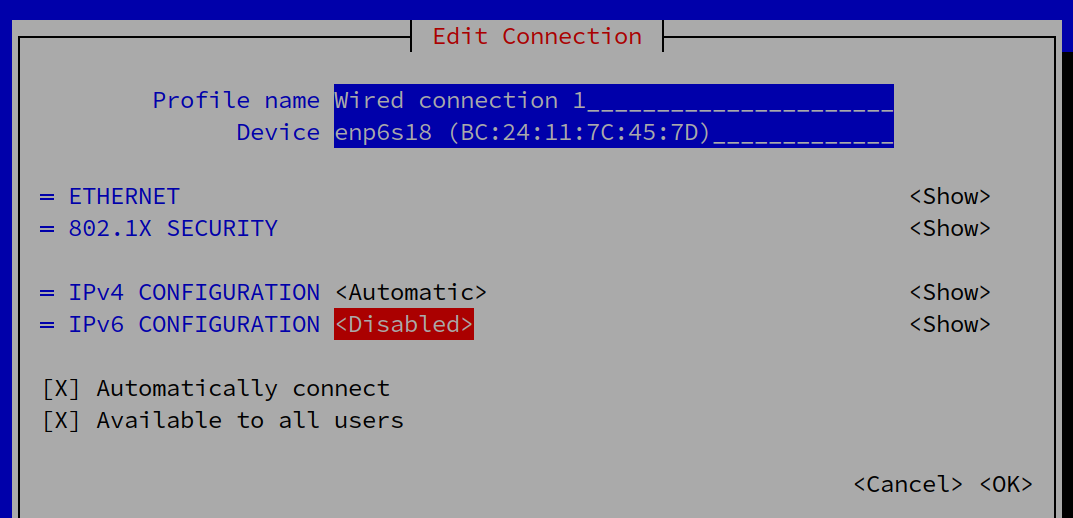
Another way is to customize the postfix configuration and set

inet_protocols = ipv4

done. Thank you

1 Like

Can you please explain what has been ‘done’, and how it solved your issue?

Excuse me. I set IPV6 CONFIGURATION = disabled with nmtui. Now mail excape in IPV4

1 Like